
Product Schema for Ecommerce: What to Implement, What to Skip, and What Actually Affects Rankings
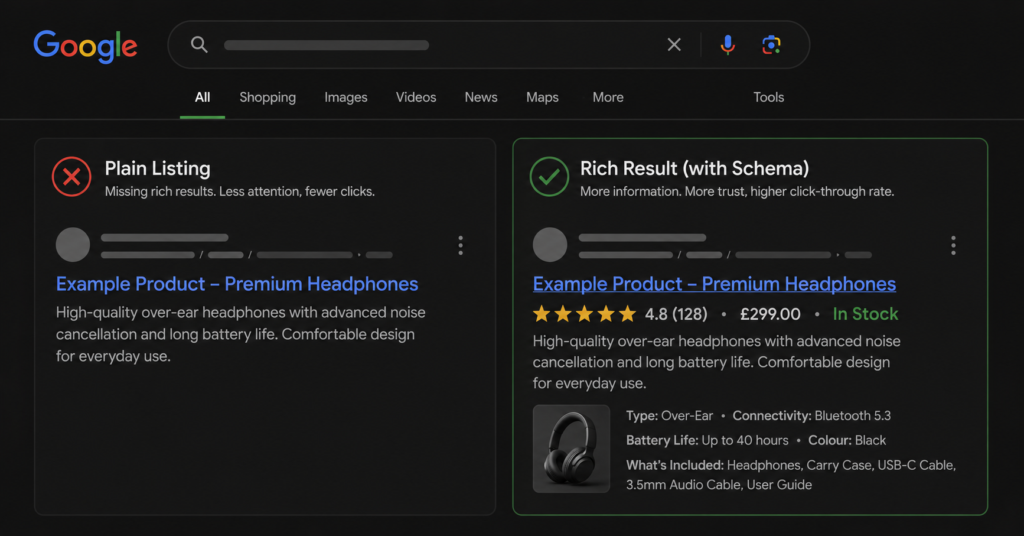
Google AI Overviews appeared on roughly 14% of shopping queries as of March 2026 — a 5.6 times increase from 2.1% in November 2025. Product schema is one of the signals that makes your product pages eligible to appear in these answers, in rich results, and in Google’s merchant listings.
Here is the honest version of what schema does and does not do: it is not a ranking signal. Google has confirmed this. What it does is make your page eligible for richer search appearances — star ratings, price, availability, and return policy shown directly in the result before anyone clicks. Higher click-through behaviour from richer results may correlate with ranking improvements over time, but schema alone does not move you up the results page.
That said, most ecommerce stores either skip schema entirely or implement it incorrectly — missing required fields, using outdated markup, or applying it to pages where it has no effect. This guide covers what to implement, what the required fields actually are, and the common mistakes that cause rich result eligibility to silently fail.
What Product Schema Actually Does
When Google crawls your product page, it reads both the visible content and any structured data you have added. Structured data — specifically JSON-LD Product schema — tells Google in explicit, machine-readable terms: this is a product, it costs this much, it is in stock, it has these reviews.
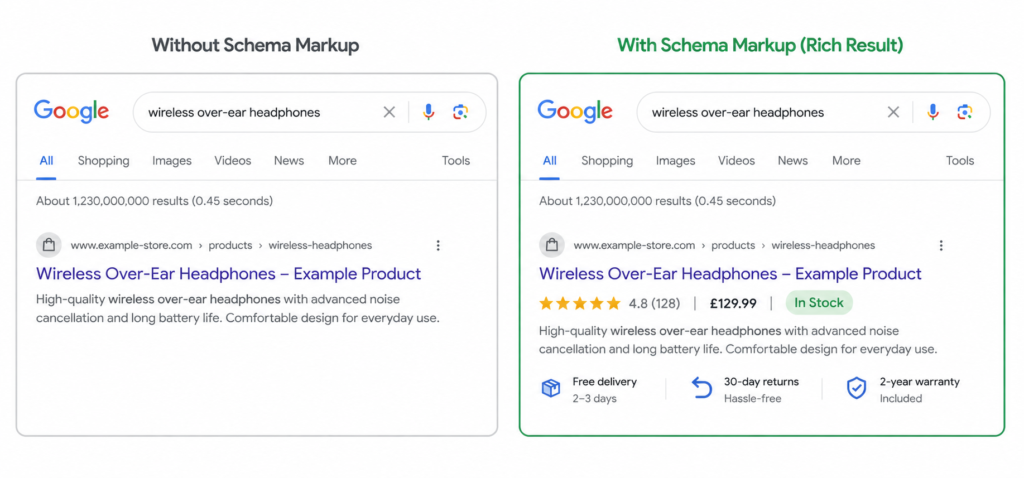
Without schema, Google has to infer all of this from page content. With schema, you confirm it directly. The result: eligibility for rich results and merchant listings that display price, rating, and availability inside the search result itself.
| “The practical implication is to treat schema as a CTR and eligibility lever rather than a ranking shortcut: implement the required and recommended fields correctly so you qualify for the richer listing, but pair it with the things that actually drive rankings — unique content, internal links, and passing Core Web Vitals.” — Digital Applied, 2026 |
The business case is straightforward: a search result showing £299, 4.8 stars, In Stock gets more clicks than a plain blue link. Higher click-through rate means more traffic to the page. That traffic converts or it does not — schema does not affect conversion rate, only the volume of visitors who arrive.
The Required Fields — What Google Actually Checks
Google distinguishes between required fields (without which you are ineligible for rich results) and recommended fields (which add more detail to the rich result if present). Most stores that fail rich result eligibility are missing one of the required fields.
| Field | Status | What to include |
| name | Required | The full product name as it appears on the page. Should match the H1 heading. |
| image | Required | At least one image URL. Google prefers multiple images (different angles). Use absolute URLs, not relative paths. |
| description | Required | A text description of the product. Should not be empty. Does not need to be identical to the visible description — but should be accurate. |
| offers | Required | Must contain price, priceCurrency, and availability. Without offers, the page is ineligible for price-in-SERP display. |
| offers > price | Required | The current price as a number. If the price is on sale, include both price and priceValidUntil. |
| offers > priceCurrency | Required | ISO 4217 currency code (GBP, USD, ZAR, EUR, etc.). Not the symbol — the three-letter code. |
| offers > availability | Required | Schema.org URL value: schema.org/InStock, schema.org/OutOfStock, schema.org/PreOrder, schema.org/Discontinued. Not a plain text string. |
| offers > itemCondition | Recommended | Schema.org URL: schema.org/NewCondition, schema.org/UsedCondition, schema.org/RefurbishedCondition. Critical for secondhand/refurb stores. |
| brand | Recommended | Organisation or brand name. Improves eligibility for merchant listing in Google Shopping. |
| aggregateRating | Recommended | reviewCount and ratingValue. Required if you want star ratings in the result. Google spot-checks these against visible review content. |
| sku or mpn | Recommended | SKU or manufacturer part number. Helps Google identify the product across different listings and match it to its product knowledge graph. |
| shippingDetails | Recommended | Shipping time and cost. Required for the shipping annotation to appear in the result. |
| hasMerchantReturnPolicy | Recommended | Return policy details. Required for the return policy annotation to appear. |
| The availability field is the most commonly wrong: It must be a schema.org URL value, not a plain text string. “In Stock” is incorrect. “https://schema.org/InStock” is correct. This is the field most stores get wrong and the one that most commonly causes rich result eligibility failure. |
A Minimal Correct JSON-LD Implementation
JSON-LD is Google’s preferred format for structured data. It goes in a <script type=”application/ld+json”> tag in the <head> of the page, not in the visible content.
| { “@context”: “https://schema.org/”, “@type”: “Product”, “name”: “Ergonomic Office Chair — Model X200”, “description”: “Adjustable lumbar support, breathable mesh back, 5-year warranty.”, “image”: [ “https://yourstore.com/images/x200-front.jpg”, “https://yourstore.com/images/x200-side.jpg” ], “brand”: { “@type”: “Brand”, “name”: “ErgoLine” }, “sku”: “EL-X200-BLK”, “offers”: { “@type”: “Offer”, “url”: “https://yourstore.com/chairs/ergo-x200”, “priceCurrency”: “GBP”, “price”: “299.00”, “availability”: “https://schema.org/InStock”, “itemCondition”: “https://schema.org/NewCondition” }, “aggregateRating”: { “@type”: “AggregateRating”, “ratingValue”: “4.8”, “reviewCount”: “143” }} |
A few things to check in your implementation:
- price must be a string number — “299.00”, not 299 (no quotes). Some implementations fail validation because the price is passed as a number without quotes.
- availability must include the full schema.org URL — not just “InStock”. The full value is “https://schema.org/InStock”.
- Image URLs must be absolute — not “/images/product.jpg” but “https://yourstore.com/images/product.jpg”.
- The aggregateRating values must reflect actual reviews visible on the page. Google validates these against what a user can see. Mismatches cause the rating to be suppressed or the page to be flagged.
What to Skip — Schema That Does Not Help Product Pages
Adding schema that does not apply to your page or that Google does not use for product pages is harmless but wasteful — it adds weight to the page and gives developers unnecessary maintenance overhead.
| Schema type | On product pages |
| Article schema | Not applicable. Article schema is for editorial content — blog posts and news articles. Product pages are not articles. |
| FAQPage schema on product pages | Use with caution. FAQ schema was heavily restricted by Google in 2023. It no longer generates rich results for most pages, including product pages. Do not prioritise this. |
| BreadcrumbList schema | Useful and recommended — but separate from Product schema. Add it alongside, not instead of. |
| WebPage schema | Redundant on product pages where Product schema is present. Google already understands the page type. |
| ItemList schema | Belongs on category pages, not individual product pages. Misapplying this to a single product page can confuse Google about the page type. |
How to Validate Your Schema
Before relying on your implementation, validate it. Broken schema — missing required fields, malformed JSON, incorrect URL values — fails silently in most cases. Google does not throw a visible error; it just ignores the structured data and reverts to the plain listing.
| Tool | What it checks |
| Google Rich Results Test (search.google.com/test/rich-results) | Tests whether a specific URL is eligible for rich results. Shows which fields are present, which are missing, and any errors that would prevent eligibility. This is the most important validation tool. |
| Google Search Console Enhancements report | Shows aggregate rich result performance across your whole site — how many product pages have valid schema, how many have errors, and how many are eligible. Updates weekly. |
| Schema.org Validator (validator.schema.org) | Validates JSON-LD syntax and schema.org compliance. Does not check Google-specific requirements — use alongside the Rich Results Test, not instead of it. |
After validating individual pages, check your Search Console Enhancements report monthly. Rich result errors accumulate — particularly for stores with dynamic pricing, inventory changes, or seasonal promotions where the schema is not updated in sync with the page content.
Platform-Specific Notes
Shopify
Most modern Shopify themes include Product schema automatically from the theme’s Liquid templates. Before adding custom JSON-LD, check whether your theme already outputs schema by running any product page through the Rich Results Test. Adding duplicate schema on top of existing theme schema causes conflicts.
The most common Shopify schema problem: themes often omit the itemCondition field (defaults to new but never specifies it), and frequently pass availability as a plain string rather than a schema.org URL. Both cause eligibility failures.
WooCommerce
WooCommerce with Yoast SEO or Rank Math generates Product schema automatically. The quality varies significantly between versions. Check that priceCurrency uses the three-letter ISO code rather than the currency symbol, and that availability is the full schema.org URL. Run the Rich Results Test on five to ten product pages — do not assume the plugin output is correct without checking.
BigCommerce
BigCommerce’s default schema implementation is generally correct for basic fields but often omits shippingDetails and hasMerchantReturnPolicy — the fields that enable shipping and return policy annotations in search results. These require custom implementation or a third-party app.
Schema and AI Overviews — What We Know in 2026
Google AI Overviews appeared on 14% of shopping queries as of March 2026, a 5.6 times increase from November 2025. The mechanism by which schema influences AI Overview inclusion is not fully documented by Google, but the pattern from analysis of pages that appear in AI shopping answers is consistent: they have complete Product schema with all required fields, they have unique product content that goes beyond manufacturer copy, and they pass Core Web Vitals.
The practical implication: schema is one of several eligibility signals for AI Overview inclusion, not the only one. A product page with perfect schema but thin content and a slow load time is less likely to be cited than a well-structured page with complete schema and strong on-page signals.
| “Sites with poor performance rarely appear in Google AI Overviews. As AI-generated answers take more SERP real estate, slow sites lose both organic click-through and AI citation potential.” — December 2025 analysis |
A Practical Implementation Checklist
| ✓ | JSON-LD in <head> — not inline in body content |
| ✓ | name matches the H1 heading on the page |
| ✓ | image uses absolute URLs with at least one high-quality image |
| ✓ | offers.price is a quoted string number (“299.00”), not an integer |
| ✓ | offers.priceCurrency is the three-letter ISO code (GBP not £) |
| ✓ | offers.availability is the full schema.org URL (https://schema.org/InStock) |
| ✓ | aggregateRating values match what is visibly displayed on the page |
| ✓ | No duplicate schema from both theme and custom implementation |
| ✓ | Rich Results Test run on representative product pages — no errors |
| ✓ | Search Console Enhancements report checked — all products valid |
FAQ
Does Product schema improve my rankings?
Not directly. Google has confirmed schema is not a ranking signal. What it does is make your page eligible for rich results — star ratings, price, and availability displayed in the search result — which can improve click-through rate. Higher CTR may correlate with ranking improvements over time, but adding schema to a page does not move it up the results page. It makes the result more visible once it is there.
What happens if my schema is wrong?
If the JSON-LD is syntactically broken, Google ignores it entirely and falls back to the plain listing. If the values are incorrect — availability as a string instead of a URL, mismatched review counts — Google either suppresses the rich result or flags the page in Search Console. Neither causes a ranking penalty. Schema errors are an eligibility problem, not a penalty problem.
Do I need schema on every product page?
Ideally yes, but prioritise by traffic and revenue. Your 20 highest-traffic product pages represent a disproportionate share of your organic revenue — implement correctly there first. Then extend to the rest of the catalogue. For large catalogues, the schema should be generated dynamically from your product database rather than written manually per page.
My platform already adds schema — do I need to do anything?
Check it before assuming it is correct. Run five representative product pages through the Google Rich Results Test. The most common platform schema errors — availability as a plain string, missing priceCurrency, omitted itemCondition — are present across Shopify, WooCommerce, and BigCommerce defaults. A five-minute check can reveal eligibility failures that have been silently present for months.
| Want to know whether your product schema is costing you rich results? A technical SEO audit covers your full structured data implementation — required fields, validation errors, and eligibility status for every product page type. Get a Technical SEO Audit → No commitment. martraff.com |