Internal Linking for Ecommerce: How to Build a Structure That Actually Moves Rankings
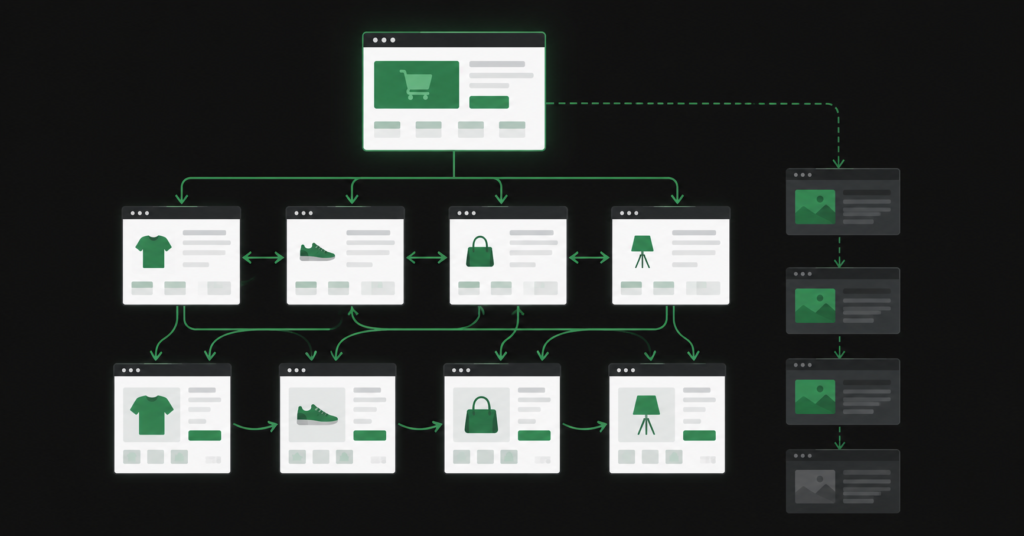
Most ecommerce stores treat internal linking as something that happens automatically — navigation menus, breadcrumbs, “related products” widgets. It is not nothing, but it is not a strategy.
A deliberate internal linking strategy does three things: it tells Google which pages are important, it ensures every page can be found and crawled, and it moves authority from high-traffic pages toward the pages you actually want to rank. Without it, authority sits at the top of your site and trickles out unevenly. With it, you are actively directing where ranking signals flow.
This guide covers how internal linking works specifically for ecommerce, what the most common mistakes look like, and how to build a structure that compounds over time.
Why Internal Linking Matters More Than Most Stores Realise
An estimated 25% of web pages receive zero internal links — meaning Google has no reliable path to find them. In large ecommerce catalogues, this number is often higher, because product pages are added regularly and nobody goes back to link to them from existing content.
| “In one documented case study, a retail brand increased internal links pointing to underperforming product pages and those pages reclaimed top ranking positions in Google with a 23% rise in organic traffic. No new content, no new backlinks — just better internal link structure.” |
The mechanism is straightforward. Google’s crawlers discover pages by following links. When they crawl a page, they distribute a portion of its authority to the pages it links to. A page that receives many internal links from high-authority pages accumulates more ranking signals than one that receives none — regardless of how good the content is.
For ecommerce this matters especially because:
- Category pages need to pass authority down to product pages — if the links are absent or weak, individual products are isolated
- Product pages need to link back to category pages and related content — otherwise Google can’t understand the topical context
- Blog content needs to feed authority toward commercial pages — a buying guide that never links to the relevant category page is a missed opportunity every time someone reads it
The Four Link Flows Every Ecommerce Store Needs
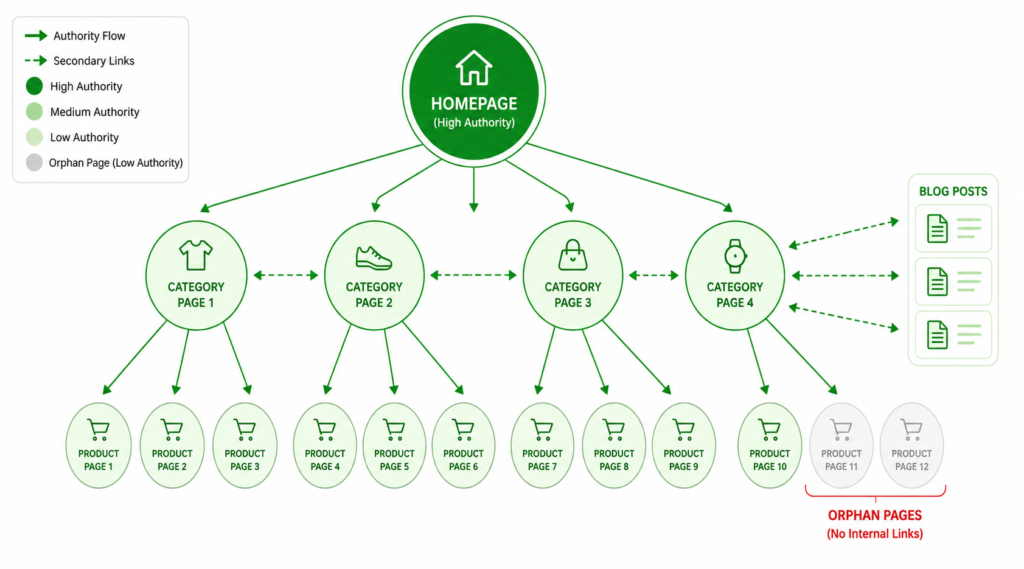
Think of your store as having four distinct link flows. Each one serves a different purpose and requires deliberate attention.
| From | To | Why it matters | |
| Homepage | → | Category pages | Establishes which categories are most important. Google interprets homepage links as high-priority signals. |
| Category pages | → | Product pages | Ensures every product is discoverable within 2-3 clicks. Missing = orphaned products. |
| Blog / buying guides | → | Category + product pages | Converts informational traffic into commercial authority. A buying guide without a link to the relevant category page is wasted equity. |
| Product pages | → | Related products + category | Keeps users browsing and signals topical relationships to Google. “Frequently bought together” and “You might also like” are SEO as well as UX. |
| The most neglected flow: Blog → Category. Most stores create content but never link it properly to commercial pages. Every informational article that ranks is an opportunity to funnel authority toward your category and product pages. If your blog has 20 posts and none of them link to your category pages — that equity is going nowhere. |
Anchor Text: The Most Underused Signal in Ecommerce
The clickable text of an internal link — the anchor text — tells Google what the destination page is about. Most ecommerce stores use generic anchor text everywhere: “click here,” “read more,” “view product,” “shop now.” These are useless for SEO.
Descriptive anchor text that includes the target keyword is one of the fastest on-page SEO improvements you can make to an existing site — because you are not creating new content, you are updating existing links.
| ✓ Good anchor “For a full range of ergonomic office chairs, see our office chairs collection.” | ✗ Weak anchor “Click here to see more products.” |
| ✓ Good anchor “Our buying guide to standing desks covers what to look for before you buy.” | ✗ Weak anchor “Read more about standing desks.” |
A few principles for anchor text in ecommerce:
- Use the target keyword of the destination page as the anchor — naturally, not force-fitted
- Vary the phrasing: “ergonomic office chairs,” “office chairs for back pain,” “best office chairs under £300” all point to the same page and reinforce different aspects of its relevance
- Avoid using the exact same anchor text for every link to the same page — variety signals organic linking rather than manipulation
- Product links from blog posts: use the product name + a descriptive modifier (“the Steelcase Leap v2 — our top pick for lumbar support”) rather than just the product name
Orphan Pages: The Silent Ranking Killer in Large Catalogues
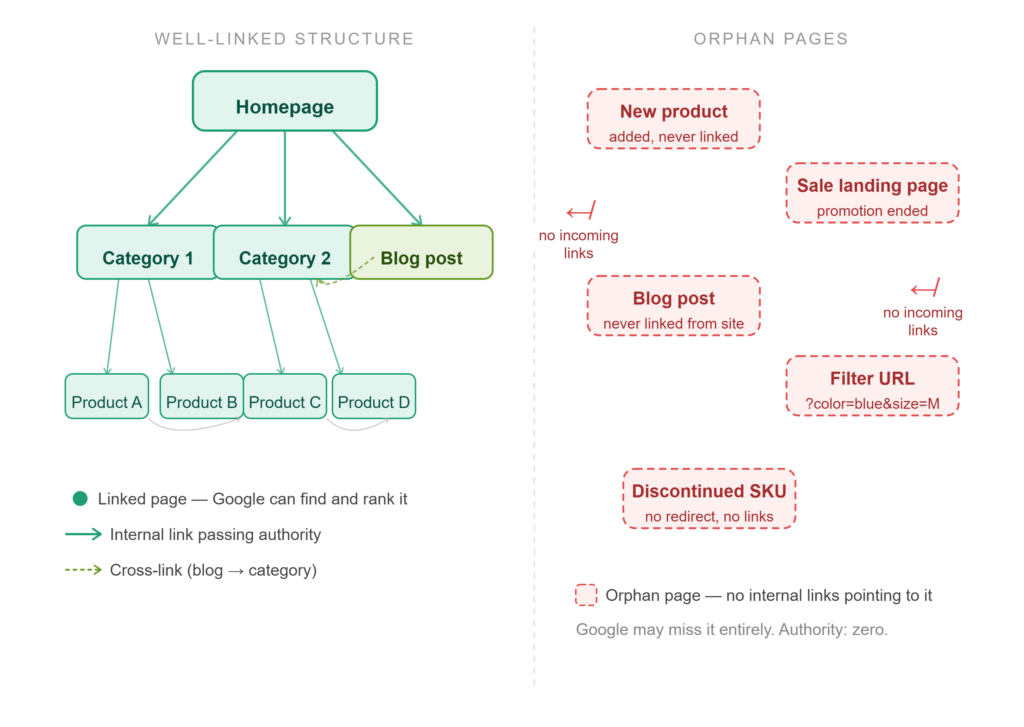
An orphan page is a page with no internal links pointing to it. It exists on your site but Google has no reliable path to find it. It may be indexed if Google has crawled it before, but it will accumulate no authority and is likely to underperform or drop from the index entirely.
In ecommerce, orphan pages are extremely common and usually happen for the same reasons:
- New products are added to the back-end but not added to any category page or linked from anywhere
- Seasonal landing pages are created, used during a promotion, and then abandoned without redirects or links
- Blog posts are published but nobody goes back to link to them from other posts or pages
- Filter-generated URLs get indexed and sit as orphaned near-duplicates consuming crawl budget without any internal link structure pointing to them
How to find orphan pages
The fastest method: crawl your site with Screaming Frog and cross-reference the list of all indexed URLs against the list of all internally linked URLs. Any URL that appears in the indexed list but not in the linked list is an orphan. In Google Search Console, the Coverage report will also show pages Google has discovered through sitemaps but cannot crawl efficiently — often a sign of orphaning.
For technical SEO at scale, this audit should run monthly — because new products, new blog posts, and new landing pages are constantly being added and not always linked correctly.
How to fix orphan pages
- For product pages: add them to the correct category pages, and link to them from any relevant blog content
- For blog posts: add internal links from other related posts and from service or category pages where relevant
- For seasonal landing pages: either 301 redirect to the most relevant category after the promotion ends, or link to them permanently from a relevant page
For filter-generated URLs: this is a crawl budget problem, not just an orphan problem — see the full guide on WooCommerce filter pages and crawl budget for the correct approach to canonicals and robots.txt.
Click Depth: Keep Important Pages Close to the Surface
Click depth is the number of clicks required to reach a page starting from the homepage. Google’s crawlers prioritise pages that are reachable in fewer clicks — a page three clicks from the homepage will typically be crawled more frequently and accumulate more authority than a page six clicks deep.
The target for any important page — main category pages, top product pages, high-priority landing pages — is three clicks or fewer from the homepage. In a well-structured ecommerce store this looks like:
| Clicks | Page type | Example |
| 1 click | Main category pages | Homepage → Office Chairs |
| 2 clicks | Subcategory pages | Homepage → Office Chairs → Ergonomic Chairs |
| 3 clicks | Individual product pages | Homepage → Office Chairs → Ergonomic Chairs → Steelcase Leap v2 |
| 2-3 clicks | Key blog posts | Homepage → Blog → How to Choose an Office Chair |
Where stores typically go wrong: large catalogues where subcategories have subcategories have subcategories, pushing individual products to five or six clicks from the homepage. The fix is usually a combination of flatter site architecture and contextual internal links that create shortcuts — a blog post linking directly to a product page bypasses the full category hierarchy and reduces effective click depth.
The Blog-to-Commercial Link: The Highest-Value Internal Link in Ecommerce
Every piece of informational content on your store — buying guides, comparison articles, how-to posts — is an opportunity to build a contextual internal link to a commercial page. This is the highest-value internal link type in ecommerce because it transfers authority from pages that attract organic traffic to the pages that generate revenue.
The typical pattern that wastes this opportunity: a store publishes a buying guide (“How to Choose the Right Office Chair”) that ranks and gets traffic. But the article links to external sources and generic category navigation — never to the specific category page where the chairs are actually sold. All that ranking authority goes nowhere commercially useful.
| The correct pattern: “For back pain specifically, an ergonomic chair with lumbar adjustment is essential. Our range of ergonomic office chairs covers options from entry-level up to professional-grade models with full adjustment.” — The italic text links to the category page.The link is natural, contextually justified, and routes authority from an informational page to a commercial one. This is what separates a blog that works for SEO from one that just generates traffic. |
Audit your top 10 informational blog posts by organic traffic. For each one, identify which category or product pages they should be linking to but are not. This is probably the fastest internal linking win available on most ecommerce sites — it requires no new content, just updating existing articles.
Platform-Specific Notes
Shopify
Shopify’s collection structure means products can appear in multiple collections, creating potential duplicate content if not handled correctly. From an internal linking perspective: make sure your primary category collection page is the one you link to consistently — do not spread links across multiple collection URLs for the same product group. Shopify’s “Related products” feature is automatic but not always topically relevant — consider overriding it with curated recommendations for high-priority product pages.
WooCommerce
WooCommerce’s product category system maps well to a clean internal linking hierarchy — categories link to subcategories, subcategories link to products, products link back up. The main risk is filter pages: faceted navigation can generate thousands of filter URLs, and if any of these are internally linked from anywhere (sidebar widgets, breadcrumbs, filter menus), they will be crawled and potentially indexed. Keep filter URL links in rel=”nofollow” or handle via canonicals and robots.txt.
BigCommerce
BigCommerce stores with large catalogues face the same filter URL problem as WooCommerce, amplified by scale. The internal linking priority for BigCommerce is: ensure every canonical category and product page sits within three clicks of the homepage, and that filter-generated variant URLs are not receiving internal links that would encourage Google to crawl and index them as separate pages.
A Practical Internal Linking Audit in 4 Steps
You do not need a dedicated tool to do a basic internal linking audit. Here is a process that works with free tools:
| 01 | Find orphan pages: In Google Search Console, go to Coverage → Valid. Export the list. Then crawl your site with Screaming Frog (free up to 500 URLs). Export all internally linked URLs. Cross-reference the two lists — any URL in the GSC list but not in the Screaming Frog list is a candidate orphan. |
| 02 | Identify your top informational content: In GSC, go to Performance and filter by page type (blog posts). Sort by Clicks. Take your top 10. For each one, open the page and manually check: does it link to the relevant category or product pages? Most will not. |
| 03 | Audit anchor text on category pages: Open your 5 most important category pages. Look at every link on those pages. How many use descriptive keyword-rich anchor text vs generic text like “view all” or “shop now”? Note every instance of weak anchor text — these are quick fixes. |
| 04 | Check click depth: In Screaming Frog, look at the “Crawl Depth” column. Any important page (main category, top product, key landing page) showing depth 4 or higher needs a shortcut link added — either from the homepage, from a high-authority blog post, or from a category page that sits higher in the hierarchy. |
FAQ
How many internal links should a page have?
There is no hard limit. The widely-repeated “150 links per page” guideline is community consensus, not a published Google rule. The practical principle is: every link should have a purpose. A category page naturally has many links (to all its products). A blog post typically has 3-8 contextual internal links per 1,000 words. Navigation, footer, and breadcrumb links are separate from contextual links and do not count against any meaningful limit.
Do internal links pass as much authority as backlinks?
Internal links and backlinks are different signals. Backlinks from external domains carry authority that originates outside your site — this is the primary signal for domain authority. Internal links distribute the authority you have already earned. They do not replace backlinks, but they ensure that the authority from your backlinks reaches the pages that need it. A site with strong backlinks but poor internal linking is leaving significant ranking potential unused.
Should I link from every product page to every other related product?
Not necessarily. Link to genuinely related products — same category, complementary items, frequently bought together. The goal is topical relevance and user helpfulness, not maximum link count. Three to five highly relevant product links are more valuable than twenty generic “you might also like” links pulled from a recommendation algorithm with no topical logic.
How often should I audit internal links?
For an actively growing ecommerce store — adding new products, publishing new content — monthly is realistic. The most important trigger is any time new content is published: when a new blog post goes live, immediately check which existing pages should link to it. When a new product is added, check which blog posts and category pages should link to it. The ongoing practice prevents the orphan page problem from compounding.
| Want to know where your internal linking is leaking authority? An SEO audit covers your full internal link structure — orphan pages, anchor text gaps, click depth issues, and the blog-to-commercial link opportunities you are missing. Get an Ecommerce SEO Audit → No commitment. martraff.com |