
Core Web Vitals for Ecommerce: What They Actually Do to Your Rankings (and What They Don’t)
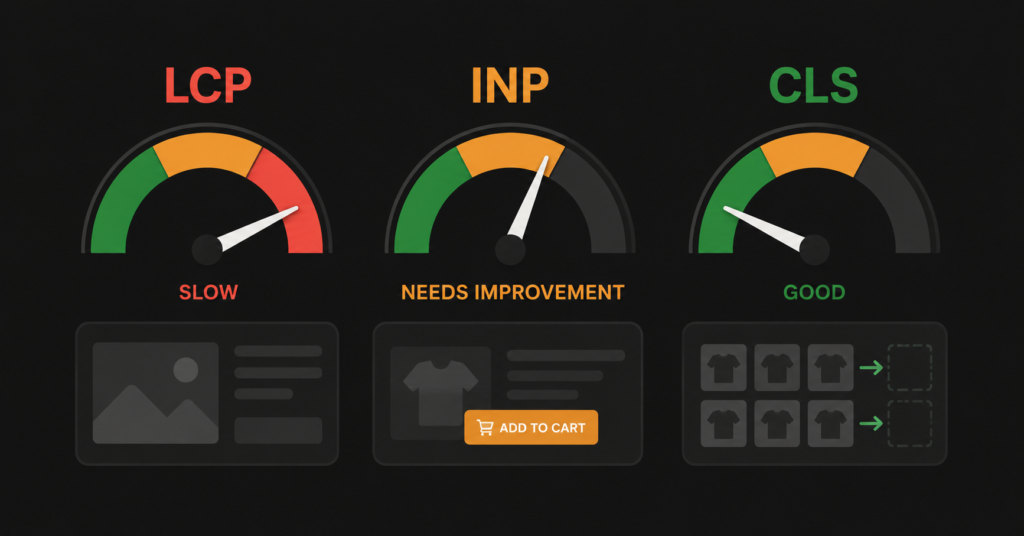
Core Web Vitals get oversold and undersold at the same time. Oversold by agencies claiming that fixing your scores will transform your rankings. Undersold by store owners who wave them off as a technical concern that does not affect the business.
The truth is more specific. Core Web Vitals are a confirmed Google ranking factor — but they function as a tiebreaker, not a trump card. A slow store with strong content and backlinks will outrank a fast store with weak content. But when two stores are otherwise comparable, the faster one consistently wins. And more importantly: speed directly affects conversions regardless of rankings, which makes it a business issue even before it is an SEO issue.
This article covers what each metric actually measures, what the current data shows about ecommerce performance, and what to do — starting with the highest-impact fixes and being honest about where the returns diminish.
The Three Metrics — What They Actually Measure
Google measures three things under Core Web Vitals. Each one reflects a different aspect of how a user experiences a page.
| Metric | Good | Needs Improvement | What it measures |
| LCP — Largest Contentful Paint | Under 2.5s | 2.5s – 4.0s | How long before the main content (usually hero image or heading) appears on screen. What users experience as “is this page loading?” |
| INP — Interaction to Next Paint | Under 200ms | 200ms – 500ms | How quickly the page responds when a user taps, clicks, or types. Replaced FID in March 2024. Measures all interactions, not just the first. |
| CLS — Cumulative Layout Shift | Under 0.1 | 0.1 – 0.25 | How much the page visually jumps around as it loads. A button shifting position just before a user clicks it is a CLS problem. |
| INP replaced FID in March 2024. If your CWV documentation is from before 2024, it is referencing a metric that no longer exists. INP is significantly more demanding than FID — it measures all interactions throughout the session, not just the first one. Many sites that passed FID fail INP. |
Where Ecommerce Stands — The Honest Numbers
Most published CWV statistics are for the web in general. Ecommerce-specific data tells a different story.
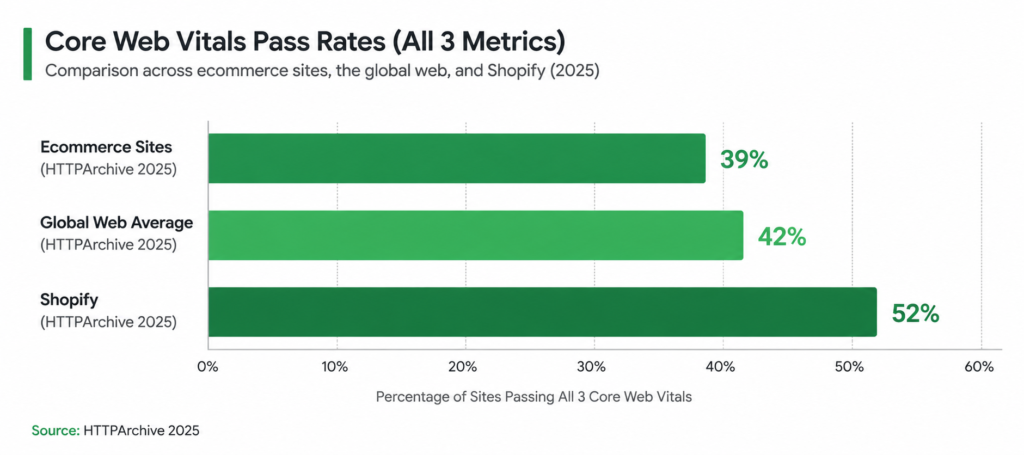
| 39% Ecommerce sites passing all 3 CWV HTTPArchive 2025 | 42% Global web average passing all 3 Web Almanac 2025 | 8% Conversion increase per 0.1s improvement Google & Deloitte | 62% Mobile pages with good LCP Web Almanac 2025 |
Ecommerce consistently underperforms the global web average on Core Web Vitals — three percentage points below in 2025. The reason is structural: ecommerce stores carry more performance baggage than other site types.
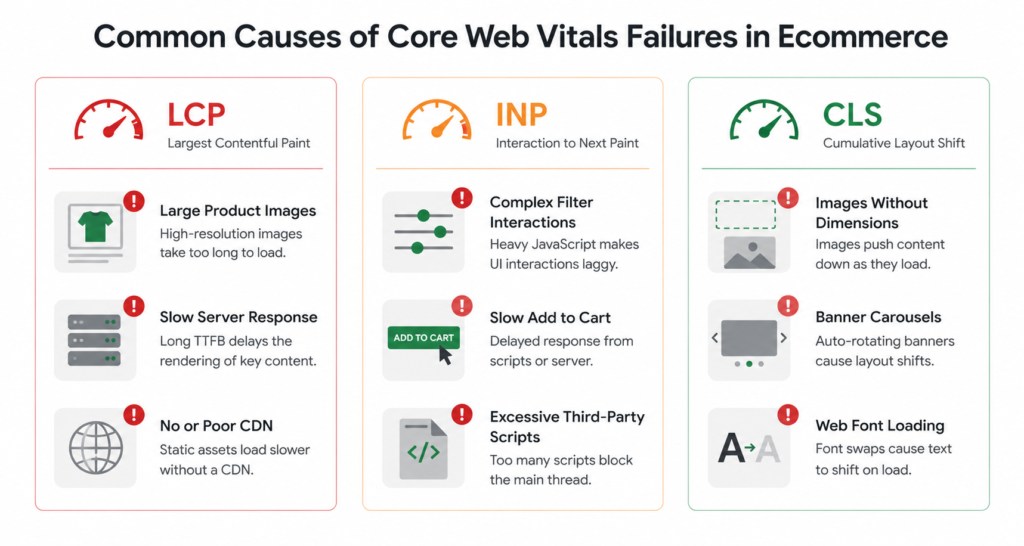
- Heavy product images — the largest contentful element on a product or category page is almost always an image, and unoptimised product photography is the leading cause of LCP failures
- Dynamic banners and sliders — elements that load asynchronously after the page renders cause layout shifts (CLS)
- Interactive filters and faceted navigation — dropdown menus, price sliders, and attribute selectors that trigger recalculation on the main thread cause INP failures
- Third-party scripts — review widgets, live chat, payment gateway SDKs, analytics, and retargeting pixels all compete for processing time
| “Every 0.1 seconds of improvement in load speed increases conversions by 8% in retail. Apply that to your store. If your LCP drops from 4.2 seconds to 2.4 seconds — an 1.8 second improvement — the potential conversion increase is in the range of 15-25%.” — Google & Deloitte, Milliseconds Make Millions |
What CWV Actually Does to Your Rankings
Google has confirmed Core Web Vitals as a ranking factor since 2021. But the mechanism matters:
| What CWV does NOT do: A perfect CWV score will not rescue a page with thin content, weak backlinks, or wrong keyword targeting. A fast page that is irrelevant to the query will not rank. CWV does not override content quality or domain authority. |
| What CWV actually does: When two pages have comparable content quality and authority, the one with better Core Web Vitals will rank higher. Google describes it as a tiebreaker. In competitive ecommerce categories — office supplies, clothing, electronics — where ten stores are all trying to rank for the same category queries, CWV is frequently the deciding factor. |
There is also an emerging secondary effect: according to a December 2025 analysis, sites with poor performance rarely appear in Google AI Overviews. As AI-generated answers take more SERP real estate, slow sites lose both organic click-through and AI citation potential.
The Highest-Impact Fixes for Each Metric
Not all CWV fixes are equal. Here is where the highest return on effort sits, specifically for ecommerce stores.
LCP — The image loading problem
LCP failures in ecommerce are almost always caused by large, unoptimised product or hero images. The fix has three parts:
- Convert to WebP or AVIF format. These modern formats are 25-50% smaller than JPEG at equivalent quality. Most platforms support them natively or via plugin.
- Add fetchpriority=”high” to the LCP image. This tells the browser to load the hero or above-the-fold product image before anything else. This is a one-line HTML change with significant LCP impact.
- Use a CDN. A CDN serves product images from the server closest to the user. For a store with international traffic, this alone can reduce LCP by 40-60%.
- Reduce Time to First Byte (TTFB) to under 200ms. TTFB — how fast your server responds — directly caps LCP. If your server takes 600ms to respond, your LCP cannot be under 600ms regardless of image optimisation. Hosting upgrade or edge caching fixes this.
INP — The interactivity problem
INP failures are harder to diagnose because they can happen on any interactive element throughout the session. The most common culprits in ecommerce:
- Faceted navigation filters. Attribute selectors that trigger DOM recalculation on every interaction block the main thread. Solution: move filter logic to a web worker or debounce filter events.
- Add to cart buttons. Cart operations that make synchronous server requests before providing visual feedback feel sluggish. Fix: show immediate visual response (button state change) before the server round-trip completes.
- Third-party scripts. Review widgets, chat scripts, and payment SDKs that run on the main thread directly compete with user interactions. Audit every third-party script and load non-essential ones with async or defer.
- Checkout forms. Real-time validation, shipping recalculation, and coupon fields that make server requests are a common source of poor INP on the highest-value page of the store.
CLS — The layout shift problem
CLS problems are usually easy to diagnose because you can see them: the page jumps as images load, banners appear, or fonts swap. Common ecommerce causes:
- Images without explicit dimensions. If a product image does not have width and height attributes set in the HTML, the browser does not reserve space for it. When it loads, everything shifts. Add width and height to every img tag.
- Banner carousels loading after the main content. Promotional banners that load asynchronously after the product grid is already visible will push the grid down. Fix: set min-height on the banner container.
- Font swaps. Custom fonts that load after the system font is already displayed cause text to jump. Add font-display: swap or preload critical fonts.
Platform-Specific Reality Check
Not all ecommerce platforms start from the same baseline. HTTPArchive’s 2025 CrUX data shows meaningful differences:
| Platform | CWV pass rate | Notes |
| Shopify | 52% | Best out-of-the-box CWV of major platforms. Cloudflare CDN integrated, performance-reviewed themes, controlled infrastructure. Main issue: third-party app bloat. |
| WooCommerce | ~35-40% | Highly variable — depends on hosting, theme, and plugins. A well-configured WooCommerce on managed hosting can compete with Shopify. Default shared hosting setups often fail all three metrics. |
| BigCommerce | ~42-45% | Solid baseline with CDN built in. Main CWV issue: filter-generated URLs and faceted navigation INP at scale. |
| Custom/other | Varies widely | No platform-level defaults. Performance depends entirely on implementation quality. |
For Shopify-specific CWV issues, the main risk is app bloat — every installed app adds scripts that run on every page. Stores with 10+ apps frequently fail INP even when the theme itself is well-optimised. Audit and uninstall unused apps before optimising anything else.
How to Measure Your CWV — The Right Way
There are two types of CWV data: lab data (simulated) and field data (real users). Google’s rankings use field data. Most tools show you lab data. This matters.
| Tool | Data type | When to use |
| Google Search Console | Field data | The source of truth. Shows CWV grouped by Good/Needs Improvement/Poor based on real Chrome user data. Fix Poor pages first. |
| PageSpeed Insights | Both | Lab data + CrUX field data where available. Use to diagnose specific issues causing failures. |
| Chrome DevTools / Lighthouse | Lab data only | Good for development and testing fixes. Does not reflect real user experience. Treat as directional, not definitive. |
| CrUX Report (BigQuery) | Field data | For detailed analysis at scale — which page templates are failing, which devices, which geographies. |
Important: Google uses a 28-day rolling window of field data. Improvements take 4-6 weeks to appear in Search Console after you deploy them. Do not expect instant ranking movement after fixing CWV issues.
Where to Stop: The Diminishing Returns Principle
This is the part most CWV guides skip.
| Moving from Poor to Acceptable has a measurable impact. Moving from Acceptable to Perfect rarely does. Once you hit the “Good” threshold on all three metrics, further speed optimisation has minimal additional ranking impact. The business case for going from LCP 2.5s to 2.0s is much weaker than going from 4.5s to 2.5s. Direct your effort accordingly. |
The CWV audit priority for an ecommerce store should be:
- Identify all pages currently rated Poor in Google Search Console — these carry the highest ranking risk and the highest conversion cost
- Fix those pages to reach the Good threshold — focus on the highest-traffic and highest-revenue pages first
- Monitor Needs Improvement pages — these are close to the threshold and worth addressing, but not urgent
- Do not chase perfect Lighthouse scores — a 100/100 in the lab does not translate to field data, and the effort to go from 90 to 100 is rarely justified
FAQ
Do Core Web Vitals directly cause ranking drops?
A ranking drop is rarely caused solely by CWV. If you see a significant ranking drop, the cause is more likely a core algorithm update, a content quality signal, or a competitor improvement. CWV acts as a tiebreaker in competitive searches — it rarely causes sudden drops but consistently costs you positions you should be winning against similar competitors.
My PageSpeed score is 90+ but I’m still failing CWV — why?
Lighthouse scores and Core Web Vitals field data are different things. Lighthouse runs in a controlled lab environment on a fast connection. Field data reflects real users on real devices and connections. A mobile user on a 4G connection in a rural area will experience your site very differently from a Lighthouse simulation. Always check your Core Web Vitals data in Google Search Console, not just your PageSpeed score.
Which CWV metric should I fix first?
Start with whatever is rated Poor in your Search Console CWV report. If all three are Poor, LCP is usually the highest priority because it is the most visible to users and the most directly tied to the “is this page loading?” perception. INP is the most complex to debug but has significant impact on conversion rate, particularly on interactive pages like filtered category pages and checkout.
How do Core Web Vitals affect mobile vs desktop rankings?
Google uses mobile-first indexing — your mobile CWV scores are what matter for rankings, even if your desktop scores are excellent. Over 64% of global web traffic comes from mobile as of Q3 2025. Ecommerce stores often have significantly worse mobile CWV than desktop due to image sizes and third-party scripts that hit mobile processors harder. Always measure and optimise mobile first.
| Not sure where your store stands on Core Web Vitals?A technical SEO audit covers your full CWV status — which pages are Poor, what is causing the failures, and what to fix first. Get a Technical SEO Audit → No commitment. martraff.com |