
SEO for Seasonal Ecommerce: How to Keep Traffic When Your Products Go Off-Season
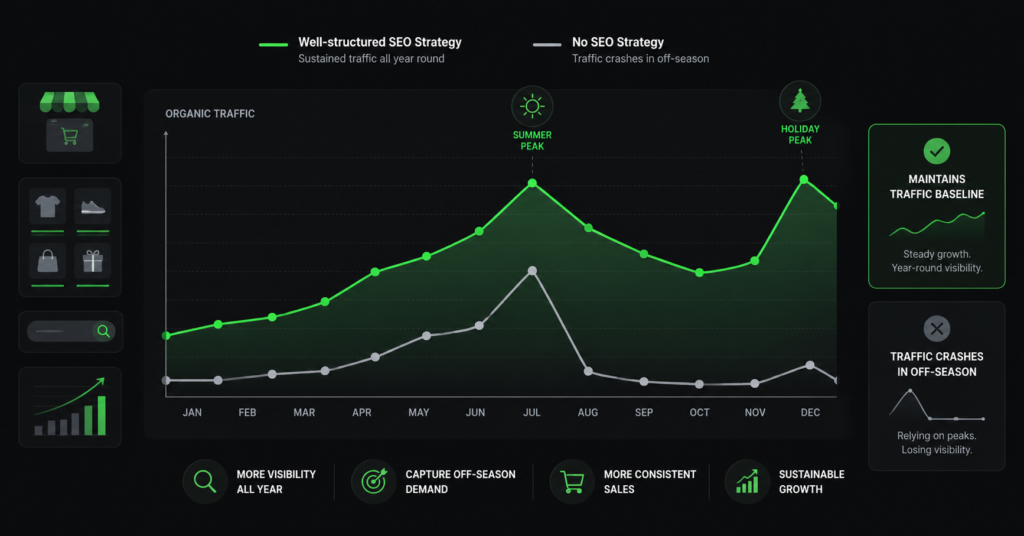
If you sell Christmas decorations, summer garden furniture, ski equipment, or Halloween costumes, you already know what the traffic graph looks like: a spike, then a cliff. Most seasonal ecommerce stores accept this as inevitable — the off-season is quiet, that is just how the business works.
But the traffic cliff is usually steeper than it needs to be. The reason is not the seasonality itself — it is the SEO decisions stores make during and after peak season. Deleting pages, redirecting seasonal URLs, letting content go stale, and doing nothing outside of peak months are all choices that compound the traffic drop and extend the recovery time the following year.
This guide covers how to structure your seasonal SEO so the off-season trough is shallower, the ramp-up before the next season starts earlier, and the peak itself is higher because you spent the quiet months building authority instead of waiting.
The Core Problem: Most Seasonal Stores Start Too Late
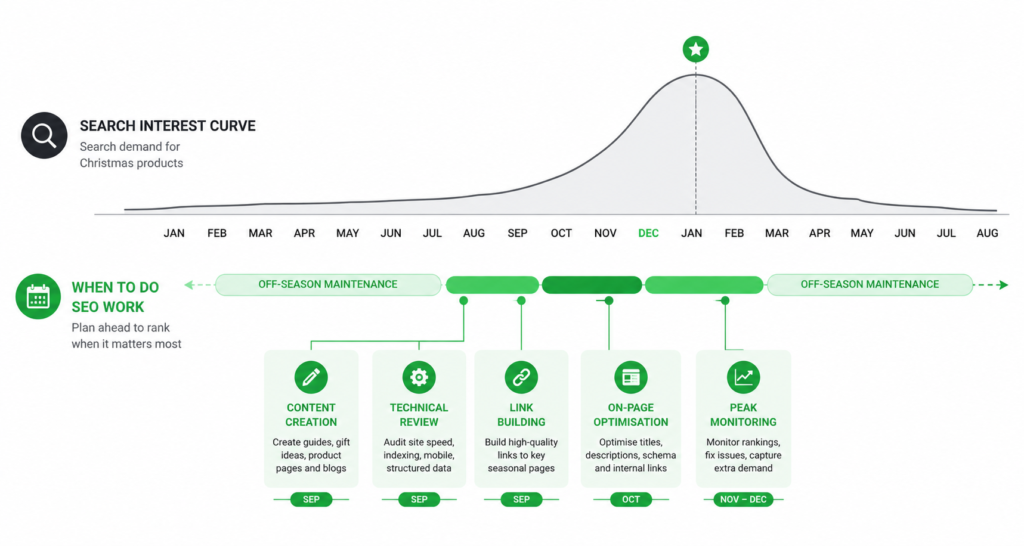
By the time shoppers are actively searching for Christmas gifts, Halloween costumes, or summer garden furniture, Google has already decided which pages to rank. The index cycle means that pages optimised in October are competing against pages that have been building authority since August.
Google Trends data consistently shows that search interest for seasonal categories begins 6-10 weeks before the obvious peak. For Christmas products, meaningful search volume starts in mid-October. For summer garden furniture, February searches are already occurring — from buyers who are planning ahead. If you start your seasonal SEO work when searches start spiking, you are already behind.
| “The stores that win peak season in December started their SEO work in September. The stores that wonder why they are not ranking in November started in October. The crawl and index cycle does not compress because your season is starting.” |
The Biggest Mistake: What to Do With Seasonal Pages Off-Season
This is where most seasonal stores make their most damaging SEO decision. When the season ends, they do one of three things — and two of them quietly destroy the authority those pages spent months accumulating.
Option 1 — Delete the page (worst choice)
| Do not delete seasonal pages. A deleted page loses all the backlinks it has earned, all the crawl history Google has for it, and all the internal link equity flowing to it. The following year, you are starting from zero instead of building on what you had. The traffic cliff becomes permanent because you have no foundation to recover from. |
Option 2 — Redirect to the homepage (almost as bad)
301 redirecting a seasonal page to the homepage feels tidy. In practice, it tells Google the page no longer exists as a distinct entity, and the homepage absorbs — at best — a fraction of the link equity the seasonal page had earned. When you recreate the URL next year, it is again treated as a new page.
| ✓ Do this Keep the URL live year-round at /christmas-decorations/ with updated evergreen content and a clear “back in October” message when out of season. | ✗ Not this Redirect /christmas-decorations/ to the homepage in January, recreate it in October. |
Option 3 — Keep the URL live with updated content (correct)
The right approach is to keep the seasonal page live at its permanent URL all year, and update its content for the off-season state. This means:
- Change the page content to acknowledge the off-season: “Christmas decorations are back in October. Browse last year’s bestsellers or sign up to be notified when new stock arrives.”
- Add genuinely useful evergreen content: A buying guide, a trend article, a “how to store your decorations” piece that attracts off-season informational traffic and keeps the page active in Google’s crawl.
- Keep internal links pointing to the page: Do not remove it from your navigation or footer. A page with no internal links is treated as less important by Google, regardless of its URL history.
- Leave the meta title and description intact or update them for off-season: “Christmas Decorations 2026 — New Collection Landing October” tells Google and shoppers that this is an active, maintained page with a clear future.
Building Authority in the Off-Season
The off-season is not dead time — it is the period when your competitors are not doing anything, which means it is the best time to build the authority that will give you a ranking advantage when peak season arrives.
Informational content that ranks year-round
A garden furniture store does not only attract buyers searching “garden furniture” — it can also attract people searching “how to clean garden furniture,” “garden furniture storage tips,” “best materials for outdoor furniture in wet climates,” “how to refurbish a teak garden table.” These searches happen year-round, at lower volume but consistently.
This informational content serves two functions simultaneously: it brings traffic during the months when product searches are slow, and it builds topical authority that makes your category and product pages more likely to rank when peak season searches begin. A store that is recognised by Google as an authority on garden furniture topics generally outranks one that only has product pages.
Link building does not stop at the season
Most seasonal stores only think about link building during peak months — when publishers and journalists are also writing about the category and links are easier to earn. This is the wrong time to start. Links built in October for a Christmas store take weeks to be crawled, indexed, and begin passing authority. Links built in July compound through September and October, and are fully contributing by the time peak season hits.
Off-season link building opportunities that seasonal stores consistently miss:
- “Best of” and gift guide roundups that are researched and drafted months before peak season — get in front of these publishers in the off-season
- Trade associations, industry directories, and category-specific sites that are not tied to seasonal promotion cycles
- Supplier and manufacturer backlinks that can be earned year-round through product pages and partnership arrangements
- Local press and community links — seasonal events, sponsorships, and local business directories that have nothing to do with the peak season calendar
How to Structure Seasonal Landing Pages for Long-Term Authority
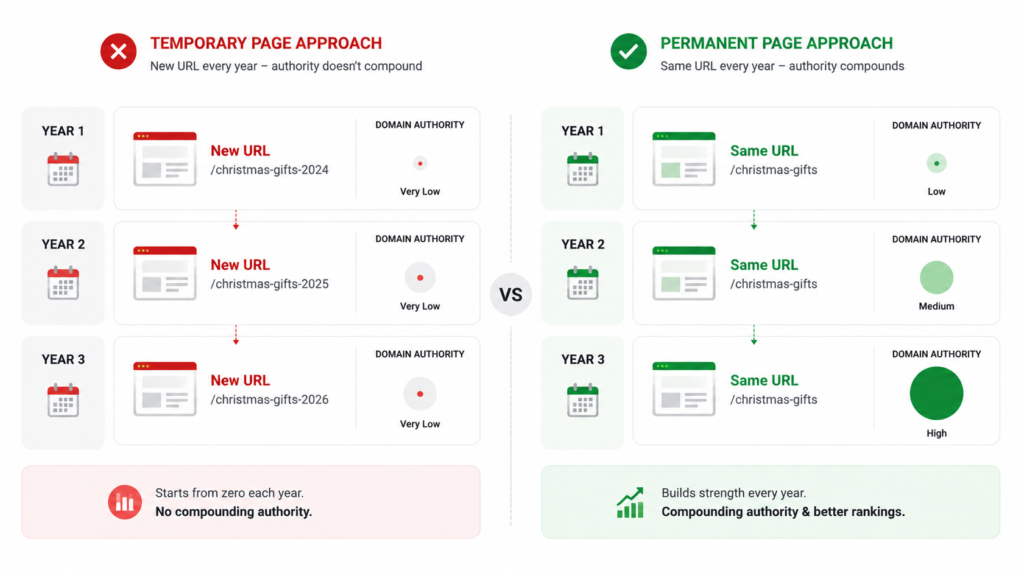
A seasonal landing page that is treated as a temporary campaign page and a seasonal landing page that is treated as a permanent brand asset are structurally different — and perform very differently over a 3-year horizon.
| Element | Temporary campaign approach | Permanent asset approach |
| URL | New URL each year (/christmas-2024/, /christmas-2025/) | Stable URL year after year (/christmas-decorations/) |
| Off-season state | Deleted or redirected | Live with updated content and evergreen section |
| Internal links | Added during season, removed after | Permanent position in navigation, category, and footer |
| Content | Product-only, seasonal copy only | Products + evergreen buying guide + off-season CTA |
| Backlinks | Start from zero each year | Compound year over year |
| Year 3 ranking start | Same position as Year 1 | Significantly stronger baseline than Year 1 |
| “Usually keeping the URL stable and updating the page content each season is worth far more than creating new seasonal URLs. Deleting often throws away authority you built. The compounding effect of a three-year-old URL with a backlink history is difficult to replicate with a fresh URL each year.” |
The Off-Season Content Calendar for Seasonal Ecommerce
A practical off-season content plan for a seasonal store follows a repeating annual structure. The specific months shift depending on your season, but the pattern is the same.
| When (example: Christmas store) | What to do |
| January — February(post-peak) | Update seasonal pages to off-season state. Publish post-season retrospective content (“trends from this Christmas”, “what sold out fastest”). Begin link outreach for upcoming season gift guides. |
| March — May(deep off-season) | Publish evergreen informational content: buying guides, care guides, trend articles. Build links. Audit technical SEO — fix any crawl or speed issues found during peak season monitoring. |
| June — July(early prep) | Early shoppers start researching. Publish “early Christmas ideas” and trend-forward content. Refresh product descriptions on top product pages. Update meta titles to include year if relevant. |
| August — September(ramp-up) | Full seasonal page refresh: update products, update copy, restore seasonal meta titles and descriptions. Publish gift guides. Increase internal linking to seasonal pages from blog content. |
| October — November(pre-peak) | Monitor rankings weekly. Publish timely content: countdowns, new arrivals, trending searches. Submit updated sitemap. Fix any crawl issues that have appeared. |
| December(peak) | Monitor conversion rate and organic traffic daily. Minimal content changes — this is execution time, not strategy time. Prepare post-season content plan. |
Technical SEO Specifics for Seasonal Pages
A few technical SEO decisions apply specifically to seasonal ecommerce that standard ecommerce guides do not cover.
Hreflang and seasonal content for international stores
If you operate in multiple markets, seasonal timing varies. Christmas in Australia falls in summer. Ski season in the southern hemisphere is June-August. Hreflang annotations need to match the correct regional seasonal pages — do not serve UK seasonal content to Australian visitors just because the URL structure is identical.
Crawl budget and seasonal indexation
During peak season, make sure your most important seasonal pages are discoverable within two clicks from the homepage and are included in your XML sitemap. In the off-season, do not remove seasonal pages from the sitemap — this signals to Google that the pages are no longer relevant. Keep them listed and let Google determine crawl frequency based on the page’s update history.
Meta title updates for each season
Include the year in the meta title of your seasonal pages — “Christmas Decorations 2026” rather than just “Christmas Decorations.” This signals freshness to Google and is relevant to searchers who are looking for current-year products. Update this each season when you refresh the page content.
FAQ
Should I use the same URL for my seasonal pages each year?
Yes. A stable URL like /christmas-decorations/ accumulates authority year over year. A new URL each year (/christmas-2024/, /christmas-2025/) starts from zero every time. The only reason to change a URL is if the original was genuinely wrong — a keyword mismatch, a URL that performs poorly, or a structural change to your site architecture. Stability is the default.
What do I put on a seasonal page when the season is over?
Update the hero content to acknowledge the off-season and set expectations: “Back in October 2026 — sign up to be notified.” Add a section of evergreen content below: a buying guide, a trend article, a care or storage guide relevant to the product category. Keep the page in your navigation. The goal is to keep the page active, internally linked, and crawled — not to make it look like peak season when it is not.
How early should I start seasonal SEO preparation?
For a Christmas store: September at the latest, August for competitive categories. For summer products: February for early researchers, March for the main preparation push. Google’s crawl and index cycle means optimisations made in September are not fully reflected in rankings until October or November. Starting in October for a December peak is leaving money on the table.
My seasonal pages rank well during peak season but drop to nothing off-season. Is that normal?
A significant drop is normal and expected — search volume genuinely falls. A drop to zero is usually a sign that the pages are being deleted, redirected, or left without any internal links or content updates. A well-maintained seasonal page should retain some off-season visibility — not at peak levels, but enough to hold position and avoid the “starting over” effect each year.
| Heading into a peak season without a clear SEO plan? An audit will tell you where your seasonal pages are losing authority, what technical issues are compressing your peak, and what to fix before the season starts. Get an Ecommerce SEO Audit → No commitment. martraff.com |