
How to Fix 301 Redirect Problems in Ecommerce
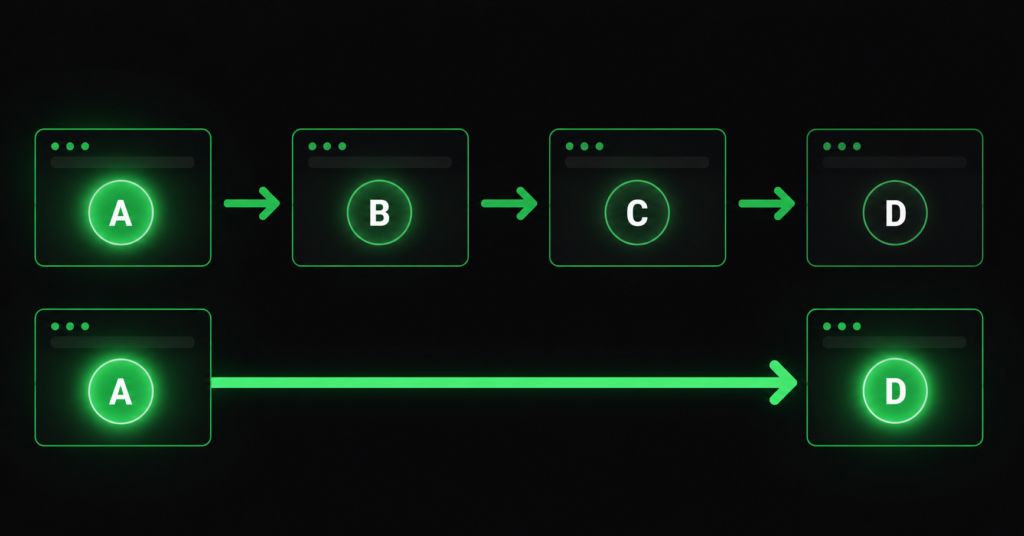
Redirects are the least glamorous part of technical SEO and one of the most consistently damaging when they go wrong. They are invisible to customers, silent in analytics, and easy to accumulate for years without anyone noticing.
In one store audit, a crawl surfaced 1,974 pages caught in permanent redirects. The cause was not a botched migration or a complicated architecture problem. It was a missing trailing slash — every URL without one redirecting to the version with one, across the entire site. Two thousand pages, every crawl, every visit, paying a redirect tax for a punctuation mark.
That is the pattern with redirect problems: the cause is usually trivial, the scale is usually enormous, and nobody finds it until someone runs a proper crawl. This guide covers how redirect problems form on ecommerce stores, what they actually cost, and how to fix them without breaking anything.
What Redirect Problems Actually Cost You
A single redirect is harmless and often necessary. The problem is what happens when they multiply, chain, or point at the wrong things.
| What it costs | How it happens |
| Page speed | Every redirect is an extra round trip to the server before anything renders. A three-hop chain can add hundreds of milliseconds — on mobile, more. This feeds directly into Core Web Vitals. |
| Crawl budget | Googlebot spends a request on each hop. On a large catalogue, thousands of redirecting URLs consume the crawl allocation that should be discovering your products. |
| Link equity | Authority passes through a redirect, but chains dilute it. Links pointing at a URL three hops from the destination deliver less than links pointing directly. |
| Indexation confusion | Long chains and mixed signals (a redirect pointing at a canonicalised page pointing somewhere else) leave Google uncertain which URL to index. |
| Broken user journeys | Redirect loops trap users entirely. Chains that end in a 404 send customers to a dead end from a link that used to work. |
| “A redirect is a tax on every request. One redirect is a rounding error. Two thousand redirects, hit on every crawl and every visit, is a structural drag on the entire site — slowing pages, burning crawl budget, and leaking a little authority at every hop.” |
The Redirect Problems That Actually Matter
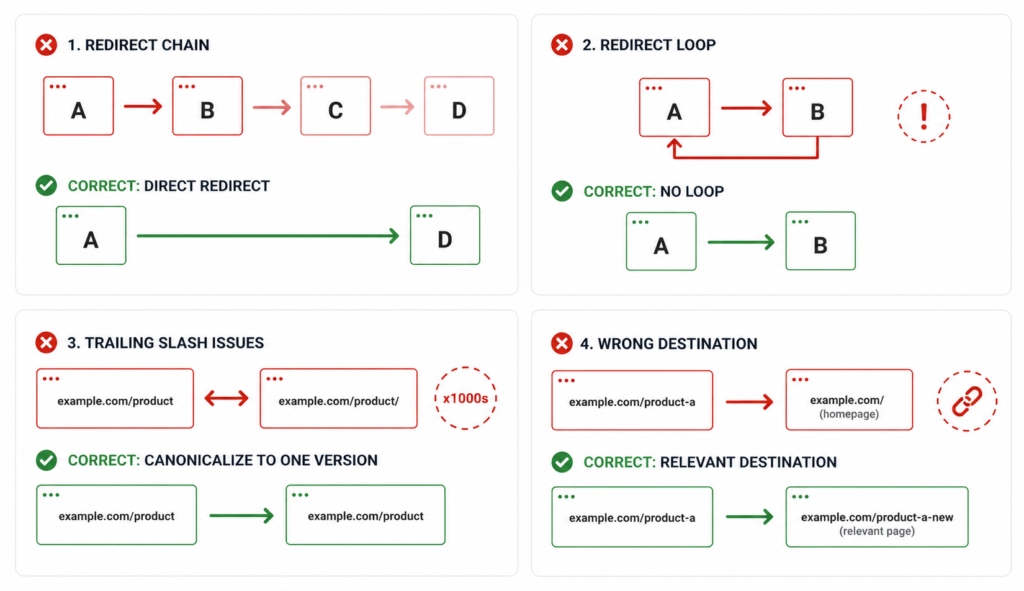
Crawl tools flag every redirect they find, which produces alarming numbers and very little clarity. Only four patterns genuinely need action.
1. Redirect chains
A chain is any redirect that points at another redirect. Each hop costs time, crawl budget, and a little authority.
| /product-old → 301 → /product-new/product-new → 301 → /products/product-new/products/product-new → 301 → /products/product-new/ 3 hops. Every visitor and every crawl pays for all three. |
The fix: point every redirect directly at the final destination. The first URL should redirect straight to the last one, not walk through the history of every URL change the page has ever had. This is the single highest-value redirect fix on most stores.
2. Redirect loops
A loop is a chain that eats its own tail — A redirects to B, B redirects back to A. The browser gives up and shows an error. The page is completely inaccessible to users and to Google.
The fix: loops are always a configuration bug, usually from two competing rules — a plugin forcing one URL format while a server rule forces another. Find the conflicting rules rather than adding a third one to compensate.
3. The trailing slash problem
This is the one that produced 1,974 redirecting pages in a single audit, and it is extraordinarily common on WordPress and WooCommerce stores.
The mechanism: your site is configured to serve URLs with a trailing slash, but internal links, sitemaps, or the CMS output URLs without one. Every single request to a non-slash URL triggers a 301 to the slash version. Multiply by every page on the site and you have thousands of redirects that exist purely because of a punctuation inconsistency.
| The important part: the redirect itself is correct — you should have one canonical URL format, and redirecting the other to it is right. The problem is that your own internal links point at the wrong version, so you are paying the redirect tax on your own traffic. Fix the links, not just the redirect. |
A working .htaccess pattern that enforces HTTPS and trailing slashes on an Apache/WordPress setup:
| # BEGIN Canonical redirects (HTTPS + trailing slash)<IfModule mod_rewrite.c>RewriteEngine On # 1) Force HTTPSRewriteCond %{HTTPS} !=onRewriteRule ^ https://%{HTTP_HOST}%{REQUEST_URI} [R=301,L] # 2) Add trailing slash to directory-like URLs# (skips files, query strings, and admin paths)RewriteCond %{REQUEST_URI} !\.[^./]+$RewriteCond %{REQUEST_URI} !^/$RewriteCond %{QUERY_STRING} ^$RewriteCond %{REQUEST_URI} !^/wp-admin(?:/|$) [NC]RewriteCond %{REQUEST_URI} !^/wp-login\.php$ [NC]RewriteRule ^(.+[^/])$ https://%{HTTP_HOST}/$1/ [R=301,L]</IfModule># END Canonical redirects |
| Before you touch .htaccess: a rewrite rule error can take an entire store offline. Back up the file, test on staging, and have someone who understands Apache review it. This is not a change to make live on a Friday afternoon. |
4. Redirects to irrelevant destinations
Common after a catalogue cleanup: every discontinued product redirects to the homepage. It feels tidy. It is nearly worthless.
Google treats a redirect to an irrelevant page as a soft 404 — the redirect passes almost no authority, and the user who clicked a link expecting a specific product lands on a generic homepage and leaves. See our guide on link building for why preserving the equity on those old URLs matters.
The fix: redirect to the closest relevant page — the product’s category, a replacement product, or a “similar items” page. Relevance determines how much authority survives the redirect.
301 vs 302: Use the Right One
The distinction is simple and consistently confused, and getting it wrong quietly costs rankings.
| Type | Means | Use it when |
| 301 | Permanent. Passes authority. Google replaces the old URL with the new one in its index. | The old URL is gone for good — product discontinued, URL structure changed, page merged, site migrated. |
| 302 | Temporary. Google keeps the original URL indexed and expects it back. | The page will genuinely return — a product temporarily out of stock, a page down for maintenance, a seasonal page returning next year. |
The common failure is using 302 for permanent changes — often because a plugin or platform defaults to it. The old URL stays in the index, the new one struggles to replace it, and authority sits in limbo. If the change is permanent, the redirect must be a 301.
How to Find Redirect Problems on Your Store
Three checks surface almost everything worth fixing:
| 01 | Crawl the site with Screaming Frog (free up to 500 URLs). Go to the Response Codes tab, filter for 3xx. The Redirect Chains report under Reports shows every chain, its length, and the final destination. Sort by number of hops — anything above one hop is a fix. |
| 02 | Check Search Console: Indexing → Pages → “Page with redirect”. This shows URLs Google has crawled and found redirecting. A large number here on pages you expect to be indexed means Google is spending crawl on redirects instead of content. |
| 03 | Audit your internal links. In the Screaming Frog crawl, look at the Inlinks for any redirecting URL. If your own navigation, sitemap, or product links point at redirecting URLs, you are paying the tax on your own traffic — fix the links at source. |
| The check most people skip: step 3. Fixing a redirect chain is good. Fixing the internal links that point at the chain is better — because then the chain is never triggered by your own site at all. External links you cannot control; your own links you can. |
The Redirect Map: What to Build Before Any URL Change
Every URL structure change, catalogue cleanup, or migration should start with a redirect map — a spreadsheet listing every old URL and its new destination, built before anything ships.
| Column | What goes in it |
| Old URL | Every URL that will stop existing. Pull from a full crawl plus Search Console indexed pages — not just what is in the CMS. |
| New URL | The closest genuinely relevant destination. Not the homepage unless there is truly nothing better. |
| Redirect type | 301 for permanent, 302 only if the page genuinely returns. |
| Organic clicks | From Search Console. High-traffic URLs get the most careful destination mapping. |
| Backlinks | From Ahrefs or Search Console Links. URLs with external links must not lose their equity to a bad destination. |
| Status | Tracked through implementation and verified after launch. |
On a large catalogue this is unavoidable work — but it is also where scale changes the approach. You do not hand-map 20,000 URLs. You map by pattern where the transformation is systematic, and hand-map only the high-traffic and high-backlink exceptions.
| Verify after launch, not before: a redirect map that was correct in the spreadsheet frequently is not correct in production. Re-crawl the old URL list the day after any URL change ships. Every URL should return a single 301 to a live 200 page — no chains, no loops, no 404s. This check takes an hour and catches problems that otherwise take months to notice. |
Redirects and Canonicals Are Not Interchangeable
A recurring confusion worth settling: both consolidate signals, but they do different jobs and are not substitutes.
- A redirect removes the old URL. Users and crawlers land on the new one. The old page is gone.
- A canonical keeps both URLs accessible but tells Google which one to index. Users can still reach either.
Use a redirect when the old page should not exist — a discontinued product, a changed URL, a merged category. Use a canonical when both URLs need to work for users but only one should rank — product variants, filter URLs, tracking parameters. Redirecting a colour variant means customers cannot select that colour. Canonicalising a discontinued product means the dead page stays in the index. Each tool for its own job.
FAQ
How much link equity does a redirect actually lose?
Google has said 301 redirects pass full PageRank, so a single well-implemented redirect loses effectively nothing. The loss comes from chains — each additional hop is another opportunity for the signal to degrade, and long chains risk Google giving up before reaching the destination. The practical rule: one hop is fine, two is worth fixing, three or more is actively harming the page.
Should I redirect discontinued products or leave them as 404s?
It depends on the URL. If the product page has backlinks or organic traffic, redirect it to the closest relevant category or replacement product — that preserves the equity. If it has neither and never ranked, a 404 is perfectly acceptable and cleaner than an irrelevant redirect. Check Search Console and your backlink tool before deciding; do not apply one rule to the whole catalogue.
How long should I keep redirects in place?
Google has indicated that a year is generally enough for it to fully process a permanent move, but the safer answer for ecommerce is: indefinitely, if the URL had backlinks. Google may have processed the move, but the external site linking to your old URL has not updated its link — remove the redirect and that link becomes a 404, and its equity is gone. Redirects cost nothing to keep if they are direct and not chained.
Do redirects hurt Core Web Vitals?
Yes, through Time to First Byte. Each redirect is a full round trip before the browser can start loading the actual page — typically 100-300ms per hop, more on mobile connections. A three-hop chain can add close to a second before anything renders, which pushes LCP directly. This is one of the clearest cases where a technical fix and a speed fix are the same fix.
| How many of your pages are stuck behind a redirect? We find and fix redirect chains, loops, and misconfigured URL rules as part of technical SEO — with the .htaccess and platform work done, not just recommended. See Our Technical SEO Service → No commitment. No generic report. martraff.com |