
Shopify vs WooCommerce for SEO: An Honest Comparison
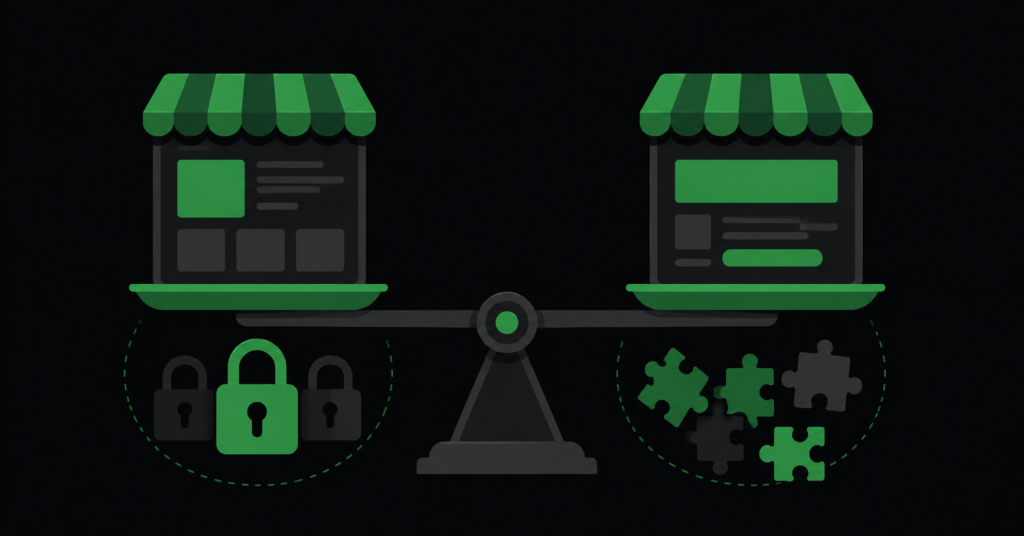
“Which platform is better for SEO?” is one of the most commonly asked and most poorly answered questions in ecommerce. The honest answer is that both Shopify and WooCommerce can rank perfectly well, and neither has a structural advantage large enough to decide the choice on its own.
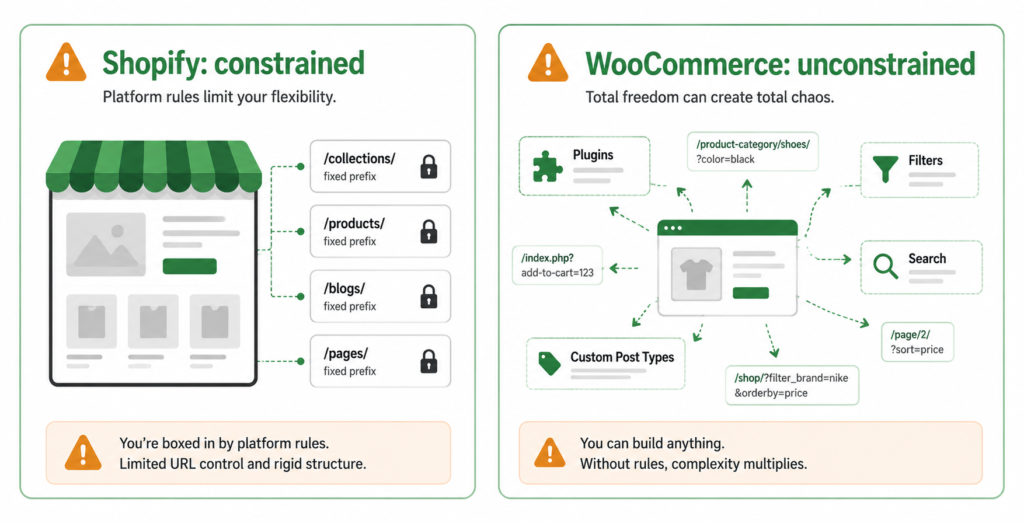
What is genuinely useful to know is that they fail in different ways. Shopify constrains you — some things are simply not configurable, and you work within its rules. WooCommerce gives you everything — including enough freedom to build a technically broken store without noticing. Neither problem is worse; they just require different work.
This guide covers the real SEO differences between the two platforms, the specific limitations each imposes, and how to decide which one fits your situation — from an agency that works on both and has no reason to prefer either.
The Short Answer
| “Platform choice is not what determines whether a store ranks. Content, technical execution, and authority determine that. A well-run WooCommerce store outranks a badly-run Shopify store and vice versa, every day. Choose the platform that fits how your business operates — then do the SEO work properly on it.” |
That said, the differences are real and worth understanding, because they change what SEO work looks like on each. Here is the practical comparison.
At a Glance
| Area | Shopify | WooCommerce |
| Out-of-the-box speed | Strong. Hosted infrastructure, integrated CDN, performance-reviewed themes. Best default Core Web Vitals of the major platforms. | Highly variable. Depends entirely on hosting, theme, and plugin load. Can match or beat Shopify on good hosting; often much worse on cheap shared hosting. |
| URL structure control | Limited. Forced /products/, /collections/, /pages/ prefixes that cannot be removed. | Full control. Any structure you want, configurable via permalinks. |
| Duplicate content risk | Built in. Products accessible via multiple collection paths. Handled by default canonicals in modern themes. | Built by you. Filter plugins and attribute URLs generate duplicates at scale unless configured. |
| robots.txt control | Editable since 2021 via robots.txt.liquid, but the default is sensible and rarely needs changing. | Full control, but the WordPress default does almost nothing useful for a store. |
| Schema markup | Usually output by the theme. Quality varies; common gaps in availability format and itemCondition. | Depends on the SEO plugin. Yoast and Rank Math both output it; quality varies by version. |
| Technical maintenance | Low. Platform handles updates, security, and infrastructure. | Ongoing. Core, theme, and plugin updates; conflicts and breakages are your responsibility. |
| Scaling to large catalogues | Handles volume well infrastructurally. App bloat becomes the constraint. | Scales with good hosting and configuration; faceted navigation becomes the main SEO constraint. |
Shopify: What Constrains You
Shopify’s SEO story is straightforward — good defaults, hard limits. You will spend less time fixing technical problems and more time working around things you cannot change.
Forced URL structure
Shopify requires /products/, /collections/, /pages/ and /blogs/ prefixes in URLs. You can change the slug after the prefix but not remove the prefix itself. In practice this has minimal ranking impact — URL structure is a weak signal — but it constrains information architecture and makes some URL strategies impossible.
Duplicate URLs from collections
The same product is reachable at /products/name and at /collections/x/products/name for every collection it belongs to. Modern themes set the canonical to the /products/ version automatically, which handles it — but verify on a product that sits in several collections rather than assuming. This is the platform’s most-cited SEO issue and is usually already solved.
Limited canonical control
You can influence canonicals through theme code, but not with the granularity a plugin gives you on WordPress. For most stores the defaults are correct. For unusual architectures — heavy faceted collections, complex variant setups — the lack of fine control becomes a genuine constraint. See our guide on fixing duplicate content for what correct canonical handling looks like.
App bloat is the real speed risk
Shopify has the best out-of-the-box Core Web Vitals of the major platforms — hosted infrastructure, integrated CDN, and themes that go through performance review. The threat to that is apps: every installed app injects scripts that run on every page. Stores with ten or more apps frequently fail Interaction to Next Paint even on a well-built theme.
| The Shopify speed rule: before optimising anything else, audit your installed apps and remove the ones you are not actively using. Uninstalled apps often leave script fragments behind — check the theme code after removal. This single step recovers more speed on most Shopify stores than any other change. Our Core Web Vitals guide covers what to measure. |
WooCommerce: What You Have to Configure
WooCommerce gives you complete control, which is genuinely valuable — and means every technical decision is yours to get right or wrong. Most WooCommerce SEO problems are configuration problems, not platform problems.
Faceted navigation generates URLs at scale
The single biggest WooCommerce SEO issue. Filter plugins generate ?filter_, ?min_price=, and attribute parameter URLs in enormous volume, and nothing stops Googlebot crawling every combination by default. A store with five filters across a hundred categories can generate more crawlable URLs than it has products, by orders of magnitude.
This is solvable — canonicals, noindex where appropriate, and targeted robots.txt rules — but it requires deliberate work that the platform does not do for you.
Hosting determines your Core Web Vitals
WooCommerce performance varies more than any other platform because it depends entirely on your stack. A well-configured store on managed WordPress hosting with a CDN can match or beat Shopify. The same store on cheap shared hosting will fail all three Core Web Vitals metrics regardless of how well the theme is built. Time to First Byte on shared hosting frequently caps LCP before any image optimisation matters.
Plugin conflicts and inconsistent schema
Multiple plugins outputting structured data — an SEO plugin, a reviews plugin, the theme itself — can produce conflicting or duplicated schema. Similarly, plugin updates can silently change canonical behaviour or robots directives. This is the maintenance cost of the flexibility: things that Shopify handles centrally are, on WooCommerce, distributed across components that update independently.
Product tags creating duplicate categories
A frequent finding in WooCommerce audits: product tags configured so that the same category is reachable at two different URLs — one via the category path and one via a tag path, with different content on each. This confuses both users and crawlers, and it accumulates quietly. The fix is usually to noindex and nofollow tag archives entirely, and to keep a single canonical category structure.
| The WooCommerce principle: everything Shopify decides for you, you decide — including the things you did not realise were decisions. Filter URL handling, tag archives, pagination directives, hosting quality, plugin schema conflicts. None of these are platform flaws; they are configuration responsibilities that come with the control. |
Which Should You Choose?
If you are picking a platform now, the SEO differences are not the deciding factor — but they do interact with how your business operates.
| Choose Shopify if | Choose WooCommerce if |
| You have no in-house technical resource | You have a developer, or an agency handling technical work |
| You want good defaults and low maintenance | You need URL structures or configurations Shopify will not allow |
| Speed matters and you cannot manage hosting | You already run WordPress and want everything in one system |
| You are comfortable working within platform limits | You want full control and accept the maintenance that comes with it |
Should You Migrate for SEO Reasons?
Almost never. Migration is expensive, risky, and the SEO gain from the platform itself is small — while the SEO risk from a badly executed migration is substantial.
A replatform means every URL changes, every redirect has to be mapped, and any error is multiplied across your whole catalogue. Stores routinely lose significant organic traffic during migrations, and recovery takes months even when everything is done correctly.
| Before considering migration: audit what is actually holding your SEO back. In most cases it is duplicate content from filters, slow hosting, thin category content, or weak authority — all fixable on your current platform for a fraction of the cost and risk of a replatform. Migrate for business reasons (cost, functionality, operations) and handle the SEO carefully. Migrating purely for SEO is rarely justified. |
What Actually Determines Whether You Rank
Platform sits well down the list of factors that decide ecommerce rankings. In order of impact:
- Content quality on commercial pages. Unique product and category content beats platform choice comprehensively. A store with real content on both platforms outranks a store with none on either.
- Technical execution. Duplicate handling, crawl efficiency, indexation — these matter enormously, and both platforms can be got right or wrong.
- Authority and links. Referring domains do not care what your store runs on.
- Site speed. Where the platform genuinely does contribute — but a well-hosted WooCommerce store beats a Shopify store weighed down by twenty apps.
- Platform defaults. Real, but the smallest of these factors — and largely a question of how much configuration work is required, not what ceiling you can reach.
FAQ
Is Shopify or WooCommerce better for SEO?
Neither, structurally. Shopify gives you better defaults and less to break; WooCommerce gives you more control and more to configure. Both can reach the same ceiling. The difference is what SEO work looks like on each: on Shopify you work within constraints, on WooCommerce you have to build and maintain the configuration yourself. Choose on business fit, then do the technical work properly.
Do Shopify URL prefixes hurt rankings?
Not meaningfully. URL structure is a weak ranking signal, and the forced /products/ and /collections/ prefixes are consistent, logical, and understood by Google. They constrain information architecture more than they cost rankings. It is a genuine limitation, but it is not why a Shopify store would fail to rank.
My WooCommerce store is slow — is that the platform?
Usually not the platform itself. WooCommerce performance is determined mostly by hosting, theme, and plugin load. Cheap shared hosting with a high Time to First Byte caps your Largest Contentful Paint regardless of what else you optimise. Before blaming WooCommerce, check server response time, count active plugins, and test the theme. A well-hosted WooCommerce store performs comparably to Shopify.
Will migrating platforms improve my rankings?
Rarely, and it introduces significant risk. Most SEO problems attributed to a platform are actually configuration or content problems that exist independently of it — and would follow you to the new platform. Diagnose the real cause first. If you do migrate for business reasons, treat the redirect map and URL mapping as the highest-priority workstream: that is where migrations lose traffic.
| Not sure whether your platform or your setup is the problem? We work on both Shopify and WooCommerce. An audit tells you what is actually limiting your store — and whether it is the platform or something you can fix where you are. Get an SEO Audit → No commitment. No generic report. martraff.com |