
How to Write Category Page Content That Actually Ranks
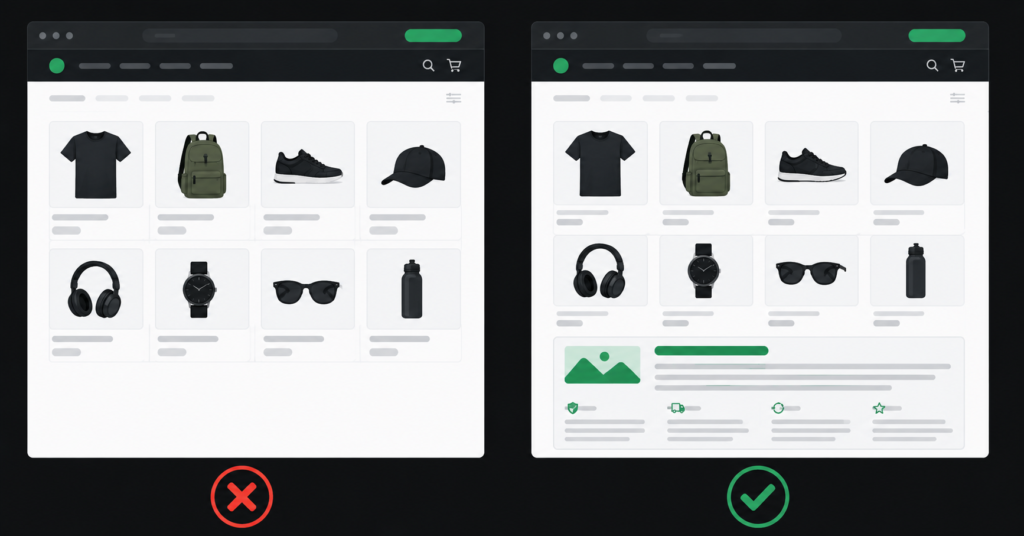
If you open the category pages on most ecommerce stores, you find the same thing: a title at the top, a product grid, and nothing else. No copy, no context, no reason for Google to understand what the page is about beyond the product images.
This is one of the most consistent missed opportunities in ecommerce SEO. Category pages are the highest-value commercial real estate on your store — they are the pages that should rank for “ergonomic office chairs”, “women’s running shoes under £100”, “professional coffee machines.” But without content, Google has almost nothing to work with.
This guide covers what category page content actually does for rankings, what to write, where to put it, how long it needs to be, and what good looks like on different platforms. There are examples throughout.
Why Category Pages Need Content
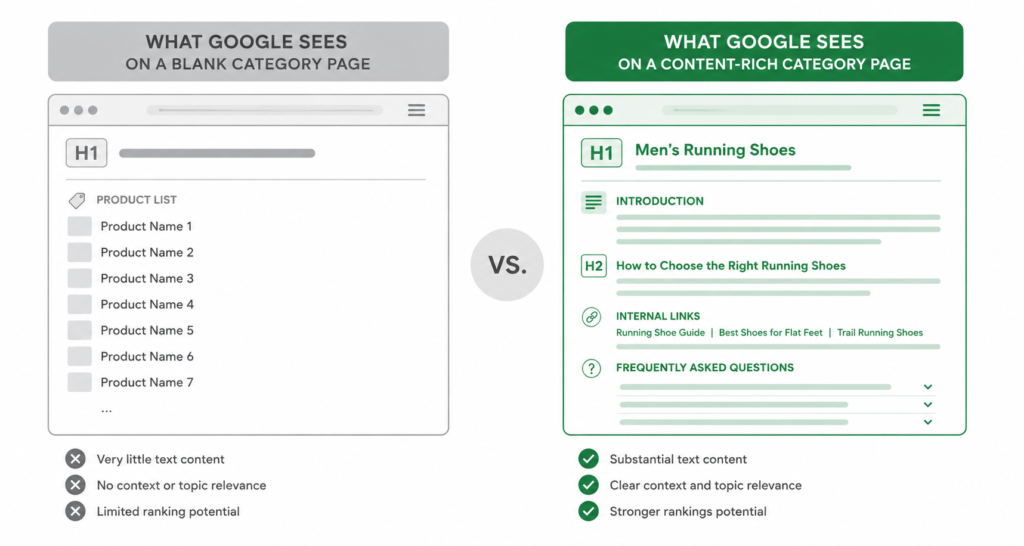
Google ranks pages based on signals — and on a content-free category page, most of those signals are absent or weak. The page title might contain a keyword. The product titles might be relevant. But beyond that, Google is working with very little.
Compare this to a competitor who has added three paragraphs of well-structured copy to the same category page: they explain what the category contains, what buyers should look for when choosing, and what makes their selection worth considering. Google has much more to evaluate — and will consistently favour that page in competitive queries.
| “Category pages can rank for broad, high-volume commercial queries that product pages never could. A product page ranks for specific searches — one model, one SKU. A category page can rank for the entire category: the generic, the comparative, the near-purchase queries. But only if it has enough content to signal what it covers.” |
What to Write: The Three Elements of Good Category Content
Good category page content is not filler. It is not 300 words of generic text about the importance of buying the right product. It has three jobs: tell Google what the page covers, help buyers decide, and do both without getting in the way of the product grid.
1. An Introductory Paragraph That Defines the Category
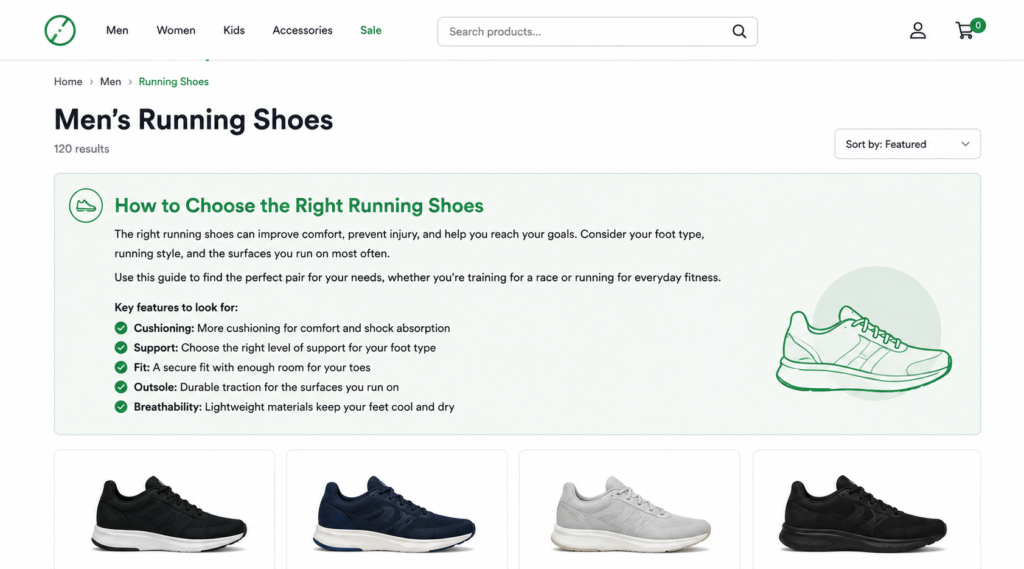
The intro paragraph is the most important piece. It should directly state what the category contains, the range of options available, and who it is for. Keep it to 2-4 sentences. It sits at the top of the page, above the product grid — where Google finds it immediately.
| ✓ Intro paragraph — goodOur ergonomic office chairs are designed for people who spend 6+ hours a day at a desk. The range covers entry-level options under £200 through to fully adjustable professional chairs with lumbar support, armrest control, and breathable mesh backs. All chairs include free UK delivery. | ✗ Intro paragraph — weakWelcome to our office chairs category. We have a great selection of chairs for your home or office. Browse our range below. |
Notice what the good version does: it names the user (“people who spend 6+ hours at a desk”), describes the range (“entry-level under £200 through to…”), and adds a useful detail (“free UK delivery”). The weak version says nothing Google or a buyer could use.
2. Buying Guidance — The Part That Builds Trust
The second element is buying guidance: the 100-200 words that help a buyer understand how to choose. This is what separates a useful category page from a product listing. It should answer the implicit question every buyer has when they land on a category page: “How do I know which one is right for me?”
For an office chairs category, this might cover: the key features to look for (lumbar support, seat depth, armrest adjustability), the difference between budget and premium options, and what questions to ask before choosing. For a coffee machines category: the difference between espresso machines and bean-to-cup, what to look for in a home vs office machine, how much maintenance each type requires.
This content serves two purposes simultaneously. It gives Google keyword-rich, topically relevant text that signals expertise. And it gives buyers the context they need to feel confident browsing — which reduces bounce rate and improves time-on-page, both of which matter for rankings.
3. Below-the-Grid Content — The FAQ or Extended Section
The third element goes below the product grid and is optional for smaller categories but important for competitive ones. An FAQ section is the most effective format: it captures informational search queries that buyers use before purchasing, and it generates featured snippet opportunities in Google.
For the office chairs category, FAQ questions might include: “What is the difference between a task chair and an executive chair?”, “How do I adjust lumbar support?”, “Are ergonomic chairs worth the price?” Each answer should be 40-80 words — enough to be useful, short enough to be scannable.
Below-the-grid content has a secondary benefit: it keeps the primary product browsing experience clean. Buyers who want to browse products see the grid immediately. Buyers who want context scroll past the grid to find it. Both user types are served.
How Long Does Category Page Content Need to Be?
There is no universal word count target. The right length depends on the competition in your category. A useful way to calibrate: check the top 3-5 pages currently ranking for your target category query and count how much content they have. That is your benchmark.
In practice, for most ecommerce categories:
- 150-300 words covers the intro paragraph and basic buying guidance. Sufficient for lower-competition categories or subcategories.
- 300-600 words is the range for most competitive main category pages — intro, buying guidance, and a short FAQ.
- 600-1,000 words is appropriate for very competitive categories where the top-ranking pages are content-heavy.
| Avoid the word count trap: more words do not equal better rankings. 200 words of specific, useful content outperforms 800 words of generic filler. The goal is density of useful information — not raw length. |
Where to Put the Content
Placement matters for two reasons: user experience and crawlability.
Above the grid — intro only
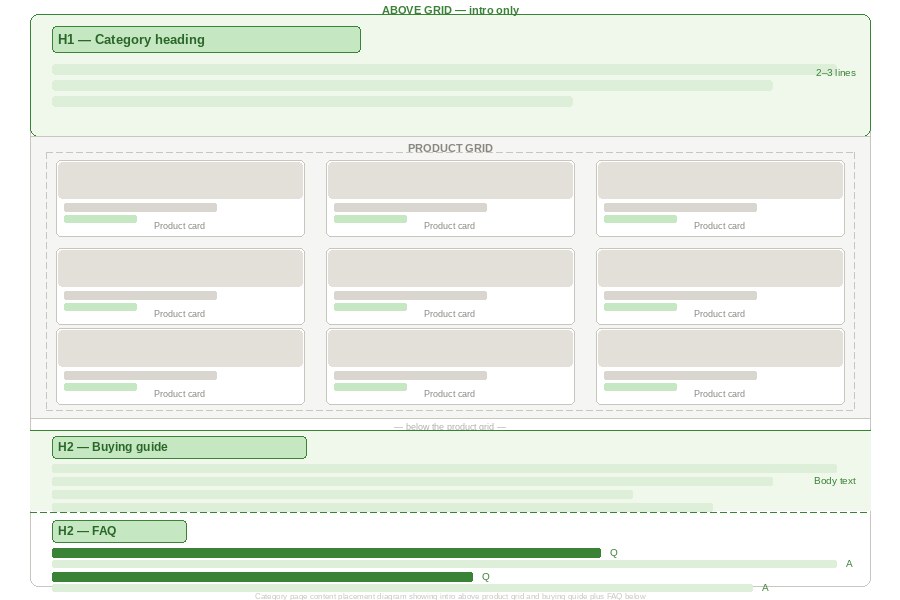
The introductory paragraph (2-4 sentences) should sit above the product grid. This is where Google will find it first, and it sets context for the buyer. Keep it short — enough to define the category and signal relevance, not so long that it delays access to the products.
Below the grid — buying guidance and FAQ
The main body of your category content — the buying guidance, the detailed description, the FAQ — should go below the product grid. This preserves the browsing experience for buyers who know what they want, while making the content accessible to both Google and to buyers who want more context before deciding.
This is standard practice on well-optimised ecommerce stores and is specifically recommended by most ecommerce SEO practitioners for exactly this reason: it does not hurt conversion rate while it significantly improves ranking signals.
Platform-Specific Notes
Shopify collection pages
Shopify’s default collection page layout places the description field above the product grid. For the above-grid intro paragraph, this works well. For below-the-grid content, you will need to modify your theme’s Liquid template to add a second description field that renders after the product list.
This is a standard theme modification — most Shopify developers can implement it in under an hour. Without it, any content you add via the admin will appear above the grid. See our Shopify SEO guide for more on Shopify-specific content and structural issues.
WooCommerce category pages
WooCommerce gives you more control. The category description field renders above the product grid by default. For below-the-grid content, you can add a second custom field via your theme or a page builder plugin.
WooCommerce also generates filter URLs for every attribute combination — if you are adding content to category pages, make sure your canonical strategy is correctly configured so that filter variants do not dilute the authority of the main category page. This is the most common WooCommerce SEO issue and it interacts directly with your category content. Read the full WooCommerce filter page guide →
BigCommerce category pages
BigCommerce provides a category description field that renders above the product grid. For below-the-grid content, custom theme work is required. BigCommerce stores with large catalogues should also consider the crawl budget implications of content-heavy category pages — particularly if filter-generated URLs are consuming crawl allocation.
Start With the Right Keywords
Before you write a word of category page content, you need to know what query you are writing for. The content only works if it is targeted at a specific search intent.
For each category page, identify:
- The primary keyword — the main query the page should rank for (“ergonomic office chairs”)
- 2-3 secondary keywords — related queries that reinforce the primary (“best ergonomic chairs”, “office chairs for back pain”, “adjustable office chairs UK”)
- The intent signal — are buyers in this category comparing options, looking for a specific specification, or ready to purchase?
The keyword research for your category pages should inform both what you write and how you structure the content. If buyers in your category are searching “how to choose” queries, that signals a longer buying guidance section is warranted. If searches are mostly transactional (“buy [product] online”), a shorter intro and a strong product grid is more appropriate.
A Practical Checklist Before You Publish
| ✓ | H1 contains the primary keyword — exactly once, at the top of the page |
| ✓ | Intro paragraph (2-4 sentences) defines the category, mentions the keyword naturally |
| ✓ | The buying guidance section (100-200 words) helps buyers understand how to choose |
| ✓ | At least one H2 subheading in the content — structured, not just a wall of text |
| ✓ | FAQ section with 3-5 questions targeting informational queries (below the grid) |
| ✓ | Meta title includes the primary keyword in the first 60 characters |
| ✓ | Meta description is written for click-through — benefit-led, not generic |
| ✓ | Content is placed below the grid where possible — not competing with the product browsing experience |
| ✓ | Internal links from the category page to relevant subcategories or related categories |
| ✓ | No duplicate content — each category page has unique copy, not templates repeated across categories |
FAQ
Does every category page need content?
Not necessarily. Subcategories with very few products or very low search volume can function without it. Prioritise your top-level category pages — the ones targeting your highest-volume commercial queries — and work down from there. A useful rule: if the category page appears in your top 20 organic landing pages in Google Search Console, it should have content.
Will adding content hurt my conversion rate?
Not if it is placed correctly. Content above the fold or above the product grid can slow down buyers who know what they want. Content below the grid is invisible to those buyers — it only serves buyers who want context before deciding, and it gives Google the signals it needs. The below-grid placement is the standard recommendation precisely because it avoids the conversion rate concern.
How often should I update category page content?
When the category changes meaningfully — new products, new price range, seasonal relevance — the content should be updated to reflect that. “Last updated” freshness is a minor signal but worth maintaining. More importantly, if the content is factually inaccurate (e.g. “all products include free shipping” when that is no longer true), update it immediately.
Can I use AI to write category page content?
Yes, with caveats. AI can produce a serviceable first draft quickly, particularly for the buying guidance section. The problems start when the same AI template is used across multiple category pages with minor variable substitution — Google is increasingly able to detect this and treats it as thin content. Each category page needs unique content that is specific to that category. AI can assist the process; it should not replace category-specific thinking.
| Need someone to write and optimise your category pages? We audit and rewrite category page content as part of our on-page SEO service — prioritised by traffic potential and implemented directly. See Our On-Page SEO Service → No commitment. martraff.com |