
How to Fix Duplicate Content in Ecommerce
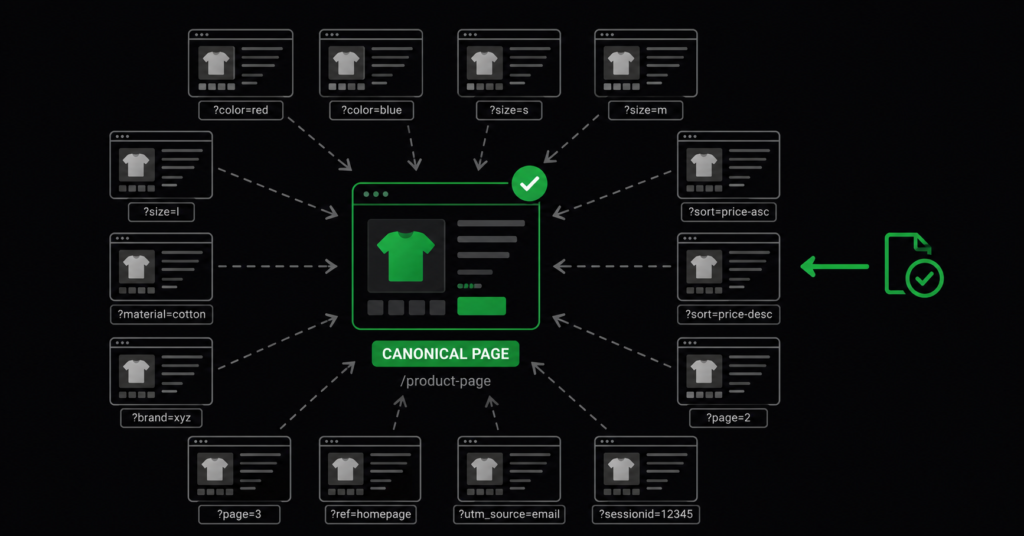
Duplicate content is the technical SEO problem that ecommerce stores have and blogs do not. A publisher writes one article, at one URL. A store sells one chair — and generates forty URLs for it: one per colour, one per size combination, one per sort order, one per filter the customer clicks.
Google sees those forty URLs and has to decide which one to rank. Usually it picks one and ignores the rest — but it might pick the wrong one, split ranking signals across several, or waste crawl budget on variants nobody searches for. None of those outcomes are good for the pages that make you money.
This guide covers the four sources of duplicate content specific to ecommerce, the correct fix for each, and — importantly — when duplicate content is not actually a problem worth solving.
What Duplicate Content Actually Costs You
Worth clearing up first: there is no “duplicate content penalty.” Google does not punish sites for having duplicate URLs. What happens instead is quieter and, for a store, more damaging.
| What happens | Why it costs you |
| Google picks the wrong URL | A filter URL or a colour variant ranks instead of your main product page — often with a worse title, less content, and a weaker conversion path. |
| Ranking signals split | Backlinks and internal links point at three versions of the same page. Each version gets a fraction of the authority instead of one page getting all of it. |
| Crawl budget is wasted | Googlebot spends its allocation crawling thousands of filter combinations instead of your new products and updated category pages. |
| Thin pages accumulate | Hundreds of near-identical indexed pages with almost no unique content drag on how Google assesses overall site quality. |
| “Duplicate content in ecommerce is not a penalty problem — it is a dilution problem. Every duplicate splits the authority that should be concentrated on one page. Fixing it does not remove a punishment; it consolidates strength you already earned.” |
The Four Sources of Duplicate Content in Ecommerce
Almost every duplicate content problem in an online store comes from one of these four. Each needs a different fix — applying the wrong one either fails to solve it or removes pages you needed.
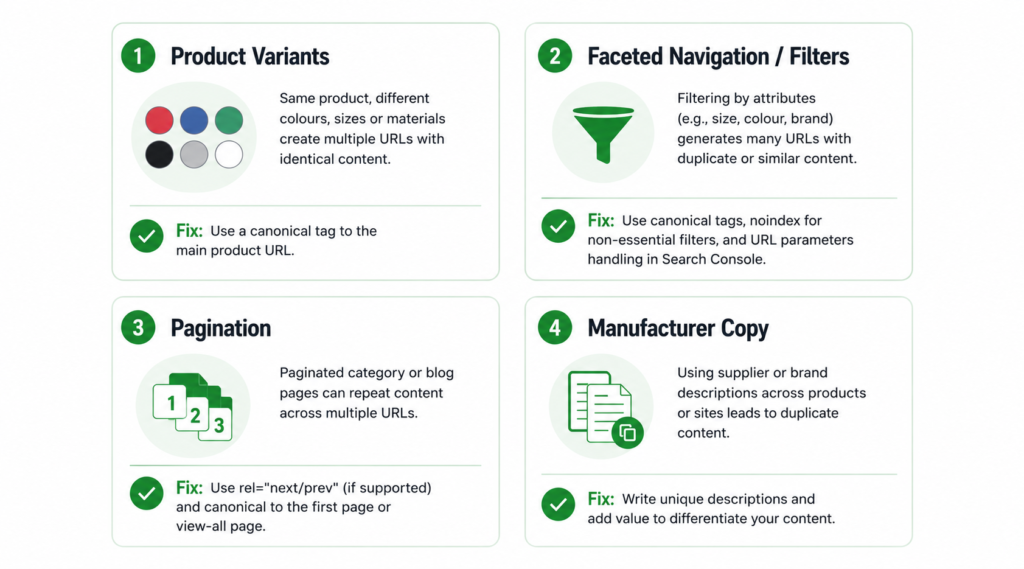
1. Product Variants
The same chair in black, grey, and navy. The same t-shirt in six sizes. Most platforms generate a separate URL for each variant, and the page content is nearly identical apart from a swatch and possibly a price.
| /products/office-chair-x200/products/office-chair-x200?variant=black/products/office-chair-x200?variant=grey/products/office-chair-x200?variant=navy → 4 URLs, 1 product, near-identical content |
The fix: a self-referencing canonical on the main product URL, and a canonical from every variant URL pointing to it. This tells Google: index the main page, attribute all signals to it, ignore the rest.
| <!– On every variant URL: –><link rel=”canonical” href=”https://store.com/products/office-chair-x200″ /> |
| The exception: if a variant is genuinely searched for as a distinct product — “black office chair X200” has real search volume, or the waterproof version of a jacket is functionally different — give it its own indexable page with unique content and its own target keyword. Do not canonicalise away a page people are actively searching for. See our product description guide for when variants deserve unique copy. |
2. Faceted Navigation and Filter URLs
This is the biggest and most damaging source. Every filter combination a customer can click generates a URL — and with five filters of four options each, that is over a thousand possible URLs from a single category page.
| /office-chairs/?color=black/office-chairs/?color=black&size=large/office-chairs/?color=black&size=large&price=200-400/office-chairs/?size=large&color=black ← same page, different order/office-chairs/?sort=price_asc → hundreds to thousands of URLs, all showing subsets of one category |
The fix depends on the filter:
| Filter type | Correct handling | Why |
| Sort order (price, popularity) | Canonical to unfiltered category | Nobody searches “office chairs sorted by price ascending”. Zero search value. |
| Price range filters | Canonical to unfiltered category | Rarely searched as a phrase, generates enormous URL combinations. |
| Colour, size, brand — low volume | Canonical to unfiltered category | Same content subset, no distinct demand. |
| Colour, brand — real search demand | Own indexable landing page with unique content | “black office chairs” or “Herman Miller chairs” have genuine search volume — build a real page, do not leave it as a filter URL. |
| Session IDs, tracking params | Canonical + robots.txt disallow | No user or search value whatsoever. Pure crawl waste. |
For high-volume filter URLs that serve no search purpose, combine canonicals with a robots.txt disallow so Googlebot does not spend crawl budget discovering them at all. A real example of the pattern used on a WooCommerce store:
| # Block filtering parametersDisallow: /*?filter_Disallow: /*&filter_ # Block price filterDisallow: /*?min_price=Disallow: /*?max_price= # Block cart actionsDisallow: /*?add-to-cart= |
| Careful: robots.txt blocks crawling, not indexing. A blocked URL that already has backlinks can still appear in search — Google just cannot see its content or read its canonical tag. Use robots.txt to prevent discovery of new junk URLs; use canonicals (and noindex where appropriate) to consolidate ones already indexed. Blocking a page you also want de-indexed prevents Google from ever seeing the noindex. |
The full treatment of crawl budget waste from filters — including how to diagnose it — is in our WooCommerce filter pages guide.
3. Pagination
A category with 300 products across 15 pages produces 15 URLs showing the same category, differing only in which products appear. Historically, stores used rel=”next” and rel=”prev” — Google stopped using those signals in 2019.
The current correct handling:
- Let paginated pages be crawled and indexed. They are not duplicates — page 2 shows different products than page 1.
- Each paginated page should have a self-referencing canonical — page 2 canonicalises to page 2, not to page 1.
- Do not canonicalise all paginated pages to page 1. This tells Google the products on pages 2-15 do not exist, and they will drop out of the index.
- Do not use “view all” as the canonical unless the view-all page loads acceptably fast. On a 300-product category it usually does not.
| “The most common pagination mistake is canonicalising page 2, 3, and 4 back to page 1. It feels like consolidation. What it actually does is remove every product on those pages from Google’s index — which on a large catalogue can mean removing most of your inventory from search.” |
4. Manufacturer Copy
The only duplicate content source on this list that is not a URL problem. When you paste the manufacturer’s product description onto your page, that exact text also appears on the manufacturer’s site and on every competitor selling the same item. Google sees hundreds of identical pages and picks one — usually not the smallest store.
The fix is not technical. It is writing unique product content: your own photography, condition or usage detail, a sentence only someone who handled the product would write. Even 60-100 words of genuinely unique copy per product page distinguishes it from the duplicate mass.
How to Diagnose the Problem on Your Store
Before fixing anything, find out what Google actually sees. Three checks, none requiring paid tools:
| 01 | Open Google Search Console → Indexing → Pages. Look under “Not indexed” for “Duplicate without user-selected canonical” and “Duplicate, Google chose different canonical than user”. Every URL listed there is a duplicate content instance Google has already flagged. |
| 02 | Search Google for [site:yourstore.com inurl:?] — this surfaces indexed URLs containing query parameters. If hundreds of filter and sort URLs appear, they are consuming crawl budget and diluting signals. |
| 03 | Crawl your site with Screaming Frog (free up to 500 URLs). Sort by page title. Identical or near-identical titles across many URLs is the clearest signal of duplicate pages. |
The Search Console report is the most authoritative of the three — it is Google telling you directly which pages it considers duplicates and which version it chose. Our guide to reading Google Search Console covers what each “Not indexed” reason means.
When Duplicate Content Is Not Worth Fixing
Not every duplicate needs action. Effort spent here is effort not spent on content or links, so it is worth knowing where to stop.
- Google has already chosen the correct canonical on its own. If Search Console shows “Google chose different canonical” but the URL it chose is the one you wanted ranking, no action needed.
- The duplicate URLs are not indexed and receive no crawl activity. A theoretical filter combination nobody has ever visited is not costing you anything.
- Pagination on a small catalogue. Three paginated pages are not a crawl budget concern.
- Print stylesheets, tracking parameters on ad campaigns, and similar — as long as canonicals are correct, these resolve themselves.
| Prioritise by revenue exposure: duplicate issues on your highest-traffic category pages and best-selling products are worth fixing this week. Duplicate issues on a discontinued product line are worth fixing never. Sort the Search Console duplicate list by which URLs sit closest to revenue and work down from there. |
Platform-Specific Notes
Shopify
Shopify creates duplicate product URLs by default: a product accessible at /products/name is also accessible at /collections/x/products/name for every collection it belongs to. Modern themes set the canonical to the /products/ version automatically — verify this on a product in multiple collections. Variant URLs using ?variant= are canonicalised correctly by default in most themes.
WooCommerce
The main risk is faceted navigation. WooCommerce filter plugins generate ?filter_ and ?min_price= parameters at scale, and by default nothing stops Googlebot crawling every combination. Canonicals plus targeted robots.txt rules (as shown above) are the standard fix. Yoast and Rank Math both handle canonical output, but neither blocks crawling — that is a robots.txt job.
BigCommerce
Same faceted navigation problem as WooCommerce, amplified on large catalogues. BigCommerce sets canonicals on product pages correctly, but filter URL handling requires configuration. Check whether filter URLs are indexed using the site: search above before assuming the platform handles it.
FAQ
Is there a Google penalty for duplicate content?
No. Google has stated repeatedly there is no duplicate content penalty for the normal, unintentional duplication that ecommerce sites produce. What happens is consolidation — Google picks one URL to rank and ignores the others. The cost is dilution of ranking signals, wasted crawl budget, and sometimes the wrong URL ranking. Deliberate scraping of other sites’ content is a different matter and is treated as spam.
Should I use noindex or canonical for filter URLs?
Canonical, in most cases. A canonical consolidates ranking signals from the filter URL into the main category page — any link equity the filter URL accumulated flows to where you want it. Noindex removes the page from the index but does not consolidate signals in the same way. Use noindex when a page genuinely should not appear in search and has no signals worth consolidating, such as internal search results pages.
Can I just block all filter URLs in robots.txt?
Only for URLs that are not already indexed. Robots.txt prevents crawling, which means Google cannot read the canonical tag or a noindex directive on those pages. If a filter URL is already indexed and you block it, it can stay in the index indefinitely as a URL-only listing. The correct sequence is: canonical (or noindex) first, wait for Google to process it, then block in robots.txt to prevent re-discovery.
How long until fixing duplicate content improves rankings?
Google needs to recrawl the affected URLs and reassess the canonical relationships. For a moderate catalogue, expect four to eight weeks before the consolidation is fully reflected. The improvement is rarely dramatic — you are consolidating existing authority, not adding new authority. What you should see is the correct page ranking instead of a variant, and crawl activity shifting toward pages that matter.
| Not sure which duplicate URLs are actually costing you traffic? We fix duplicate content from filters, variants, and pagination as part of technical SEO — prioritised by which pages sit closest to revenue. See Our Technical SEO Service → No commitment. martraff.com |