
5 BigCommerce SEO Problems That Are Suppressing Your Organic Traffic
BigCommerce is a solid platform. It handles large catalogues well, scales without breaking, and gives merchants enough control to run a serious ecommerce operation. But it has a set of SEO characteristics that, if left unaddressed, will quietly suppress your organic rankings — regardless of how good your products or content are.
Most SEO agencies do not know BigCommerce well enough to find these problems. They apply the same audit template they use on WooCommerce or Shopify and miss the platform-specific issues entirely.
This article covers five of the most impactful BigCommerce SEO problems — what they are, why they happen, and what to do about them. These are based on direct experience auditing BigCommerce stores, including a 20,000-SKU office supplies store in South Africa where several of these problems were present simultaneously.
1. Faceted Navigation Generating Thousands of Uncontrolled URLs
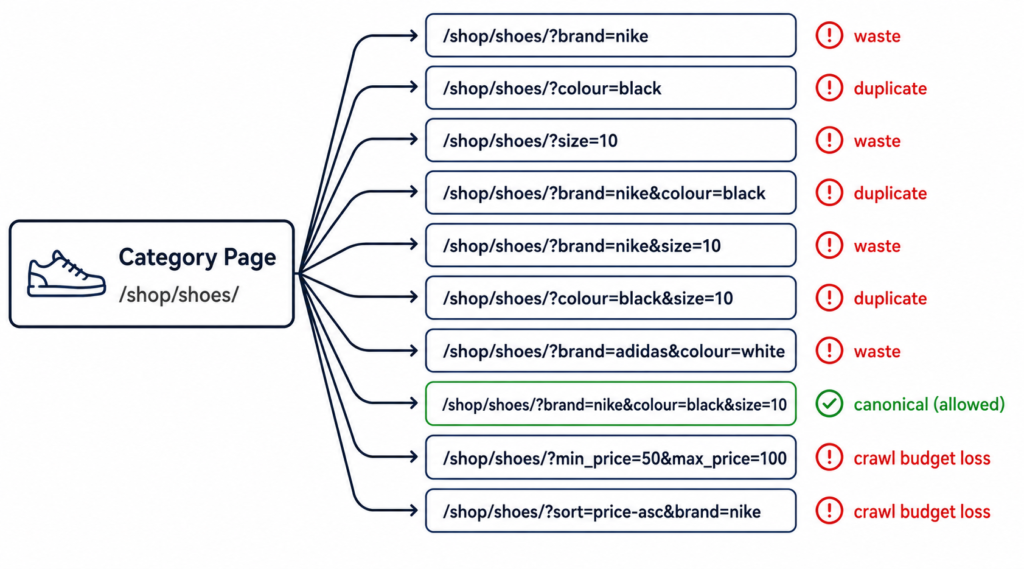
BigCommerce’s faceted navigation — the filter system that lets users sort by colour, size, price, brand, and other attributes — creates a separate URL for each filter combination a customer applies. On a store with 50 brands, 10 colours, 8 sizes, and 3 price ranges, the combinatorial math produces tens of thousands of potential URLs.
By default, BigCommerce does not tell Google to ignore these URLs. Without a proper configuration, they are crawlable, potentially indexable, and will consume a disproportionate share of your crawl budget — leaving less capacity for Google to crawl your actual category and product pages.
Why this matters
Google allocates a crawl budget to every site — a rough limit on how many URLs it will process within a given period. When it finds thousands of filter-generated URLs, it spends time evaluating each one. The pages that actually drive revenue — category pages, product pages, landing pages — get crawled less frequently as a result.
We’ve seen BigCommerce stores where filter URLs accounted for the majority of crawled pages, with core category pages being refreshed by Google every two to three weeks instead of every few days.
What to do
- Use the BigCommerce URL parameter handling settings to mark filter parameters as non-indexable
- Add canonical tags on filter-generated pages pointing back to the base category URL
- If your theme supports it, use the robots meta tag to noindex high-volume zero-value filter combinations
- For filter combinations with genuine search demand — e.g. “black office chairs” — consider creating dedicated landing pages rather than relying on filter URLs
| ⚠ Do not simply block all filter URLs in robots.txt without auditing first. If a filter combination has real search traffic, blocking it will remove that page from Google entirely. Audit before blocking. |
2. Canonical Tag Gaps on Category and Product Pages
Canonical tags tell Google which version of a page is the “official” one when multiple URLs point to similar or identical content. BigCommerce generates canonical tags automatically — but there are several scenarios where the auto-generated canonical is incorrect or missing.
Common canonical problems on BigCommerce
- Product pages accessible via both /products/product-name/ and through a category path — two URLs, one product, split ranking signals
- Paginated category pages (page 2, page 3) sometimes canonicalised to each other instead of to the root category
- Sort order variations (?sort=featured, ?sort=newest) generating indexable URLs without canonical tags
- Brand pages and search result pages occasionally missing canonical tags entirely
Each of these scenarios fragments your ranking signals. Instead of one strong category page accumulating authority over time, you get several weaker versions competing with each other.
During a BigCommerce SEO audit on a South African office supplies store, we identified approximately 2,400 filter-generated pages with missing or broken canonical tags. The fix — implementing a consistent canonical strategy across all filter and pagination variants — was one of the highest-impact technical changes in the engagement.
What to do
- Crawl your site with Screaming Frog or Sitebulb and filter for pages with missing, self-referencing incorrect, or duplicate canonical tags
- For product pages, ensure the canonical always points to /products/product-name/ regardless of how the page was accessed
- For paginated category pages, the canonical should point to the root category (page 1)
- For sort order variations, add rel=”noindex” or canonical to the base category URL
3. XML Sitemap Including Non-Indexable URLs
Your XML sitemap is a direct signal to Google: “these are the pages I want you to index.” If your sitemap includes URLs that are noindexed, canonicalised to another page, redirecting, or returning errors — you are actively sending Google conflicting instructions.
BigCommerce generates a sitemap automatically. On a large catalogue, this sitemap can include filter-generated URLs, brand pages without sufficient content, and search result pages — none of which should be submitted for indexing.
What to check
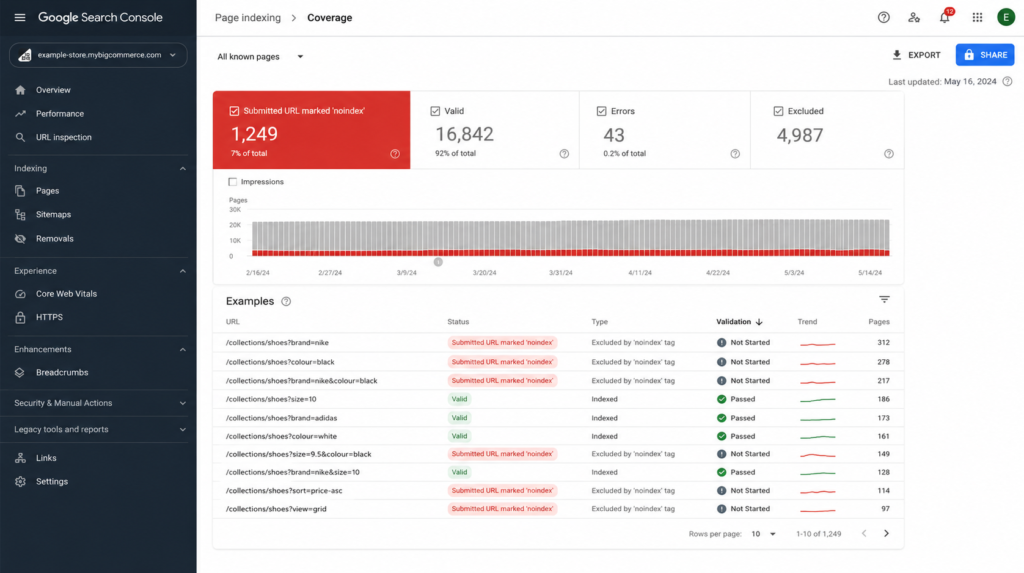
- Submit your sitemap URL in Google Search Console and review the “Submitted URL marked noindex” and “Submitted URL has crawl issue” reports
- Cross-reference your sitemap against your GSC Coverage report — any URL in the sitemap should also appear as “Valid” in GSC
- Look for filter parameter URLs, sort order variants, and internal search URLs in the sitemap output
- Check for pages that are in the sitemap but returning non-200 status codes
| “A sitemap should contain only pages you actively want indexed. Every non-indexable URL you submit wastes Google’s attention and creates confusion about your site’s structure.” |
4. Structured Data Missing or Incomplete Across the Catalogue
Structured data — specifically Product schema and BreadcrumbList schema — tells Google additional information about your pages that it cannot infer from the HTML alone. Product schema enables rich results in Google: star ratings, price, availability, and review count directly in the search snippet.
BigCommerce has some built-in schema support, but it is often incomplete or inconsistently implemented — particularly on large catalogues where product pages were created at different times, using different theme versions, or where the theme itself has gaps in its schema output.
What is typically missing
- Product schema missing “offers” block — Google cannot display price or availability in rich results
- Review aggregate schema not connected to the product schema — ratings visible on the page but not in SERP
- BreadcrumbList schema absent on category and subcategory pages — Google cannot build the breadcrumb SERP display
- Organisation schema missing on homepage — reduces brand entity recognition
Rich results are not guaranteed even with correct schema — but pages without any schema cannot receive them. On a competitive category where multiple stores are bidding for the same query, a rich result with price and ratings vs a bare blue link is a meaningful CTR advantage.
What to do
- Crawl your site with a schema validator or run a sample of product URLs through Google’s Rich Results Test
- Identify which schema types are present, incomplete, or missing entirely
- For BigCommerce, schema is usually implemented via the theme — check your theme’s settings and documentation for structured data options
- If the theme does not support full Product schema, implement it via a custom script injected through the BigCommerce Script Manager
- Validate output with Google’s Rich Results Test before and after implementation
5. Redirect Chains Across Product and Category URLs
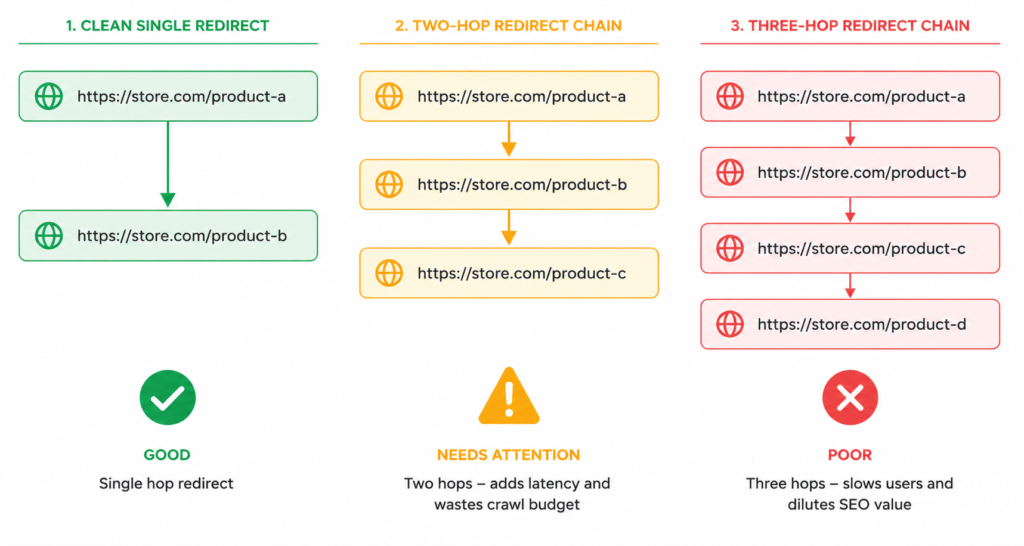
As a BigCommerce store grows — products get renamed, categories get restructured, URLs get updated — redirects accumulate. A product that has had its URL changed twice now sits behind a chain: the original URL redirects to a first intermediate URL, which redirects to the current URL. Three hops.
Each hop in a redirect chain loses a small amount of link equity and adds latency. On a store with thousands of products and years of catalogue changes, redirect chains can affect hundreds or thousands of URLs — and are often invisible to store owners because the front-end experience looks fine.
How to find redirect chains
- Screaming Frog: run a full crawl, go to Reports > Redirect Chains — any chain of 2+ hops will appear
- Google Search Console: Coverage > “Page with redirect” — cross-reference with internal links to identify where chains are being linked to
- Ahrefs or Semrush: check which backlinks are pointing to redirected URLs — these are losing equity unnecessarily
What to do
- Update all redirect chains to point directly from the original URL to the current destination — eliminate intermediate hops
- Update any internal links that still point to redirected URLs — direct links pass full equity
- Update any backlinks you control (social profiles, partner directories) to point to current URLs
- On BigCommerce, redirects are managed in the admin under Storefront > URL Redirects
| “We resolved over 140 technical issues including redirect chains on a 20,000-SKU BigCommerce store — canonical fixes, redirect cleanup, sitemap rebuild, and schema implementation. Organic sessions grew 67% over six months. The redirect work alone was not the only driver, but it was part of a systematic fix of compounding problems that had been accumulating for years.” — Full case study: OfficeGear, South Africa |
FAQ
Does BigCommerce have worse SEO than Shopify or WooCommerce?
Not inherently — but it has different problems. Shopify has its own structural issues (duplicate product URLs, canonical limitations). WooCommerce has filter page and crawl budget problems. BigCommerce’s challenges are concentrated around faceted navigation, canonical handling at scale, and sitemap management. None of these platforms is “better” or “worse” for SEO — they each require platform-specific knowledge to get right.
Can I fix these issues myself or do I need an agency?
Some of these fixes — redirect chain cleanup, sitemap review, schema validation — are achievable with the right tools and some technical patience. The canonical strategy for faceted navigation is more complex and benefits from an experienced hand, particularly on a large catalogue where the wrong configuration can suppress hundreds of category pages simultaneously. If you’re not sure where to start, a BigCommerce SEO audit will tell you exactly what your site has and what the priority order should be.
How long does it take to see results after fixing these issues?
Technical SEO fixes produce results on a delay — Google needs to recrawl and reprocess the affected pages. Crawl budget improvements are typically visible in GSC within 4-8 weeks. Ranking changes on affected category and product pages usually follow within 2-4 months, depending on domain authority and competition.
We have a large BigCommerce catalogue — where should we start?
Prioritise in this order: (1) canonical tags — the highest-impact fix with the broadest effect across the catalogue; (2) sitemap cleanup — removes conflicting signals; (3) redirect chains — particularly any chains involving pages with backlinks; (4) structured data — adds SERP features but does not directly fix ranking suppression; (5) faceted navigation — complex to configure, so save for when the foundation is clean.