
How UX Fixes Improve Both Conversions and SEO
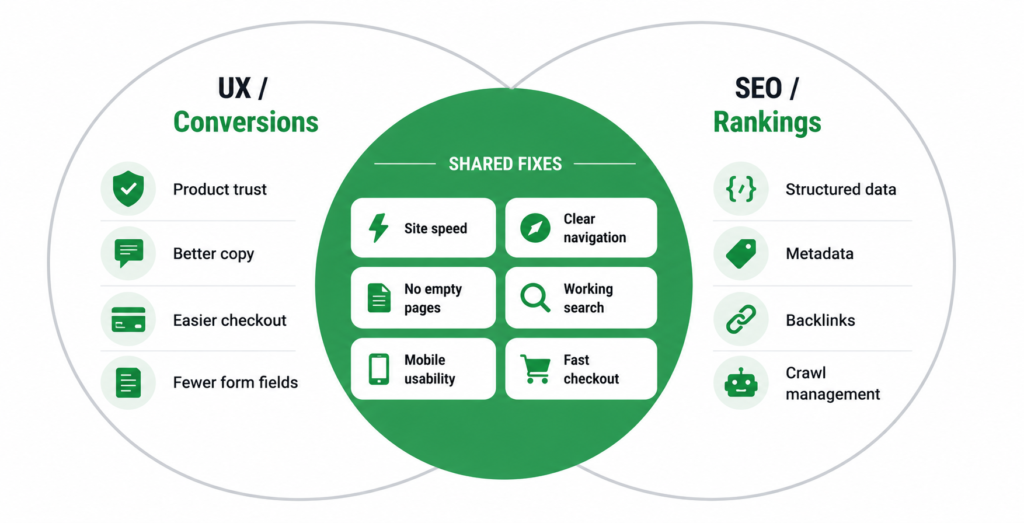
There is a persistent myth that UX and SEO are separate disciplines competing for the same budget — that you either make the site nicer for users or better for Google, and you have to choose. For an ecommerce store, this is almost entirely false. The overlap is enormous, and most of the highest-value work sits exactly where the two meet.
The reason is simple: Google’s ranking systems increasingly measure how real users experience your site. A page people abandon, a checkout people quit, a category page people bounce from — these send negative signals to Google at the same time as they cost you sales. Fix the user experience, and you improve the search signals as a direct consequence.
This guide covers the specific ecommerce UX problems that damage both conversions and rankings, drawn from patterns that show up in real store audits — and why fixing them is the rare SEO work that pays off twice.
Why UX and SEO Are the Same Problem
Google cannot directly see whether your customers are happy — but it can measure proxies for it, and those proxies are increasingly central to how pages rank.
| User behaviour signal | What it tells Google |
| Bounce back to search results | The user did not find what they wanted — the page did not satisfy the query. |
| Time on page and pages per visit | Engaged users who browse further signal a useful, trustworthy site. |
| Core Web Vitals (speed, stability) | A direct ranking factor measured from real user experience. |
| Repeat visits and branded searches | People returning and searching your brand signal genuine satisfaction and authority. |
| Conversion-path completion | While not a direct ranking input, abandoned journeys correlate with the frustration signals Google does measure. |
| “A usability audit and an SEO audit are looking at the same site from two angles that keep meeting. A confusing navigation menu hurts conversions and buries pages from crawlers. An empty category page frustrates buyers and gives Google nothing to rank. Fix the experience and the search signal improves as a by-product.” |
The Fixes That Pay Off Twice
These are the recurring problems that show up in real ecommerce audits — each one damaging conversions and search signals simultaneously, each one fixable.
1. Empty category and subcategory pages
A subcategory that contains no products, or a category page that is just a bare product grid with no content, is a double failure. For the buyer, it signals a limited or broken store and pushes them to leave. For Google, it is a thin page with nothing to rank — often ending up flagged as “Crawled — currently not indexed.”
The fix: either populate the category, merge it into a parent, or remove it and redirect. For live categories, add real category page content — an intro that defines the category and buying guidance that helps customers choose. This retains buyers and gives Google something to index.
2. Empty or broken “Related Products” sections
A “Related Products” or “You might also like” section that renders empty, or shows nothing on many product pages, quietly hurts both goals. It gives buyers no path to keep browsing — reducing pages per visit and time on site — and it wastes an internal linking opportunity that would otherwise pass authority between product pages.
The fix is straightforward: configure the section to pull from the main category when no specific related products are defined, or hide it entirely when empty. An empty widget is worse than no widget — it signals a limited range and adds nothing for crawlers.
3. Search that redirects to an error or empty page
A common and damaging pattern: a user clicks the search button without entering anything, or searches a term with no results, and is dumped on a bare error page or an empty technical URL. For the user, it is a dead end. For SEO, these auto-generated empty search URLs can get crawled and indexed as thin, low-value pages.
The fix: inline validation that shows a clear message (“Please enter a search query”) without redirecting, and a helpful no-results page that suggests popular categories or products rather than a blank screen. Keep search-result URLs out of the index with the correct directives.
4. Checkout friction and interruptions
The checkout is where UX failures cost the most, and several common ones directly cause abandonment: the ability to accidentally log out mid-checkout, an “Add to Cart” button that keeps adding duplicates because its state never updates to “In Cart,” validation errors that redirect to a separate error page instead of showing inline. Each one interrupts the purchase and loses the sale.
While checkout completion is not a direct ranking factor, the frustration these cause feeds the broader engagement signals Google does read — and the revenue impact is immediate regardless of SEO. Fixing checkout friction is the clearest example of UX work that justifies itself on conversions alone, with the search benefit as a bonus.
| Real pattern from store audits: an “Add to Cart” button that does not change to “In Cart” after a click leads customers to add the same item three or four times without realising. They discover it at checkout, get frustrated, and a meaningful share abandon entirely. A single button-state fix recovers those sales — and reduces the bounce-from-checkout behaviour that correlates with poor engagement signals. |
5. Slow, unstable pages
Site speed and visual stability are the clearest case where UX and SEO are literally the same metric. Slow-loading pages and content that jumps around as it loads frustrate users into leaving — and they are measured directly by Google as Core Web Vitals, a confirmed ranking factor. There is no daylight between the UX case and the SEO case here: the same fix serves both, measured by the same numbers.
6. Confusing or non-clickable navigation
Navigation problems hurt both sides quietly. A category title on the homepage that looks like a heading but is not clickable — when users expect it to lead to the full category — creates friction and buries a page that should be one click from the homepage. Carousels with no “View All” link trap products where neither users nor crawlers can easily reach the full listing.
The fix: make category titles clickable links to their full pages, add “View All” links to homepage carousels, and ensure every important page is reachable within a few clicks. This improves the browsing experience and flattens crawl depth so Google can find and prioritise your key pages.
How to Prioritise UX Fixes for Maximum Return
Not every UX issue is worth fixing immediately. Prioritise by two axes: revenue exposure (how close the problem is to a purchase) and reach (how many users hit it).
| Problem area | Priority | Why |
| Checkout friction | Fix first | Closest to revenue. Every fix here directly recovers sales. |
| Slow / unstable key pages | Fix first | Direct ranking factor plus high bounce impact on high-traffic pages. |
| Empty category pages | High | Frustrates buyers and blocks indexing of commercial pages. |
| Broken search / no-results | High | Users who search convert at higher rates — losing them is expensive. |
| Navigation / clickability | Medium | Improves crawl depth and browsing but rarely blocks a sale outright. |
| Empty related-products widgets | Medium | Lost browsing and internal linking, but lower per-user impact. |
| The rule: the closer a problem sits to the point of purchase, the sooner it gets fixed. A broken checkout costs you money today; an empty related-products widget costs you a little authority over time. Both are worth fixing — but not in the same week. |
How to Find These Problems on Your Store
You do not need a formal audit to find the worst offenders. Three things surface most of them:
- Walk your own store like a customer. On mobile, on a normal connection, complete a full purchase. Note every point of friction, confusion, or hesitation. Most UX problems are obvious the moment you stop assuming and start clicking.
- Check GA4 for high-exit pages and checkout drop-off. Where do users leave? Where do they abandon the funnel? These numbers point straight at the pages worth investigating.
- Read your Search Console indexing report. “Crawled — currently not indexed” and soft-404 flags often mark the same empty or thin pages that frustrate users. The SEO symptom and the UX symptom appear together.
A full SEO audit that includes a usability review will find the rest — and, importantly, prioritise the fixes by impact on both revenue and rankings rather than treating them as two separate lists.
FAQ
Is UX actually a Google ranking factor?
Parts of it are direct, parts are indirect. Core Web Vitals — page speed and visual stability — are a confirmed, direct ranking factor. Mobile usability is a requirement under mobile-first indexing. Other UX elements (navigation clarity, checkout flow) are not direct ranking inputs, but they shape user behaviour signals — bounce, engagement, return visits — that Google’s systems do respond to. So UX affects rankings through both direct and indirect paths.
Should I invest in UX or SEO first?
The premise is the flaw — the highest-value work is where they overlap, so you are rarely choosing. Start with the fixes that serve both: site speed, empty pages, checkout friction, working search. These improve conversions immediately and search signals over time. Pure-SEO work with no UX benefit (like schema markup) and pure-UX work with no SEO benefit (like a checkout colour scheme) can come after the overlapping fixes are done.
Will fixing UX improve my rankings on its own?
It helps, but rarely in isolation. UX improvements strengthen the user-behaviour and Core Web Vitals signals that support rankings — but they work alongside content, keywords, and links, not instead of them. A fast, usable site with thin content and no authority still will not rank. Think of UX as removing the things holding your rankings back, not as a standalone growth lever.
How quickly do UX fixes show up in rankings?
The conversion benefit is immediate — a fixed checkout recovers sales the same day. The SEO benefit is slower: Core Web Vitals improvements take weeks to reflect in Search Console field data, and behaviour-signal improvements accumulate gradually as more users experience the better site. Expect conversion impact now and search impact over the following one to three months.
| Want to know which UX problems are costing you sales and rankings?Our SEO audit includes a usability review — finding the fixes that improve conversions and search signals at once, prioritised by impact on both. Get an SEO Audit → No commitment. No generic report. martraff.com |