
How to Do Keyword Research for an Online Store
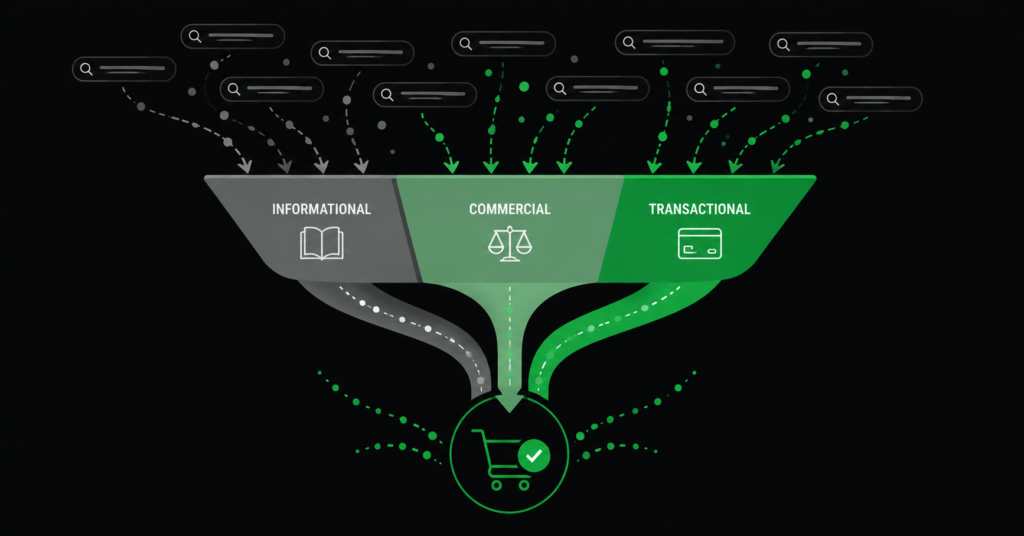
Most keyword research goes wrong in the same way: it chases search volume. Someone finds a keyword with 40,000 monthly searches, gets excited, builds a page for it, and then wonders why the traffic that arrives never buys anything. The keyword had volume. It did not have intent.
For an ecommerce store, the entire point of keyword research is finding the searches that lead to purchases — not the searches that lead to the most visitors. A keyword with 200 monthly searches and clear buying intent is worth more than one with 20,000 searches from people who will never spend a cent. Volume is a vanity metric; intent is a revenue metric.
This guide covers how to do keyword research the way it actually produces sales: built around buyer intent, clustered by page, and mapped to the commercial pages that make you money. It uses mostly free tools and does not require prior experience.
Start With Intent, Not Volume
Every search a person makes carries an intent — a reason they typed it. For ecommerce, four intent types matter, and they are not equally valuable to a store.
| Intent type | Example search | Value to a store |
| Transactional | “buy ergonomic office chair”, “office chair with lumbar support” | Highest. The person is ready to purchase. These are your priority. |
| Commercial | “best office chair for back pain”, “Herman Miller vs Steelcase” | High. Comparing options, close to buying. Buying guides win these. |
| Informational | “how to sit properly at a desk”, “what is an ergonomic chair” | Lower but useful. Builds authority and captures buyers early — if you route them onward. |
| Navigational | “Steelcase official site”, “IKEA chairs” | Usually not worth chasing unless it is your own brand. |
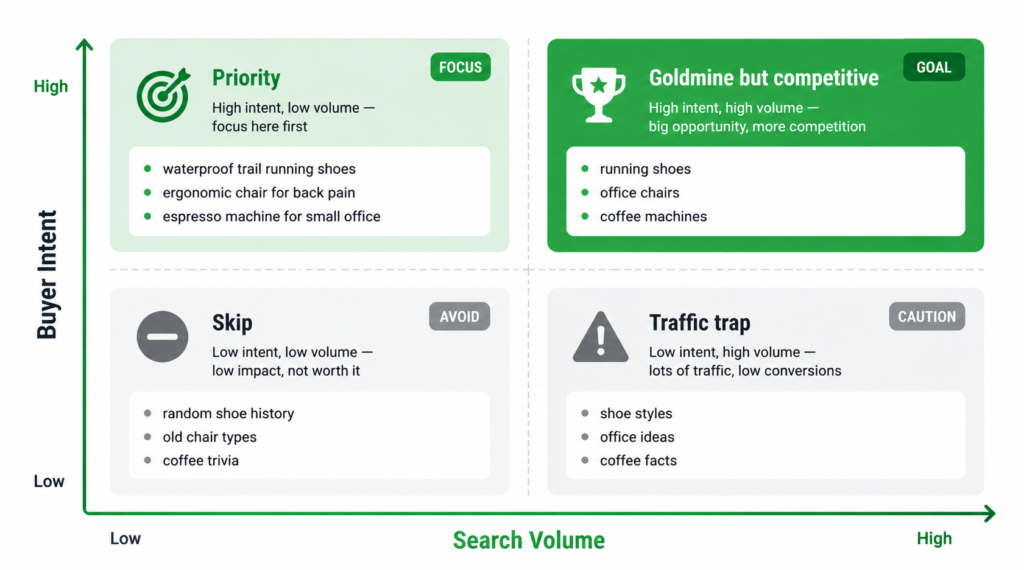
| “The keyword research that grows a store is built around buyer intent, not search volume. A page targeting ‘buy X online’ with 300 searches will out-earn a page targeting ‘what is X’ with 30,000 — because one attracts buyers and the other attracts researchers. Sort by intent first, volume second.” |
The Process, Step by Step
Six steps take you from a blank spreadsheet to a keyword map you can act on. None require paid tools, though paid tools speed up steps 3 and 4.
Step 1 — Start with your own categories and products
Your existing catalogue is your seed list. Write down every category, subcategory, and product type you sell, in the words a customer would use — not internal jargon. If you sell “seating solutions” but customers search “office chairs,” use “office chairs.” This list is the spine of everything that follows.
Step 2 — Expand with the free sources hiding in plain sight
Before any tool, Google itself hands you real searches for free:
- Autocomplete. Start typing your product into Google and note every suggestion. These are real, popular searches.
- People Also Ask. The expanding question boxes on the results page reveal the questions buyers ask around your product.
- Related searches. The block at the bottom of the results page gives you variations and adjacent queries.
- Your own site search. What people type into your store’s search bar is pure intent data — they are on your site looking for something specific. Check it in GA4.
Step 3 — Pull volume and difficulty (where tools help)
Now add data to your list. Free tools — Google Keyword Planner, Ubersuggest’s free tier, Google Trends — give you rough search volume and seasonality. Paid tools (Ahrefs, Semrush) add keyword difficulty and more accurate volume.
Two numbers matter per keyword: approximate monthly search volume, and difficulty (how hard it is to rank). But remember — these inform the decision, they do not make it. A high-difficulty keyword you cannot realistically rank for is not worth targeting yet, no matter its volume.
| On keyword difficulty: a common finding in real ecommerce research is that the highest-volume keywords in a category also have the highest difficulty — dominated by established sites with authority you cannot match quickly. The realistic play is often the lower-volume, lower-difficulty, higher-intent long-tail keyword you can actually rank for this year, rather than the flagship keyword you might reach in three. |
Step 4 — Mine your competitors’ keywords
Your competitors have already done keyword research — you can borrow the results. A competitor SEO analysis shows which keywords they rank for that you do not. Filter that list for two things: commercial or transactional intent, and keywords where at least two competitors rank in the top ten (proof the term has demand and is rankable).
This is often the fastest source of high-value keywords, because someone else has already validated that the terms convert enough to be worth ranking for.
Step 5 — Cluster by page, not by keyword
This is the step most DIY keyword research skips, and it is what separates a usable keyword map from a messy list. You do not build one page per keyword. You group keywords that share the same intent onto a single page, because Google ranks one page for many variations of the same search.
“Ergonomic office chair,” “ergonomic desk chair,” “office chair with lumbar support,” and “best ergonomic office chair” are not four pages. They are one category page, targeting a cluster. Grouping them tells you what each page should cover and prevents you from creating competing pages that split your own rankings.
| Cluster | Keywords grouped | Page type |
| Ergonomic chairs | ergonomic office chair, ergonomic desk chair, office chair lumbar support | Category page |
| Chairs for back pain | office chair for back pain, best chair lower back, posture chair | Category or buying guide |
| Model X200 | office chair X200, X200 review, X200 vs Y300 | Product page |
| How to choose | how to choose an office chair, office chair buying guide | Blog / buying guide |
Step 6 — Map each cluster to a page
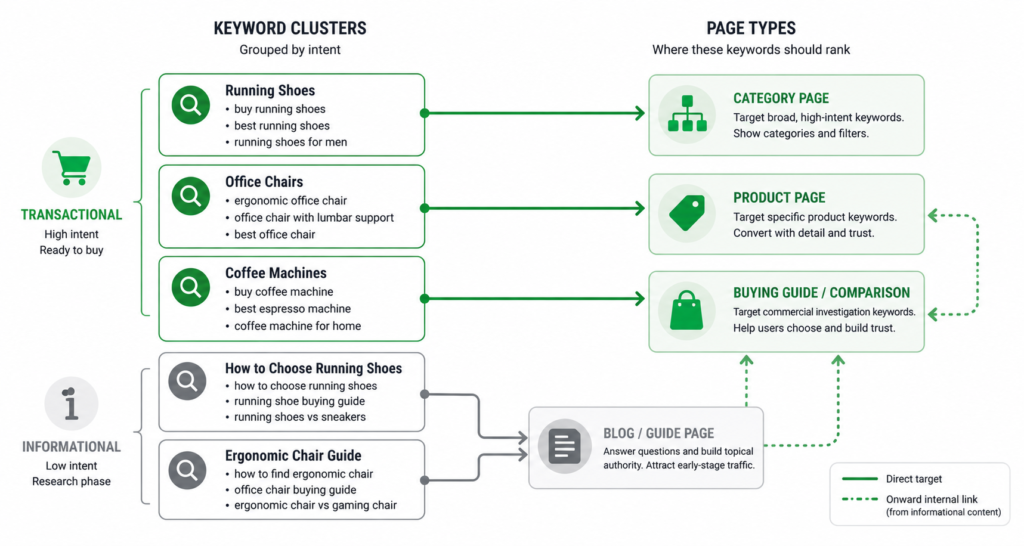
The final output is not a keyword list — it is a map connecting each cluster to a specific page on your site (or a page you need to create). Transactional and commercial clusters map to category and product pages. Informational clusters map to blog content and buying guides that link onward to those commercial pages. See our guide on writing category page content for what to do with each mapped cluster.
| IMAGE 3: Keyword Map DiagramAI Prompt: Flat diagram showing keyword clusters on the left connected by lines to specific page types on the right (category page, product page, buying guide, blog). Transactional clusters connect to commercial pages in green; informational clusters connect to blog pages in grey with a green arrow showing the onward link to commercial pages. White background, green accent.Size: 900x480pxPlacement: Inline after step 6.Alt text: Ecommerce keyword map connecting keyword clusters to category, product, and blog pages by intent |
The Mistakes That Waste the Effort
Even a thorough keyword research process produces nothing if it falls into one of these traps.
- Chasing volume over intent. The original sin. High-traffic informational keywords fill your analytics with visitors who never buy. Prioritise intent.
- One page per keyword. Creating separate pages for “office chair” and “office chairs” splits your ranking signals and makes your pages compete with each other. Cluster instead.
- Ignoring difficulty. Targeting keywords dominated by national retailers on a new store wastes months. Match ambition to your current authority.
- Forgetting local and long-tail. “Office chairs Cape Town” or “waterproof hiking boots size 12” have lower volume but far higher intent and lower competition than their generic parents.
- Never revisiting. Keyword research is not one-and-done. New products, seasonal shifts, and competitor moves change the picture. Revisit quarterly.
Validate and Expand With Your Own Data
Once your store has been live for a while, your single best keyword research source is your own Google Search Console data. It shows the exact searches Google already shows your site for — including ones you never targeted.
Open the Performance report, go to the Queries tab, and sort by impressions. You will find searches bringing you impressions but few clicks — keywords you rank for around position 8-20 without having optimised for them. These are the fastest wins available: you are already close, and a small improvement to the matching page can push them onto page one where the clicks are. Real keyword data from your own store beats any tool estimate.
| The compounding loop: do initial keyword research with tools and competitor analysis, build and optimise pages, then use Search Console to find the keywords you actually started ranking for — and optimise further. Each cycle sharpens the next. This is how keyword research stops being a one-time task and becomes an ongoing engine. |
FAQ
How many keywords should I target per page?
One primary keyword and a cluster of related variations — usually three to eight per page. You are not stuffing eight separate keywords in; you are covering one topic thoroughly enough that the page naturally ranks for all the ways people search for it. A category page for ergonomic chairs should read naturally while covering “ergonomic office chair,” “ergonomic desk chair,” and “office chair with lumbar support” because those are the same intent expressed differently.
Do I need paid tools to do keyword research?
Not for the fundamentals. Google autocomplete, People Also Ask, related searches, Google Keyword Planner, Google Trends, and your own Search Console data are all free and cover most of what a store needs. Paid tools (Ahrefs, Semrush) add speed, more accurate difficulty scores, and easier competitor keyword extraction — valuable at scale, but not required to start.
Should I target high-volume competitive keywords or low-volume easy ones?
Both, in sequence. Start with lower-volume, lower-difficulty, high-intent keywords you can realistically rank for now — they produce sales while you build authority. As your domain strengthens, move up to the higher-volume, more competitive terms. Targeting only the flagship keywords on a new store means months with no rankings; targeting only the easy ones caps your ceiling. Sequence matters.
How often should I redo keyword research?
A full research pass once or twice a year, with ongoing Search Console monitoring monthly. New product lines trigger a fresh cluster of research. Seasonal categories need a pre-season refresh. But the biggest ongoing source is your own Search Console data, which surfaces new keyword opportunities continuously as your rankings evolve — check it monthly and act on the striking-distance keywords.
| Want a keyword map built around buyer intent, not vanity volume?We build clustered, intent-classified keyword maps for online stores — mapped to the pages that drive revenue, prioritised by what you can realistically rank for. See Our Keyword Research Service → No commitment. martraff.com |