
How to Structure Headings (H1–H6) for SEO
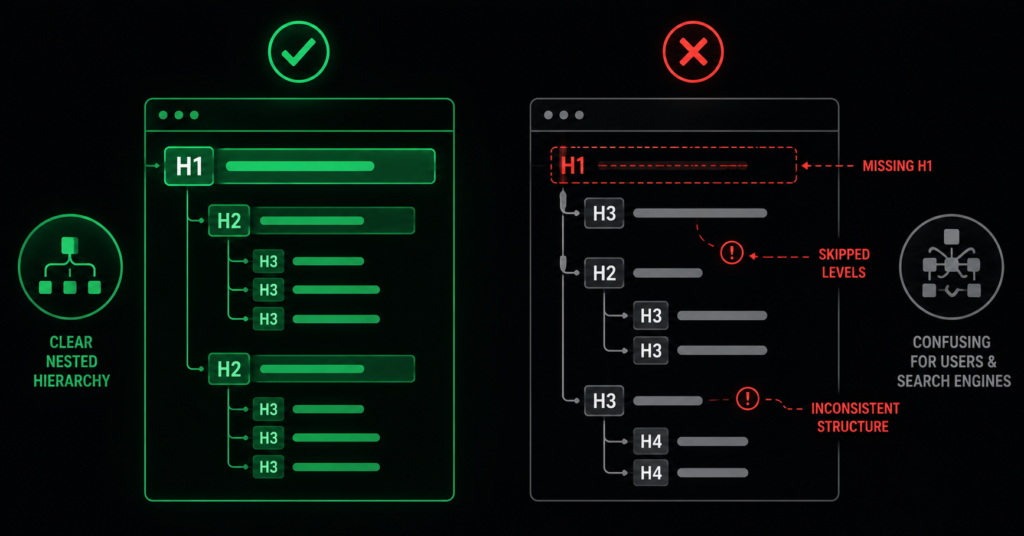
Headings are the outline of your page. Before anyone reads a word of your content, the heading structure tells Google — and any human skimming — what the page is about and how it is organised. Get the structure right and you make the page easy to understand. Get it wrong and you send confused or contradictory signals about what the page is even for.
Most heading problems are not dramatic. They are quiet, systematic issues baked into a theme or a template: a heading that looks like a title but is coded as an ordinary paragraph, a level that skips from H1 straight to H3, or the same H2 repeated on every page of the site because it lives in a template. None of these will get you penalised, but each one weakens how clearly Google reads your pages — across every page at once.
This guide covers how heading structure actually works for SEO: the rules that matter, the two mistakes that show up in almost every audit, and how to check your own pages.
What Headings Actually Do
Headings serve two audiences simultaneously, and both matter for SEO.
- For Google: headings describe the structure and topic of the page. The H1 states the main subject; H2s mark the major sections; H3s break those into sub-points. This hierarchy helps Google understand what the page covers and which parts answer which queries — and it is how content gets pulled into featured snippets.
- For people: most visitors scan before they read. A clear heading structure lets them find what they need fast, which keeps them on the page. Screen readers also navigate by headings, so structure is an accessibility requirement, not just an SEO one.
| “Think of your headings as the table of contents Google reads before deciding what your page is about. If the outline is logical and complete, the page is easy to understand. If headings are missing, mislevelled, or coded as plain text, you are handing Google a table of contents with the chapters out of order.” |
The Rules That Matter
One H1 per page, describing the page
Every page should have exactly one H1, and it should state what the page is about. On a category page that is the category (“Ergonomic Office Chairs”); on a product page, the product name; on an article, the article title. HTML5 technically permits multiple H1s, but for clarity — and to avoid ambiguity about the page’s main topic — one H1 remains the safest, clearest practice.
Do not skip levels
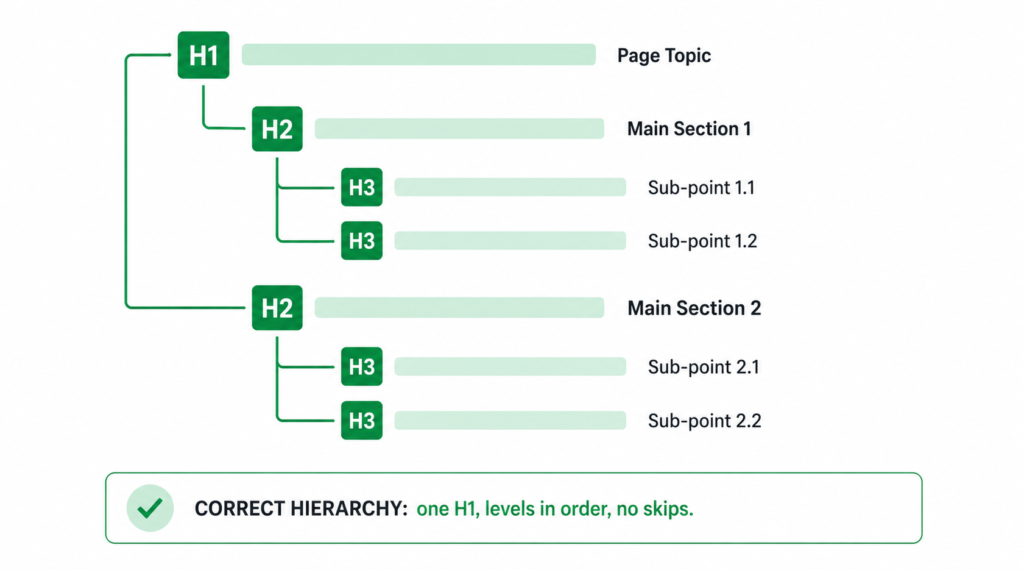
Headings should nest in order: H1, then H2 for main sections, then H3 for sub-points within those sections. Do not jump from H1 straight to H3 because you prefer how the smaller heading looks. The level communicates the relationship; skipping one breaks the logical outline.
| ✓ Correct — levels nest in order <h1>Ergonomic Office Chairs</h1> <h2>Chairs for Back Pain</h2> <h3>Lumbar Support Models</h3> <h2>How to Choose</h2> | ✗ Wrong — H1 skips to H3 <h1>Ergonomic Office Chairs</h1> <h3>Chairs for Back Pain</h3> <h2>How to Choose</h2> <h3>…</h3> (H2 missing above) |
| The styling trap behind level-skipping: most level-skipping happens because someone picks a heading tag for its default size, not its place in the hierarchy. “I used H3 because H2 looked too big.” That is what CSS is for. Choose the heading level by what it means structurally, then style it to whatever size looks right. Never choose a level for its appearance. |
Headings must be real headings, not styled text
A common and invisible problem: text that looks like a heading — big, bold, prominent — but is coded as an ordinary paragraph with styling. To a human it reads as a heading. To Google it is body text, and it contributes nothing to the page’s structure. The reverse also happens: ordinary text wrapped in a heading tag purely to make it big, which pollutes the outline with a “section” that is not one.
| A real audit finding: a page where the true topic heading was coded as a styled paragraph while a generic tagline was marked up as an H2 — meaning the page’s actual subject was invisible to Google as a heading, and a decorative phrase was being treated as a main section. The fix was to promote the real heading to its proper level and demote the tagline to plain text. Both were structural errors hiding behind correct-looking visuals. |
Include keywords naturally — do not force them
Headings carry more weight than body text for understanding a page, so the H1 and H2s are a natural place for your primary and related keywords. But naturally: an H1 that reads “Office Chairs | Ergonomic Office Chairs | Buy Office Chairs” is keyword-stuffing, and it reads as spam to Google and to people. State the topic clearly and the keyword is usually already there.
The Two Mistakes in Almost Every Audit
Beyond the rules, two specific problems appear again and again — both because they are baked into templates rather than written by hand, which means they affect every page at once.
1. The sitewide duplicate H2
This is the most common heading problem on templated sites. A phrase in the header, footer, or a recurring call-to-action block is marked up as an H2 — so it appears as a heading on every single page of the site. A tagline like “Eliminate IT downtime for good” or “Why choose us” coded as an H2 in a global template becomes a duplicate H2 across hundreds of pages, adding a meaningless section to every page’s outline.
It is not a heading in any meaningful sense — it carries no page-specific information and exists identically everywhere. The fix is simple: it should be plain text (styled however you like), not a heading tag. Remove the heading markup and the outline of every page on the site gets cleaner at once.
2. Mislevelled headings inside content
The second recurring finding: within an article or page, the heading levels do not reflect the actual structure. A main section is marked as H3 while a sub-point is an H2, or everything is flattened to the same level so there is no hierarchy at all. The content might read fine visually, but the outline Google builds from it is wrong — sections appear subordinate to points they actually contain.
The fix is to map the real structure: what is the page about (H1), what are its main sections (H2), what sits inside each section (H3). Then align the tags to that map. This is routine on-page SEO work, and on a templated site fixing the template fixes it everywhere.
| Why templates make this worse — and easier: a heading error written by hand affects one page. A heading error in a template affects every page built from it. That sounds bad, and it is — but it also means the fix scales the same way. Correct the template once and the entire site’s heading structure improves in a single change. |
Headings on Ecommerce Pages Specifically
Product and category pages have their own heading conventions worth getting right.
| Page type | Heading approach |
| Product page | H1 = the product name (including distinguishing attributes). H2s for major sections — Description, Specifications, Reviews. Not every bold label needs to be a heading. |
| Category page | H1 = the category name. H2s for any content sections and for subcategory groupings. The product grid items themselves are usually not headings. |
| Blog / buying guide | H1 = the article title. H2s for main sections, H3s for sub-points. FAQ questions commonly as H3. |
| Homepage | H1 = a clear statement of what the business does or sells, not just the brand name or a vague slogan. This is a frequent miss. |
| The H1-equals-title confusion: the H1 and the title tag are different things — the H1 is the heading on the page, the title tag is what shows in search results. They can be similar but do not have to be identical, and making them identical wastes an optimisation angle. Our guide on title tags and meta descriptions covers the distinction. |
How to Check Your Heading Structure
| 01 | Install a free heading-outline browser extension (several exist for Chrome and Firefox). It shows the heading hierarchy of any page as an indented outline — mislevelled and missing headings become obvious instantly. |
| 02 | Crawl the site with Screaming Frog (free up to 500 URLs). The H1 and H2 tabs flag pages with missing H1s, multiple H1s, and duplicate headings across pages — which surfaces the sitewide-duplicate-H2 problem directly. |
| 03 | Read the outline, not the page. Look at just the headings in order, ignoring the body. Do they form a logical table of contents on their own? If the outline does not make sense in isolation, neither does it to Google. |
| 04 | Check your templates, not just individual pages. Since most heading errors live in templates, inspect one page of each type (product, category, blog, homepage) and fix at the template level. |
| The fastest check: read only your headings, top to bottom, and ignore everything else. If they tell the story of the page on their own — clear topic, logical sections, sensible order — your structure is working. If they read as a jumble or leave out the actual subject, that is exactly what Google sees too. |
FAQ
Can I have more than one H1 on a page?
HTML5 technically allows it, and Google has said it can handle multiple H1s. But for clarity, one H1 per page remains the recommended practice — it states unambiguously what the page is about. Multiple H1s create the risk of a muddled main topic for no real benefit. Use one H1 for the page subject and H2s for everything below it; there is no upside to more.
Do headings actually affect rankings?
Headings are not a heavy direct ranking factor on their own, but they matter in several indirect ways that add up. They help Google understand page structure and topic; they are weighted more than body text for relevance; they are how content gets pulled into featured snippets; and they improve the user engagement signals that do influence rankings. A well-structured page is not guaranteed to rank, but a badly structured one makes itself harder to understand — which never helps.
Is the H1 the same as the title tag?
No. The H1 is the main heading visible on the page; the title tag is the clickable headline shown in search results and browser tabs. They serve different audiences in different places and can be worded differently. Making them identical is a missed opportunity — the title can be optimised for click-through in results while the H1 is optimised for clarity on the page. They can overlap, but they are not the same element.
Should every bold line be a heading?
No — this is a common error in both directions. Not everything prominent needs a heading tag; a bold label, a product attribute, or an emphasised sentence is often just styled text, and marking it as a heading pollutes the page outline. Conversely, a genuine section heading must be a heading tag, not a styled paragraph. The test is structural: does this text introduce a distinct section of the page? If yes, it is a heading. If it is just emphasis, it is styled text.
| Not sure if your heading structure is helping or confusing Google? Our on-page SEO work fixes heading structure across your templates — so every page has a clear, logical outline Google can read, not a jumble baked into the theme. See Our On-Page SEO Service → No commitment. No generic report. martraff.com |