
How to Refresh Old Content to Recover Rankings
Content does not rank forever. A page that reached the top of Google two years ago and has not been touched since is almost certainly slipping — not because it got worse, but because everything around it moved. Competitors published fresher, deeper versions. Search intent shifted. Facts went out of date. Google’s idea of what a good answer looks like evolved. The page stood still while the race continued.
This is content decay, and it is normal. It is also the biggest missed opportunity in most content strategies, because the fix is usually far cheaper than the alternative: refreshing an existing page that already has authority, history, and some rankings often recovers more traffic, faster, than writing a brand-new page from zero.
This guide covers how to find decaying content, how to decide what to do with each page, and how to refresh the ones worth saving — the maintenance work that keeps a content investment compounding instead of quietly eroding.
Why Content Decays
Understanding the causes tells you what to fix. A page loses rankings for one or more of these reasons:
| Cause | What happened |
| Competitors improved | Someone published a more thorough, more current, better-structured version and Google now prefers it. |
| Search intent shifted | What people want from the query changed. A query that once wanted a definition now wants a comparison, and your page answers the old need. |
| Information went stale | Statistics, prices, dates, product references, or recommendations that are now out of date. Both Google and readers notice. |
| Freshness expectations | For some queries Google favours recent content. A page dated three years ago loses to one updated last month, other things being equal. |
| Technical or link erosion | Internal links to the page disappeared as the site changed, or backlinks were lost — quietly reducing the page’s authority. |
| “A page that once ranked has something a new page does not: proven history with Google, existing authority, and often some backlinks. Refreshing it builds on all of that. Writing a new page throws it away and starts from zero. For a page that has declined but not collapsed, the refresh is almost always the better investment.” |
How to Find Your Decaying Content
You cannot refresh what you have not identified. Your own Google Search Console is the single best tool for this — it shows exactly which pages are losing ground.
| 01 | In Search Console, open the Performance report and compare the last 6 months against the previous 6 months. Sort pages by the biggest clicks decline. These are your decaying pages, ranked by how much traffic they have lost. |
| 02 | For each declining page, check the query it lost. Is the position slipping (competitors overtook you), or are impressions falling (intent or demand shifted)? The distinction changes the fix. |
| 03 | Look for “striking distance” decay too — pages that dropped from page one to positions 8-15. These are the highest-value refreshes: a small recovery puts them back where the clicks are. |
| 04 | Cross-reference with revenue in GA4 where possible. A decaying page that used to convert is a higher priority than one that brought traffic but never sold anything. |
| The highest-ROI refresh target: a page that used to rank on page one, has slipped to positions 8-15, and still converts when it does get traffic. It has proven it can rank and proven it can sell — it just needs updating to climb back. Start your refresh work with these, not with pages that never performed. |
Decide What Each Page Needs
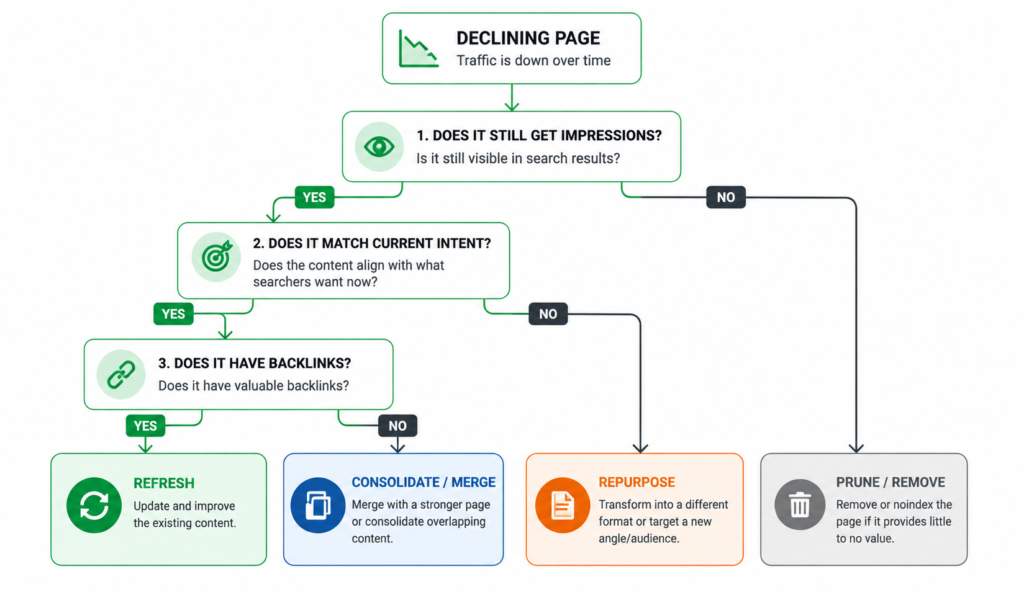
Not every decaying page should be refreshed. Four options, and choosing the right one matters as much as the refresh itself.
| Option | When to choose it |
| Refresh | The page still targets a valuable, relevant query and has history worth building on. The default choice for most declining pages. |
| Consolidate | Two or more thin pages target the same intent and compete with each other. Merge them into one strong page and redirect the others. |
| Repurpose | The topic still matters but the format is wrong — an old blog post that should be a buying guide, or a thin page that should be a section of a bigger one. |
| Prune | The page never converted, targets a query with no value, and has no backlinks. Remove it and redirect, or let it go. Fewer, stronger pages beat many weak ones. |
| On pruning: removing weak content can raise the quality signal of the whole site. A store with 300 thin, decaying pages and 20 strong ones often does better after cutting the 300 down to the pages that earn their place. More content is not better; better content is better. Prune without sentiment. |
How to Actually Refresh a Page
Once you have decided a page is worth refreshing, the work follows a consistent order. The goal is to make the page genuinely better than the competitors that overtook it — not to change the date and hope.
1. Re-check the search intent first
Before touching the content, look at what currently ranks for the target query. If the top results have changed format — now they are comparisons where they used to be guides, or listicles where they used to be prose — the intent has shifted and your page needs to match the new intent, not just improve the old version. This is where keyword research meets refreshing: the intent may have moved since you first wrote the page.
2. Update the facts and remove the stale
Replace outdated statistics, years, prices, and product references with current ones. Remove recommendations for discontinued products or obsolete methods. Stale specifics are the clearest signal to both Google and readers that a page has been abandoned — and often the easiest thing to fix.
3. Fill the gaps competitors now cover
Read the pages currently outranking yours. What do they cover that you do not? New sections, questions you never answered, angles that have emerged since you published. Adding genuine depth where competitors have overtaken you is usually the single biggest lever in a refresh. This is not padding for length — it is covering the parts of the topic your page now misses.
4. Improve structure and readability
Older content is often a wall of text. Break it into clear sections with proper headings, add a comparison table or list where it helps, and make it scannable. Better structure improves both how Google reads the page and how long people stay on it. If the page is a buying guide, make sure it still makes clear recommendations and routes to current products.
5. Refresh internal links and CTAs
Link the refreshed page to and from newer relevant content — a page that lost internal links as the site grew has quietly lost authority. Point the refreshed page at current product or category pages, and make sure newer pages link back to it. Update any calls-to-action that reference old offers or discontinued products.
6. Update the metadata and the visible date
Rewrite the title tag and meta description if they can be sharper, and update the visible “last updated” date if the page shows one — an honest update date, backed by genuine changes, is a legitimate freshness signal. Do not change the date without changing the content; that is a trick Google sees through and it helps nothing.
| Keep the URL: refresh the page at its existing URL. It already has whatever history, links, and authority it earned — changing the URL throws that away and forces a redirect. Update the content in place. A refresh is an upgrade of an existing asset, not a new page pretending to replace it. |
After the Refresh: Measure and Be Patient
Once the updated page is live, two things matter: telling Google, and giving it time.
- Request re-indexing. In Search Console, use the URL Inspection tool to request indexing of the updated page. This prompts Google to recrawl sooner than it might on its own.
- Give it weeks, not days. Google needs to recrawl, reassess, and re-rank the page against competitors. Meaningful movement usually takes two to eight weeks. Judging a refresh after three days tells you nothing.
- Track the same metrics you started with. Compare the page’s clicks and average position before and after in Search Console. That is how you know whether the refresh worked and whether to go deeper.
| Refreshing is a cycle, not a one-off: the pages you refresh will decay again as the market keeps moving. A content programme that reviews its top pages once or twice a year and refreshes the decaying ones keeps its whole library compounding — while a store that publishes and forgets watches its old wins slowly erode. Maintenance is not glamorous, but it is often the highest-return content work available. |
FAQ
Is it better to refresh old content or write new content?
For a page that once ranked and has declined, refreshing is usually the better investment — it builds on existing authority, history, and links, and recovers traffic faster than a new page starting from zero. Write new content to cover topics you do not yet address. Refresh existing content to recover ground you have lost. Most content programmes underinvest in refreshing and overinvest in publishing new pages that dilute the site.
How often should I refresh content?
Review your top pages at least once or twice a year, and refresh the ones showing decline. Some content needs it more often — anything with statistics, prices, or “best of [year]” framing decays fast and benefits from annual updates. Evergreen explainer content can go longer. Let the Search Console decline data set the priority rather than refreshing on a fixed schedule regardless of performance.
Does just changing the date help rankings?
No — and it can hurt. Changing the visible date or the metadata timestamp without genuinely updating the content is a trick Google has long been able to detect, and it does nothing for rankings. An updated date is a legitimate freshness signal only when it reflects real changes to the page. Update the content, then update the date to match. The date follows the work, not the other way round.
Should I delete old content that is not performing?
Often, yes. Content that never converted, targets a valueless query, and has no backlinks is dead weight — and a large volume of thin, unvisited pages can drag on how Google assesses overall site quality. Removing or consolidating them (with redirects where the URL has any equity) can lift the whole site. Prune the genuinely dead; consolidate the thin-but-related; refresh the declining-but-valuable. Not everything is worth saving.
| Losing traffic on pages that used to rank? Our content strategy work includes finding and refreshing your decaying pages — recovering rankings on content you already have, often faster than building new. Get Your Content Strategy → No commitment. No generic report. martraff.com |