Title Tags and Meta Descriptions That Get Clicks
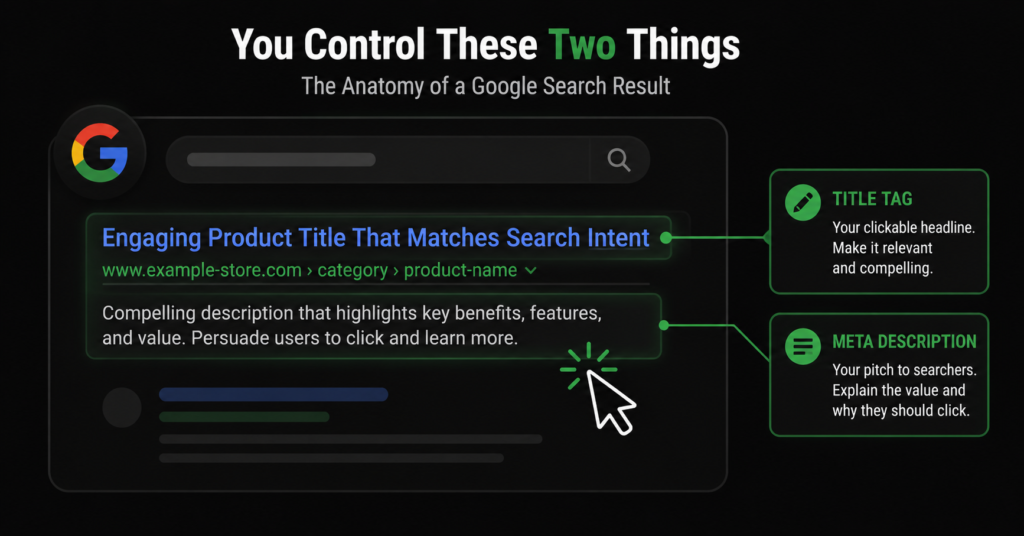
Your title tag and meta description are the only advertising you get in Google search results, and they are free. They are the blue headline and the grey text beneath it — the entire pitch a searcher sees before deciding whether to click your store or a competitor’s. And on most stores, they are an afterthought: auto-generated, duplicated across hundreds of pages, or missing entirely.
In one store audit, the numbers told the whole story: 56 pages with duplicate titles, 89 titles too short to say anything useful, 64 pages with no meta description at all, and 74 descriptions so long Google was cutting them off. Every one of those is a page competing in search results with a weak or broken pitch — and every one is fixable.
This guide covers how to write title tags and meta descriptions that earn clicks: the right length, where keywords go, how to write for click-through rather than just ranking, and how to handle them across a catalogue too big to write by hand.
Why These Two Lines Matter More Than You Think
Title tags and meta descriptions do two distinct jobs, and confusing them leads to writing both badly.
| Element | What it does |
| Title tag | A ranking factor AND the clickable headline in search results. Google reads it to understand the page topic, and searchers read it to decide whether to click. It has to serve both. |
| Meta description | Not a direct ranking factor — but it is your ad copy. It heavily influences whether someone clicks your result over the others. A compelling description lifts click-through rate, and higher CTR means more traffic from the same ranking. |
| “The meta description will not rank you higher — but it decides how many people click the ranking you already have. Two stores in positions three and four: the one with the better description can out-earn the one above it. This is the cheapest CTR lever in SEO, and most stores leave it blank.” |
Writing Title Tags That Rank and Get Clicked
The title tag is the higher-stakes of the two — it affects both ranking and click-through. A few rules make the difference.
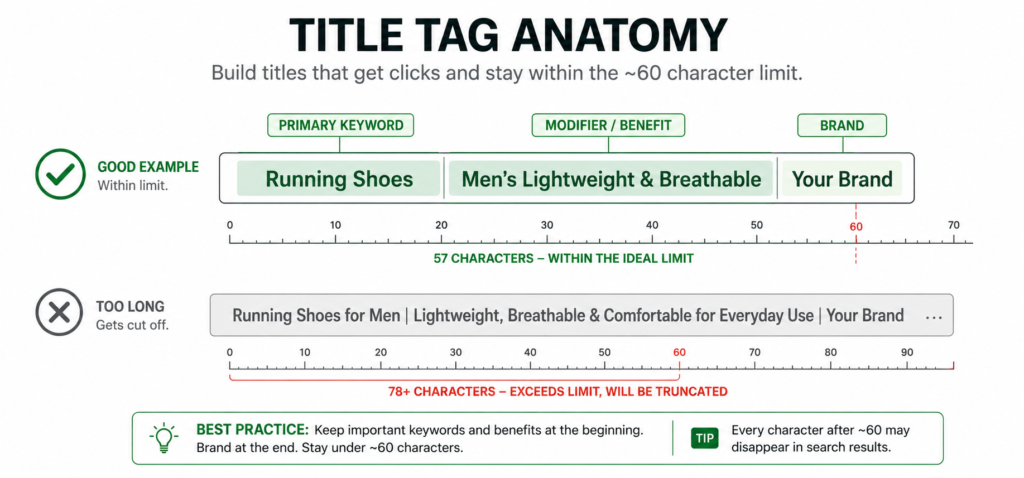
Length: keep it under about 60 characters
Google truncates titles at roughly 580 pixels — about 60 characters for most text. Past that, your title gets cut off with an ellipsis, and whatever you put at the end disappears. Front-load the important words. An audit finding of “28 pages with titles too long” means 28 pages where the end of the pitch is invisible in results.
Put the primary keyword near the front
Both Google and searchers weight the start of the title most heavily. Lead with what the page is about, then add brand or modifiers.
| ✓ Good Ergonomic Office Chairs — Free Delivery | StoreName | ✗ Weak StoreName | Welcome to Our Online Shop of Quality Products |
Make every title unique
Duplicate titles — the “56 pages” problem — tell Google that many pages are about the same thing, splitting their relevance. On a store, this usually comes from a template outputting the same title across a category’s products or across paginated pages. Every page needs a title that distinguishes it.
Do not make the title identical to the H1
A subtle one that shows up in audits: pages where the title tag exactly matches the H1 heading. It is not a penalty, but it wastes an opportunity. The H1 can be clear and descriptive for users on the page; the title tag can be optimised for clicks and keywords in search results. Making them identical means you only get one angle instead of two.
| Title formula for product pages: Product Name + key attribute + brand or benefit. For category pages: Category + modifier + brand. Keep it a formula with real variables — pulling the product’s actual distinguishing attributes — not a static template that produces near-identical titles across the catalogue. |
Writing Meta Descriptions That Earn the Click
The meta description is your sales pitch. It does not rank you, so its entire job is persuasion — giving the searcher a reason to choose your result.
Length: aim for 150-160 characters
Google truncates descriptions at roughly 155-160 characters on desktop, less on mobile. The “74 pages with descriptions too long” finding means 74 pages where the pitch gets cut mid-sentence. Too short — the “20 pages too short” finding — wastes the space and says too little. The 150-160 character band is the target.
Never leave it blank
The single most common finding — “64 pages with no meta description” — is also the easiest fix and the biggest missed opportunity. When you leave it blank, Google generates one by pulling text from the page, often awkwardly. Writing your own means you control the pitch. On the pages that matter, always write it.
Write it like ad copy: benefit, specifics, and a reason to click
A good description states what the page offers, includes a concrete detail (free delivery, range size, a guarantee), and gives a reason to click now. Include the keyword naturally — Google bolds matching terms in the description, which draws the eye — but write for the human, not the algorithm.
| ✓ Good — specific, benefit-led Shop ergonomic office chairs built for all-day comfort — lumbar support, breathable mesh, free next-day delivery. 30-day returns on every order. | ✗ Weak — generic, says nothing We sell office chairs and other office furniture products for your office needs. Browse our selection of quality items at great prices today. |
| The test for a meta description: read it next to three competitors’ descriptions for the same search. Does yours give a clearer, more specific reason to click? If it could describe any store in your category, it is not doing its job. Specifics — numbers, guarantees, delivery terms — are what separate a clicked result from a scrolled-past one. |
What Not to Do
A few practices actively hurt, and they are common enough to be worth calling out.
- Keyword-stuffing the title. “Office Chairs, Cheap Office Chairs, Buy Office Chairs Online” reads as spam to both Google and humans, and lowers click-through.
- Duplicating across pages. The same title and description on every product in a category wastes both. Each page needs its own.
- Writing for the algorithm, not the person. A title crammed with keywords but unreadable gets fewer clicks than a natural one — and click-through feeds back into rankings.
- Misleading copy. Promising something the page does not deliver gets the click but causes an immediate bounce back to search — a negative signal, and a wasted visit.
- Ignoring what Google shows instead. Google sometimes rewrites titles and descriptions. If it is consistently overriding yours, that is a signal your version does not match what the page is actually about — worth investigating, not fighting.
Handling Meta Tags Across a Whole Catalogue
On a store with thousands of products, writing every title and description by hand is not realistic — and this is where the audit findings come from, because the template was set once and never revisited.
The solution is a dynamic formula with real variables, the same principle as SEO at scale. A title formula that pulls the product name, a key attribute, and the brand produces a differentiated, keyword-relevant title for every product automatically — as long as the formula uses attributes that genuinely distinguish the products.
| Page type | Formula approach |
| Product pages | {Product Name} {Key Attribute} | {Brand} — pulls real, differentiating attributes so no two are identical. |
| Category pages | {Category} — {Modifier/Benefit} | {Brand} — often worth writing manually for top categories, formula for the long tail. |
| Descriptions (products) | Formula with product-specific fields and a consistent benefit line — but sample-check the output for the awkward edge cases every formula produces. |
| Descriptions (top pages) | Hand-write for your highest-traffic categories and best-sellers. These pages earn enough traffic to justify individual attention. |
| The tiering rule: hand-write titles and descriptions for your top categories and best-selling products — the pages that earn most of your traffic. Use good formulas for the long tail. Spending an hour crafting the meta description for a product that gets four visits a month is effort stolen from a category page that gets four thousand. |
How to Find Your Meta Tag Problems
You cannot fix what you have not found. Three ways to surface the issues:
- Crawl with Screaming Frog (free up to 500 URLs). The Page Titles and Meta Description tabs flag missing, duplicate, too-long, and too-short tags automatically — the exact categories the audit numbers came from.
- Check Search Console for low-CTR pages. In the Performance report, sort by impressions and look for pages with high impressions but low click-through. Those are pages ranking well but with titles and descriptions that are not compelling the click — the highest-value rewrites.
- Search for your own pages. Google your key products and categories and look at how your results actually appear. Truncated titles, missing descriptions, and Google-rewritten snippets are all visible directly in the results.
| The highest-ROI meta tag work: find the pages that already rank on page one but have below-average click-through, and rewrite their titles and descriptions. You are not chasing new rankings — you are converting rankings you already hold into more clicks. It is the fastest organic traffic win most stores have available. |
FAQ
Does the meta description affect rankings?
Not directly — Google has confirmed it is not a ranking factor. But it strongly affects click-through rate, and a result that earns more clicks than expected for its position tends to hold and improve that position over time. So the description influences rankings indirectly, through the behaviour it drives. Write it to earn the click, not to rank.
Why is Google showing a different title than the one I wrote?
Google rewrites titles when it judges its version better matches the search or the page content — often when your title is too long, keyword-stuffed, or does not reflect what the page is actually about. If Google consistently overrides your title, treat it as feedback: your title probably is not aligned with the page or the query. A clear, accurate, appropriately-sized title is rewritten far less often.
How long should title tags and meta descriptions be?
Title tags: under about 60 characters, or roughly 580 pixels, before Google truncates. Meta descriptions: 150-160 characters on desktop, though mobile shows less. These are ceilings, not targets — a clear 45-character title beats a padded 60-character one. The goal is to say the important thing before the cutoff, not to fill the space.
Should every single page have a unique meta description?
Every page that matters for search, yes. For your highest-value pages — top categories, best-sellers, key content — write unique descriptions by hand. For a large long-tail catalogue, a good dynamic formula that produces varied, product-specific descriptions is acceptable and far better than leaving them blank. What you want to avoid is identical descriptions repeated across many pages, or the blank-by-default state that lets Google guess.
| How many of your pages are competing with a weak or missing pitch? Our on-page SEO work covers title tags and meta descriptions across your key pages — written for clicks and rankings, not left to a default template. See Our On-Page SEO Service → No commitment. No generic report. martraff.com |