
Robots.txt for Ecommerce: What to Block and Why
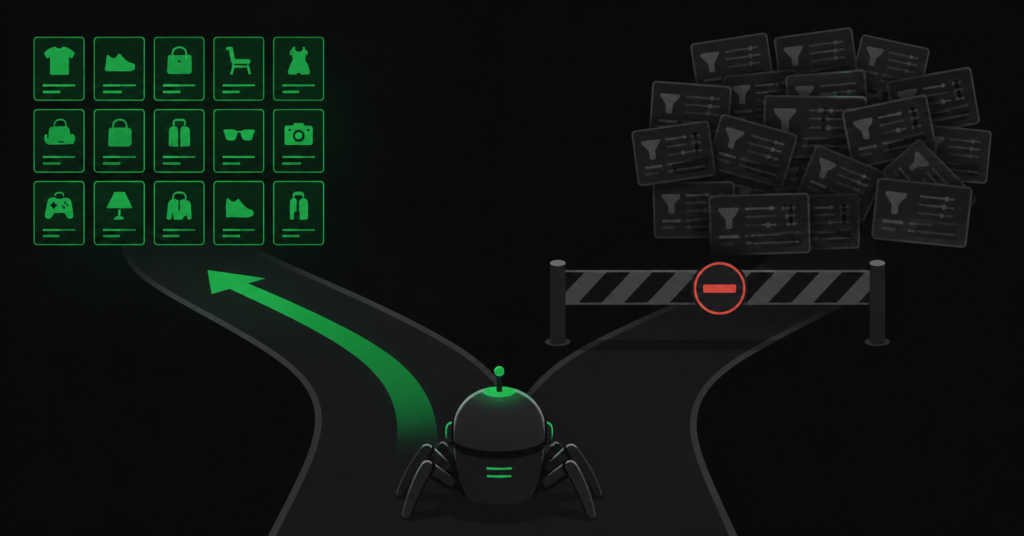
Robots.txt is a text file most store owners have never opened and many developers edit without thinking too hard about it. It is also one of the few files on your site where a single wrong line can remove your entire store from Google.
For ecommerce specifically, it matters more than for most sites — because ecommerce stores generate enormous numbers of URLs nobody should ever crawl, and robots.txt is the main tool for stopping that. Used well, it points a finite crawl budget at the pages that make you money. Used badly, it either wastes that budget or locks pages in the index where you cannot remove them.
This guide covers what robots.txt actually does, what to block on an online store, the one distinction that causes most robots.txt mistakes, and a working example from a real WooCommerce configuration.
The Distinction That Causes Most Robots.txt Mistakes
Almost every robots.txt error traces back to one misunderstanding:
| Robots.txt blocks crawling. It does not block indexing. These are different things, and confusing them is how pages end up stuck in Google’s index permanently with no way to remove them. |
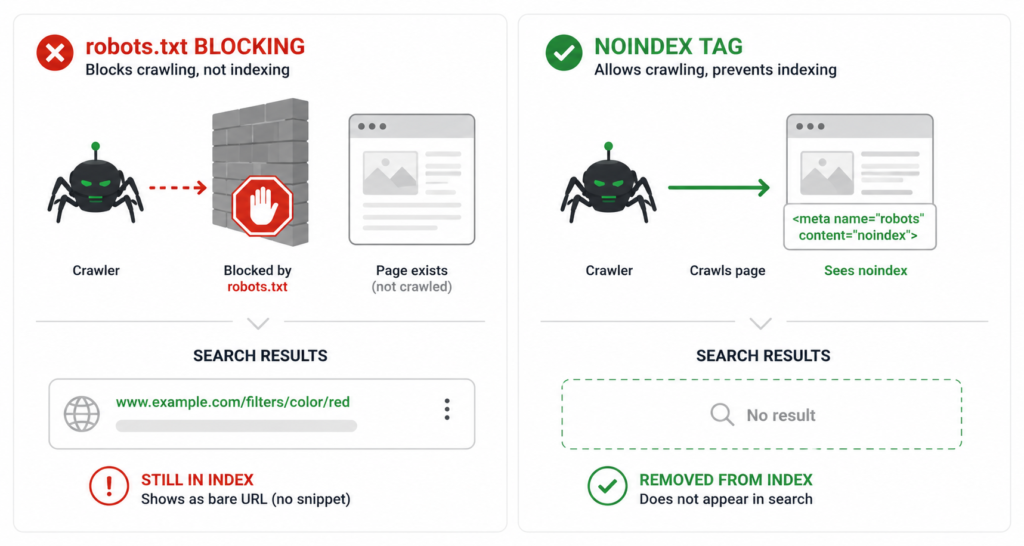
Here is the mechanism. When you block a URL in robots.txt, Googlebot will not fetch that page — it never sees the content. But if that URL has links pointing at it from anywhere, Google knows it exists. It can still index the URL itself, showing it in results as a bare link with no description, often with the note that no information is available for this page.
Worse: because Google cannot fetch the page, it cannot read a noindex tag on it either. So if you block a page in robots.txt to get it out of the index, you have guaranteed it stays there — you have made the removal instruction unreadable.
| Tool | What it does | Use it for |
| robots.txt Disallow | Stops Googlebot fetching the URL. Saves crawl budget. Does not remove from index. | Preventing discovery of URLs that are not yet indexed and never should be — cart actions, admin, infinite parameter combinations. |
| noindex meta tag | Tells Google to remove the page from the index. Requires the page to be crawlable. | Removing pages that are already indexed but should not be — thin filter pages, internal search results. |
| canonical tag | Keeps the page accessible but consolidates signals to another URL. | Duplicate variations that should still work for users — product variants, tracking parameters. |
| The sequencing rule: if a page is already indexed and you want it gone — noindex first, wait for Google to recrawl and drop it, then block in robots.txt if you want to stop future crawling. Never both at once, and never robots.txt alone for something already in the index. |
Why This Matters More for Ecommerce
A blog has a few hundred URLs. An ecommerce store generates URLs the way a photocopier generates paper — filters, sort orders, cart actions, session parameters, search queries, attribute combinations. A store with a few thousand products can easily produce hundreds of thousands of crawlable URLs.
Google will not crawl them all. It allocates a crawl budget, and every request spent on ?filter_color=blue&sort=price_asc is a request not spent on a product page. On large catalogues this becomes the constraint that determines whether your products get indexed at all.
| There is a second, less obvious cost. When Googlebot crawls large volumes of low-value parameter URLs, it forms a view of overall site quality from what it sees. A crawl dominated by thin filter pages does not just waste budget — it shapes Google’s assessment of the site itself, and can mean the bot never reaches your target pages at all. |
What to Block on an Ecommerce Store
The safe list — URLs that have no search value, should never be indexed, and are generated in volume.
| What to block | Why |
| Cart and checkout | No search value, user-specific, and often generates unique URLs per session. |
| Account and login pages | Private, no search value, and account URLs can leak personal paths into the index. |
| Admin paths | No reason for a crawler to be there. Note: blocking admin in robots.txt tells the world where your admin is — it is not a security measure. |
| Add-to-cart action URLs | Every product generates one. Pure crawl waste, zero value. |
| System upload and log directories | Platform-generated files that should never surface in search. |
| Empty search queries | A search URL with no query is a thin page generated infinitely. |
| Menu and template fragment URLs | Some themes expose menu fragments as crawlable URLs. These are not pages and should never be crawled. |
What Never to Block
Some robots.txt entries cause active damage. These are the ones that show up in audits and cost stores real traffic.
- CSS and JavaScript files. Google renders your pages to assess them. Block the CSS and JS and Google sees a broken, unstyled page — and judges mobile usability and layout accordingly. This was common advice a decade ago; it is now actively harmful.
- Product or category pages you want to de-index. As above — blocking makes the noindex unreadable. Use noindex, let it be crawled, then block later if needed.
- Images you want in Google Images. For many stores, image search is a real traffic source. Blocking the uploads directory wholesale kills it.
- Anything with backlinks. If an external site links to a URL and you block it, Google cannot see the redirect or canonical on it — the equity gets stranded.
| The catastrophic one: Disallow: / blocks the entire site. It appears by default on many staging environments and gets pushed to production during launches more often than anyone would like to admit. If organic traffic vanishes overnight after a deployment, check robots.txt before anything else. |
The Filter URL Question: Block or Noindex?
This is the genuinely difficult decision in ecommerce robots.txt, and the answer is not the same for every store. Filter URLs are generated in enormous volume, have almost no search value individually, and are the single biggest crawl budget drain on most stores.
Two valid approaches, with a real trade-off:
| Approach | How it works | Trade-off |
| Block in robots.txt | Disallow the filter parameter patterns. Googlebot never fetches them. | Saves crawl budget immediately. But any filter URL already indexed stays indexed — Google cannot read its canonical or noindex. |
| Canonical + noindex, no robots.txt block | Every filter URL carries a self-referencing canonical and a noindex tag. Googlebot crawls them, reads the instruction, and drops them. | Cleanly removes them from the index. But Googlebot still spends crawl budget fetching them first. |
| The practical sequence that resolves it: if filter URLs are already in the index, start with noindex and no robots.txt block — let Google crawl them, read the instruction, and clear them out. Once the index is clean, add the robots.txt block to stop future discovery. Doing it in the other order leaves indexed junk permanently stuck. |
The full canonical strategy for filters, variants, and pagination is covered in our guide on fixing duplicate content — robots.txt is one part of a system, not a solution on its own.
A Working Example: WooCommerce
A real robots.txt from a WooCommerce store, blocking the URL patterns that genuinely waste crawl while leaving everything Google needs accessible:
| User-agent: * # System and private pathsDisallow: /cdn-cgi/Disallow: /checkout/Disallow: /cart/Disallow: /my-account/Disallow: /wp-admin/Allow: /wp-admin/admin-ajax.php # WooCommerce logs and temp uploadsDisallow: /wp-content/uploads/wc-logs/Disallow: /wp-content/uploads/woocommerce_transient_files/ # Cart action URLsDisallow: /*?add-to-cart=Disallow: /*&add-to-cart= # Filter parametersDisallow: /*?filter_Disallow: /*&filter_Disallow: /*?min_price=Disallow: /*?max_price= # Sort and view modesDisallow: /*?sale_status=Disallow: /*?stock_status=Disallow: /*?view_mode= # Attribute and variation parametersDisallow: /*?attribute_pa_Disallow: /*?variation_id= # Empty search queriesDisallow: /*?s=& # Theme menu fragmentsDisallow: /etheme_mega_menus/*?s= Sitemap: https://yourstore.com/sitemap_index.xml |
Two things worth noting in this example. The Allow: /wp-admin/admin-ajax.php line matters — many themes and plugins load content through that endpoint, and blocking it can break rendering for Googlebot. And the sitemap declaration at the bottom is not optional housekeeping: it is how Google discovers your sitemap without you submitting it manually.
| Note on the search rule: Disallow: /*?s=& blocks empty search queries specifically, while leaving real searches with text crawlable. Blocking all search URLs is usually right for ecommerce — but if you block them with robots.txt while some are already indexed, they stay. Same rule as everything else on this page. |
Platform Notes
Shopify
Shopify generates robots.txt automatically and historically did not allow editing it at all. Since 2021 you can override it via the robots.txt.liquid template, but the default is reasonable for most stores — it already blocks cart, checkout, account, and internal search. The main reason to customise is to block app-generated parameter URLs or specific collection filter patterns. Edit with care: the default exists because it works.
WooCommerce
WordPress generates a virtual robots.txt by default, which does almost nothing useful for an ecommerce store. This is where most of the work is needed — filter plugins, price sliders, and attribute selectors all generate parameter URLs that the default file does not touch. A physical robots.txt file in the site root overrides the virtual one. The example above is a WooCommerce configuration.
BigCommerce
BigCommerce allows robots.txt editing through the admin. The default handles the basics; faceted search parameters at scale usually need explicit rules. As with WooCommerce, the volume of filter-generated URLs is the thing to check first.
How to Check Whether Yours Is Right
| 01 | Open yourstore.com/robots.txt in a browser. Read every line. If you do not know why a rule is there, find out before removing it — but an unexplained Disallow on a directory you care about is a red flag. |
| 02 | Use the robots.txt report in Google Search Console (Settings → robots.txt). It shows the file Google last fetched, when, and any parse errors. A file Google cannot parse is a file Google ignores. |
| 03 | In Search Console, check Indexing → Pages for “Blocked by robots.txt” and “Indexed, though blocked by robots.txt”. The second one is the warning sign — those are pages stuck in the index that you have made unremovable. |
| 04 | Search Google for [site:yourstore.com] and look for results showing a bare URL with no description. Those are blocked-but-indexed pages. Each one needs the noindex-first sequence to clear. |
The “Indexed, though blocked by robots.txt” report is the one that reveals the mistake this article is about. Our guide to reading Google Search Console covers what each indexing status means.
FAQ
Can robots.txt hide pages from Google entirely?
No — and this is the most consequential misconception about it. Robots.txt stops Google fetching a page’s content, but if the URL is linked from anywhere, Google can still index the URL itself and show it as a bare link in results. To genuinely remove a page from search, use a noindex tag on a crawlable page, or password-protect it. Robots.txt is a crawl instruction, not a privacy or removal tool.
Should I block my filter URLs in robots.txt?
Eventually, usually yes — but not as the first step if they are already indexed. Start with canonical and noindex on the filter URLs so Google can crawl them, read the instruction, and drop them from the index. Once the index is clean, add the robots.txt block to prevent Google rediscovering them. Blocking first locks the indexed ones in place permanently.
Does robots.txt affect rankings directly?
Not directly — it is not a ranking signal. It affects rankings indirectly by controlling where crawl budget goes. On a small store this barely matters. On a large catalogue where Google crawls a fraction of your URLs, robots.txt determines whether that fraction is your products or your filter combinations, and that difference is substantial.
What happens if I have no robots.txt at all?
Google crawls everything it can find. For a small site this is usually fine. For an ecommerce store it means every filter combination, cart URL, and parameter variant competes for crawl budget with your product pages. Having no robots.txt is not an error, but for any store with faceted navigation it is leaving a significant amount of crawl efficiency on the table.
| Not sure if your robots.txt is helping or hurting? We audit crawl configuration as part of technical SEO — robots.txt, canonicals, and noindex working as one system rather than three conflicting ones. See Our Technical SEO Service → No commitment. No generic report. martraff.com |