Google’s November 2026 Core Update Lands Right Before Black Friday: What Online Stores Should Do
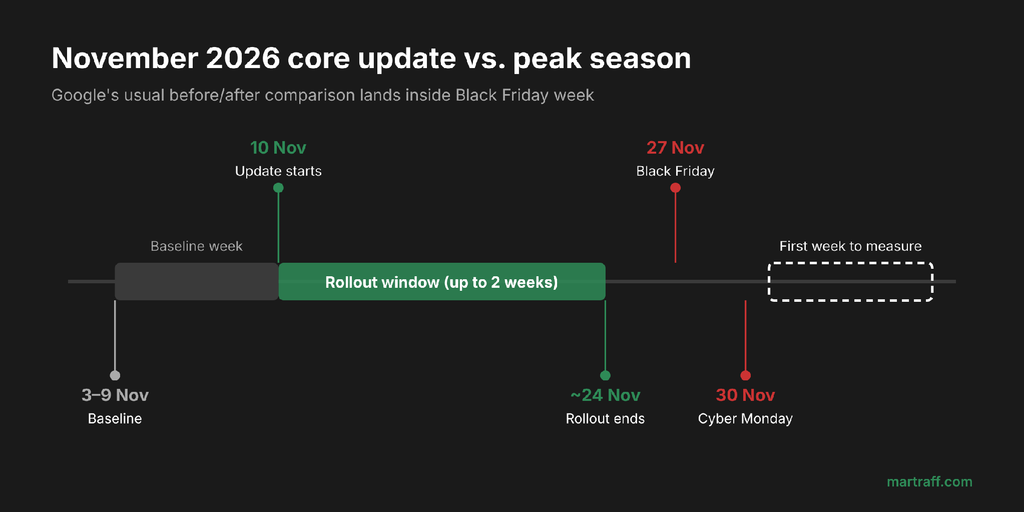
Google started rolling out its November 2026 core update on 10 November. The rollout can take up to two weeks, which puts the likely finish around 24 November — three days before Black Friday.
For most websites, a core update is something to watch and then assess. For an online store, the timing makes it harder. Rankings may shift during the most valuable fortnight of the year, and the usual way of measuring the impact breaks down once holiday traffic arrives.
Here is what is confirmed, what to do while the update rolls out, and how to read your data afterwards without mistaking seasonal demand for a ranking change.
What We Know So Far
The facts are short, because Google has shared very little:
- Start: 10 November 2026, around 10:06 Pacific time, according to the Google Search Status Dashboard.
- Scope: it applies globally and to all languages. No markets, industries or site types were singled out.
- Duration: up to two weeks. Expect it to finish around 24 November.
- What it is: Google calls it a regular update meant to better surface relevant, satisfying content from all types of sites. It is the third core update of 2026, after March and May.
- New guidance: none. Google pointed site owners to its existing core updates documentation.
That last point matters. A core update is not a penalty and does not target specific sites. It is Google re-assessing which pages best answer each search. If your pages move, it usually means competitors’ pages were judged a better match — not that you broke a rule.
Why the Timing Is Awkward for Online Stores
Google’s own advice for measuring a core update is simple: wait at least a full week after the rollout ends, then compare that week in Search Console with the week before the rollout started.
For most sites that works. For a store, it does not — not this time.
- The week before the rollout is 3–9 November, a normal trading week.
- The rollout ends around 24 November.
- Black Friday is 27 November and Cyber Monday is 30 November.
- The first clean week to measure starts around 1 December.
So the “after” week will sit inside peak season. Impressions and clicks will almost certainly rise compared with early November, simply because more people are shopping. A store that lost rankings could still see more traffic than before and conclude it came through fine. A store that gained could credit the update for what was really seasonal demand.
What to Do While the Update Rolls Out
The short answer: protect what you have and avoid creating noise you will have to untangle later.
Freeze risky changes until the rollout ends. Do not change URL structures, migrate platforms, rename categories or push big template changes in the next two weeks. If rankings move, you want to know whether it was Google or you. A URL change also brings its own risk — see our guide to redirect problems in ecommerce.
Keep your Black Friday pages on stable, indexable URLs. If you reuse a permanent /black-friday/ page every year, make sure it is live, indexable and linked from your main navigation or homepage. If you were planning to launch a new URL for this year’s sale, reuse the old one instead. We explain why in our guide to SEO for seasonal ecommerce.
Run a quick technical check on your money pages. Open your top categories and best-selling products and confirm the basics: no accidental noindex, correct canonical tags, nothing blocked in robots.txt, and the pages are still in your XML sitemap. These problems have nothing to do with the core update, but if one appears now, you will blame the wrong thing.
Do not rewrite or delete pages because of daily rank movements. Rankings can bounce for days during a rollout. Changing a page in the middle of that makes it impossible to tell what caused what.
How to Read Your Data After the Update
Google’s week-versus-week method needs one adjustment for retail this year. Here is the process we would follow:
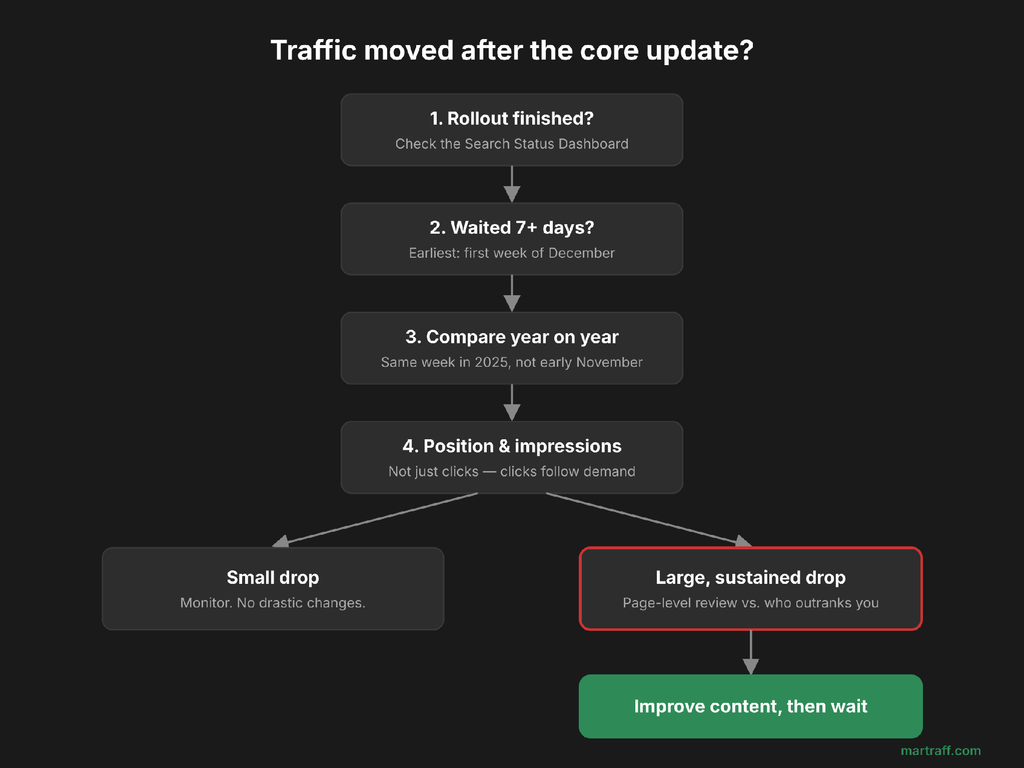
- Confirm the rollout is finished. Check the Search Status Dashboard for the official end date.
- Wait at least a full week. Earliest useful data: the first week of December.
- Compare year on year, not week on week. Compare the first week of December 2026 with the same week in December 2025 — and do the same for the Black Friday week. That removes most of the seasonal effect that would otherwise hide the update’s impact.
- Look at average position and impressions, not only clicks. Clicks follow demand. Average position for the same queries tells you whether you actually moved.
- Split categories, products and blog content. A drop limited to blog posts calls for a different response than a drop across category pages.
- Analyse search types separately. Google recommends checking Web, Image and other search types on their own, since a drop can sit in only one of them.
If Search Console is new to you, start with our beginner’s guide on how to read Google Search Console. This is also exactly what a monthly SEO report should separate for you: ranking change versus seasonal change.
If You Did Lose Rankings
First, size the drop. Google’s own guidance is that a small drop does not call for drastic action — and that you should avoid changing content that still performs well. A large, sustained drop deserves a closer look at the affected pages.
For an online store, that review usually comes down to a few questions:
- Do the pages that now outrank you answer the search better? Open them. Compare their category copy, product detail, reviews and buying guidance with yours.
- Is your product and category content your own? Manufacturer descriptions copied across hundreds of stores give Google little reason to prefer yours.
- Does the store show it can be trusted? Clear delivery and returns information, real contact details, reviews and an About page all count. Our guide to E-E-A-T for ecommerce covers the pages that matter.
- Has the content aged? A buying guide that still recommends last year’s models will slide as competitors update theirs. Our content refresh guide explains how to prioritise.
What not to do: quick fixes. Removing page elements because someone said they hurt SEO, mass-deleting products, or rewriting everything at once rarely helps. Google treats deleting content as a last resort.
And be realistic about timing. Some improvements show within days, but Google says its systems can take months to recognise a site that consistently improves. Sometimes the recovery only shows at the next core update. Nobody — including Google — can promise a recovery date.
The Bottom Line
A core update right before Black Friday is not a reason to panic, and it is not a reason to change everything. It is a reason to stop making risky changes, keep your seasonal pages stable, and measure the result properly in December — year on year, not week on week.
We will update this post when Google confirms the rollout is complete.
FAQ
When did the Google November 2026 core update start?
It started on 10 November 2026, around 10:06 Pacific time, according to Google’s Search Status Dashboard.
How long will the November 2026 core update take?
Google says the rollout may take up to two weeks, so it should finish around 24 November 2026.
Is the core update a penalty?
No. Core updates are broad changes to how Google ranks results. They do not target specific sites, and a drop does not mean you broke a rule.
Should I change my site during the rollout?
Avoid big changes — URL changes, migrations, template releases or mass rewrites — until the rollout ends. Otherwise you cannot tell whether a ranking change came from Google or from your own changes.
How do I know if my store was affected when traffic rises for Black Friday anyway?
Compare year on year rather than week on week, and focus on average position and impressions for the same queries. Clicks alone will mostly reflect seasonal demand.
How long does it take to recover from a core update?
It varies. Some changes show within days, but recovery can take months, and sometimes only shows at the next core update. There is no guaranteed timeline.
Not sure whether the update or the season moved your numbers?
We will separate the two and tell you which pages need attention — and which should be left alone.