Your Product Feed Is Now an SEO Asset: Free Listings, AI Mode and What to Fix First
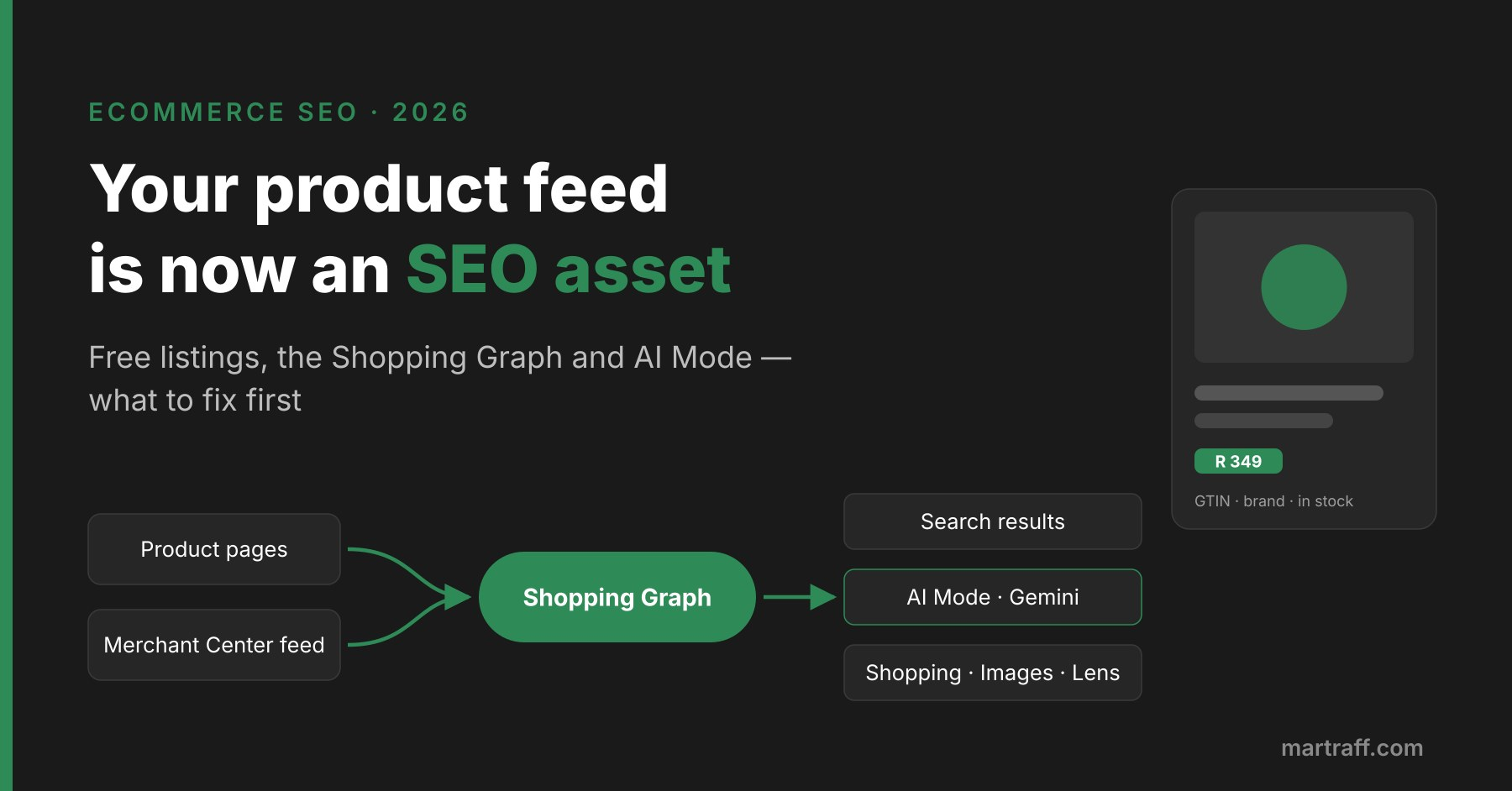
For years, the Merchant Center feed belonged to the paid media team. It existed to run Shopping ads, and SEO people rarely opened it. That split no longer makes sense. The products Google shows in AI Mode, in Gemini and in the free product listings across Search come from the same product database — and that database is filled from your feed and your product pages.
This autumn, SEO agencies and tool vendors have published a wave of articles on the subject. Some argue that feed quality now matters more than title tags. Others say nothing has really changed. Both positions miss something. Here is what has actually changed, what the data says, and the checks we would run on any online store before the end of the year.
In short: free product listings are organic traffic, and they draw on the same product data as AI Mode. If your feed is incomplete, inconsistent with your pages, or never opted in to free listings, you are invisible on a growing share of Google’s shopping surfaces — however good your category pages are.
What Changed: Products in AI Answers Come From the Shopping Graph
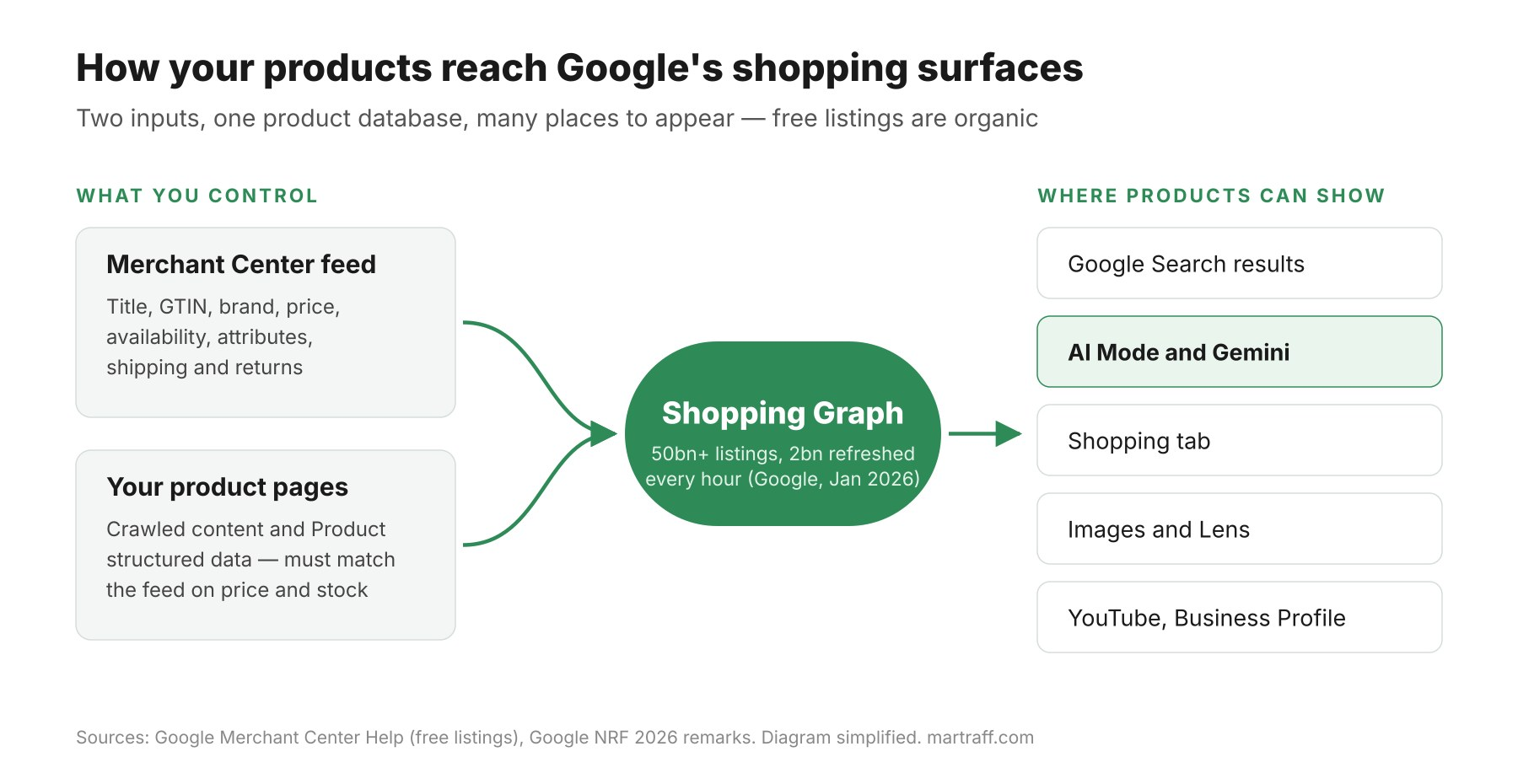
Google’s product results — classic carousels, the Shopping tab and the product cards inside AI Mode — draw on the Shopping Graph. According to Google’s remarks at NRF in January 2026, it holds more than 50 billion product listings, and more than 2 billion of them are refreshed every hour.
Two things put your products into that graph:
- Your Merchant Center product data — the feed, or products Merchant Center builds from your site.
- Your website itself. Google states that crawled retail content on your site can also appear in product listings for free (Merchant Center Help).
Once products are eligible, free listings can show across Search, Images, Lens, YouTube, Gemini, the Shopping tab and the products module on a Business Profile. Google describes them plainly: free listings generate organic traffic. In GA4 they arrive as the Organic Shopping channel, not as paid.
Why This Is an SEO Question, Not an Ads Question
On many stores, the feed is set up once by whoever launched Shopping ads and then left alone. It is optimised for bidding, not for being understood. Titles are cut short, attributes are missing, and nobody checks whether the free listings setting is on. That used to cost a few organic clicks from the Shopping tab. Now it affects whether a product can appear in AI answers at all.
Two studies published this autumn show how different AI shopping results are from the carousels SEO teams are used to:
- Far fewer slots. In a Productrise study of more than 2 million product listings across US and UK searches (9–31 August 2026), the Popular products carousel showed 27.8 products on average, while AI Mode showed 3.9. Only 1.28% of carousel products also appeared in AI Mode for the same query on the same day, and 49.6% of matched products had a different lead seller (Search Engine Journal). Google has not verified the study and says both surfaces use the same Shopping Graph.
- Clicks often stay on Google. A Findrix study of 55,198 AI answers found that 57% of links in AI Mode product answers led to Google Shopping pages rather than to retailers’ sites (Search Engine Land).
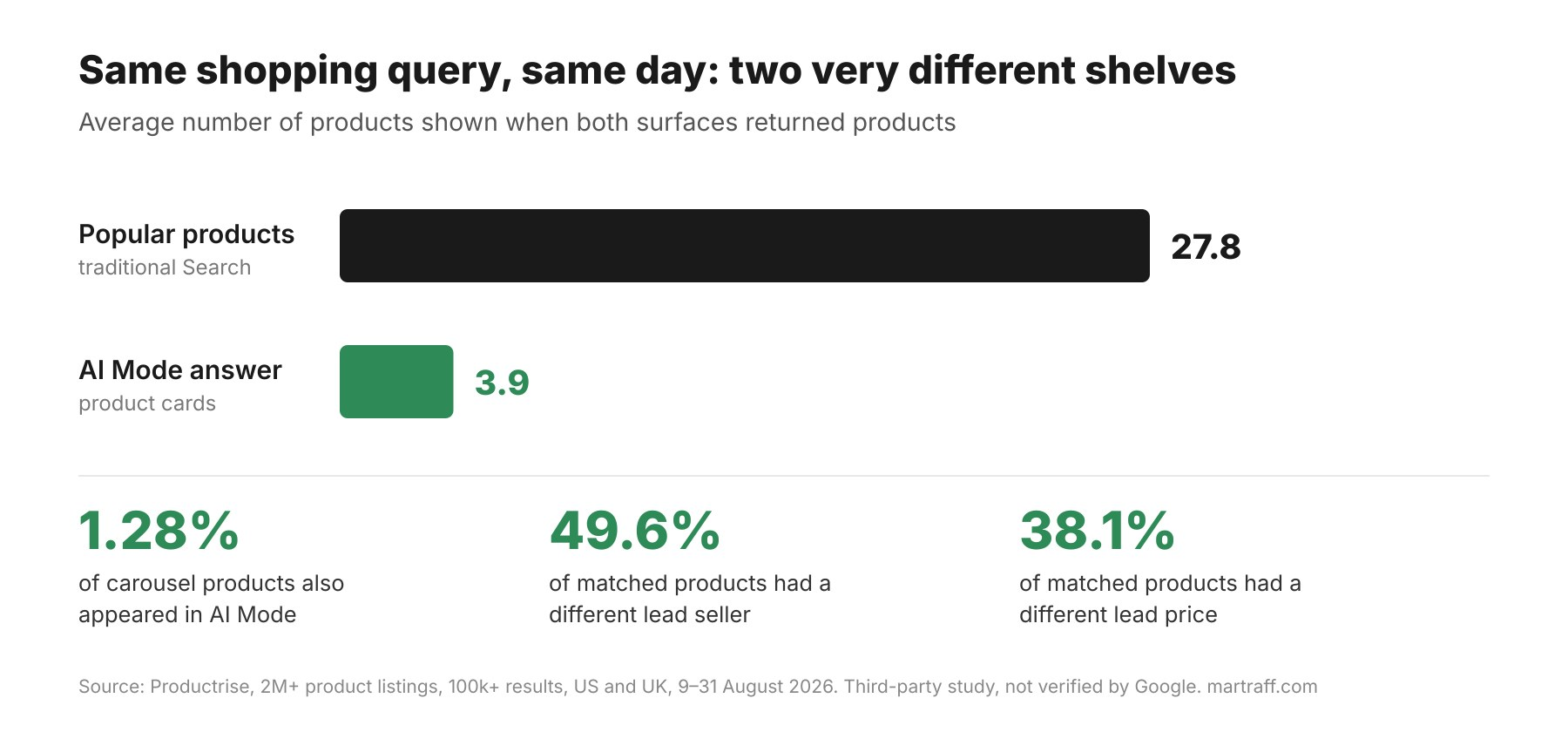
Neither study measured sales, and both cover only the US and UK. But the direction is clear: AI shopping answers have a short shelf, and ranking well in the classic carousel does not put you on it.
What Agencies Are Saying — and Where We Land
Read enough agency blogs this season and you will find two camps. One says product data now outweighs on-page SEO and that stores should shift budget from content to feeds. The other says AI Mode is just Search with a new interface and stores should carry on as before.
Our view sits in between. Google’s own guidance on generative AI features (May 2026) says they run on the same index and ranking systems as regular Search — so category pages, internal linking and product structured data still matter. What has changed is that the feed is now part of SEO. A store can do everything right on its pages and still lose AI and free-listing visibility because the feed says something different, leaves out key attributes or was never opted in.
In practice, that means one owner for product data. Whoever is responsible for organic search should see the feed, its errors and its free-listing performance — not only the ads team.
The Feed Audit: 8 Checks to Run First
You do not need a new tool for this. Merchant Center and Search Console cover almost everything.
| Check | Where to look | Why it matters |
| 1. Free listings are on | Merchant Center → Free listings card | It is on by default for most accounts, but not all. If it is off, your products cannot appear in free placements at all |
| 2. No disapproved or limited products | Merchant Center → Products → diagnostics | Disapproved items are invisible. Fix by impact: best-selling products first |
| 3. GTIN and brand on every product | Feed attributes gtin, brand | Google limits the performance of free listings that lack unique product identifiers (Merchant Center Help) |
| 4. Titles that describe the product | Feed attribute title | Brand + product type + the attributes people search for (model, size, colour, material). No promotional text |
| 5. Attributes filled in | product_type, google_product_category, color, size, material | AI answers match products to multi-condition questions. Missing attributes mean fewer matches |
| 6. Price and stock match the page | Feed vs product page vs Product schema | Mismatches lead to disapprovals and erode trust. AI answers show your price before the click |
| 7. Shipping and returns set | Merchant Center → Shipping and returns | Delivery time and returns are part of the offer shoppers compare |
| 8. Clean main image | Feed attribute image_link | A clear product photo on a plain background; extra angles via additional_image_link |
Two of these checks are pure SEO work: titles and attributes. Write them from your keyword research, the same way you would write a title tag — around the words buyers use, not internal product codes.
Platform Notes: Shopify, WooCommerce and BigCommerce
Most stores send their feed through a platform integration rather than by hand. That is fine, as long as someone checks what the integration actually sends.
- Shopify. With the Google & YouTube app, stores are opted in to free listings automatically (Merchant Center Help). Check which product fields the app maps — custom metafields such as material or compatibility often never reach the feed. More in our Shopify SEO service.
- WooCommerce. Feeds usually come from Google’s WooCommerce extension or a feed plugin. Variable products, attribute names and sale prices are where mismatches appear. Check that variants go through as separate items with their own GTINs. See WooCommerce SEO.
- BigCommerce. Large catalogues often run several feed channels at once. Make sure only one source owns each product in Merchant Center, or duplicates will compete. See BigCommerce SEO.
How to Measure It Without Vanity Metrics
- Merchant Center performance, filtered to free listings: clicks and impressions per product.
- GA4 Organic Shopping channel: sessions, conversions and revenue. If you only look at Organic Search, you are missing this traffic.
- Merchant Center AI performance insights (Google Help), where available: share of voice in AI surfaces and the attributes shoppers prioritise in conversational queries.
- A fixed query panel. 20–30 shopping questions run weekly in AI Mode, logging which products and sellers appear. It is the same idea as the AI check in our competitor analysis guide.
Judge the work by organic revenue from these channels, not by how often your brand appears in a screenshot.
What Not to Do
- Do not stuff titles with keywords. Long, repetitive titles help nobody and can be rejected.
- Do not build thin “AI pages”. Google’s guidance says it does not need special AI files or content rewritten for AI.
- Do not chase one study. The Productrise and Findrix numbers are useful signals from two markets and one period. Measure your own products before changing strategy.
- Do not let the feed and the page disagree. One price, one stock status, one product name everywhere.
Frequently Asked Questions
Are Google free listings organic traffic?
Yes. Free listings cost nothing per click and Google describes them as organic traffic. In GA4 they usually appear as Organic Shopping. They use the same Merchant Center data as Shopping ads, but you do not need to run ads to appear.
Do I need Merchant Center to appear in AI Mode shopping results?
Google says crawled content from your site can also appear in product listings, so Merchant Center is not the only route. But it is the most reliable one: it gives Google complete, structured data on price, stock, identifiers and shipping, and it shows you errors that would otherwise stay hidden.
Is product schema still worth implementing?
Yes. Product structured data helps Google read your pages for rich results and keeps your page data consistent with your feed. Treat schema and feed as two views of the same product — they should never disagree.
Who should own the product feed — SEO or paid media?
Both should see it, but someone has to own its quality. In most stores that means the person accountable for organic revenue, working with the ads team on shared fields like titles, attributes and images.
Does this apply outside the US?
Free listings are available in many countries, and AI shopping features are rolling out market by market. The checks above are worth doing wherever you sell: they improve free listings, Shopping ads and on-site consistency at the same time.
| Not sure what your feed is costing you? An ecommerce SEO audit shows what is limiting your store in search — and now includes a Merchant Center review: free listings status, feed errors, missing GTINs and attributes, and mismatches between your feed, pages and structured data. Every fix is ranked by revenue impact. Get an SEO Audit → No commitment. No generic report. |